Want to win more jobs with less effort?
Grow your business and send quick quotes with our home service software.

Want to see your potential revenue?
See what businesses like yours earn with Housecall Pro in 1 - 2 minutes.
Running an HVAC business means keeping up with service calls, scheduling, paperwork, and customer questions—often while you’re out on a job. The right apps can help you stay on top of that work and save valuable time.
Start with the tasks that take up the most time, then look for tools that fit how you and your team work. This guide compares 11 HVAC apps by features, pricing, and what they’re useful for, so you can decide which ones your business needs.
We compared each app based on how it helps with everyday HVAC tasks, works in the field, fits your budget, and supports your business as it grows. Pricing comes from each provider’s pricing page as of October 2026.
Quick answer: What are the best apps for HVAC businesses?
The best apps for HVAC businesses depend on the specific problem you want to solve. Cool Calc supports equipment sizing, Bluon handles equipment lookup and troubleshooting, HVAC Buddy handles superheat and subcooling calculations, and Freon Tracker keeps refrigerant records organized. QuickBooks Online handles accounting, Square supports payments, NiceJob and Broadly help with reviews and customer communication, Homebase manages employee shifts, and MileIQ tracks mileage. For scheduling jobs, sending estimates and invoices, and collecting payments in one place, consider field service software such as Housecall Pro.
What to look for in an HVAC app
Look for an app that fits your day-to-day work and budget. Before you commit, check these four things:
- Problem fit: Will it make a task you handle regularly easier or faster?
- Field usability: Is it easy to use on a phone, and which features work without a signal?
- Pricing: What’s the total cost, including the plan, users, and add-ons you need?
- Long-term value: Can it connect with your current software and support your business as you grow?
Pro tip: Use a free trial to test the tasks you’ll handle most often, and have your technicians try it in the field. If there’s no trial, look for reviews from HVAC businesses with needs similar to yours.
Best HVAC apps compared: features and starting prices
Compare each app’s main use and starting price below. Prices can change, so check the provider’s website for current plans, billing terms, and fees.
| App | Category | Price* | Best for |
| Cool Calc | Equipment sizing and estimating | From $50/user/month or $45 per project | Manual J, S, and D load calculations |
| Bluon | Diagnostics and field reference | Free for verified HVAC technicians | Equipment information and troubleshooting support |
| HVAC Buddy | Diagnostics and field reference | $9.99 one-time purchase | Superheat, subcooling, and refrigerant calculations |
| Danfoss Ref Tools | Refrigerant charging and PT charts | Free | Pressure-temperature lookups for 80+ refrigerants |
| Fieldpiece Job Link | Refrigerant charging and PT charts | Free; Pro from $12/user/month; Pro + Invoicing from $29/user/month | Live readings and charge diagnostics with Fieldpiece wireless tools |
| Testo Smart | Refrigerant charging and PT charts | Free app; works with compatible Testo instruments | Remote readings and documentation with Testo digital manifolds and probes |
| Freon Tracker | Refrigerant compliance | Free with in-app purchases | Tracking refrigerant usage and service records |
| QuickBooks Online | Accounting | From $38/month | Invoicing, expenses, bookkeeping, and financial reporting |
| Square | Payments | Free software; from $49/month for premium features | Accepting payments and managing transactions |
| NiceJob | Marketing and reputation | From $75/month; paid add-ons available | Automating review requests and follow-ups |
| Broadly | Marketing and reputation | From $79/month (for Reputation AI) | Lead capture, customer communication, and reputation management |
| Homebase | Employee scheduling | Free for up to 10 employees; paid plans from $30/location/month | Employee shifts, time tracking, and team communication |
| MileIQ | Mileage tracking | Free plan; Unlimited starts at $11.66/month (when billed annually) | Tracking business mileage and generating reports |
| Housecall Pro | Field service management | From $59/mo (when billed annually) | Managing scheduling, estimates, invoices, and payments together |
Pricing and plan details are current as of October 2026. All prices are in USD; billing basis (monthly, annual, per user, per seat, or per location) varies by app. Prices and features can change, so confirm current details directly with each provider.
HVAC apps for sizing and estimating
Sizing apps help you calculate a property’s heating and cooling loads so you can select equipment with the right capacity. Use those results to build an estimate that covers equipment, materials, labor, overhead, and profit.
Accurate inputs matter: check the building measurements and other project details before using the results to select equipment or price a job.
Cool Calc
Cool Calc is HVAC load-calculation software that helps you determine the heating and cooling capacity a building needs. You can set up a free account, create a project, and only pay to unlock the results.
What to know before you commit:
- Best for: HHVAC contractors who need Manual J load calculations, Manual S equipment selection, and Manual D duct design
- Standout feature: Load calculations with floor-plan and LiDAR-based measurement options
- Pricing: $45 per project, with monthly plans starting at $59/user when priced annually
- Watch out for: Inaccurate results when room-by-room data is incomplete
Read more: How to calculate CFM for HVAC
HVAC apps for diagnostics and field reference
When a technician needs a wiring diagram or equipment manual, searching for it can slow down the job. Diagnostics and field reference apps put equipment information and troubleshooting guidance within reach on a phone.
Bluon
Bluon gives HVAC technicians access to equipment information and AI-powered troubleshooting support. Technicians can search for a model or scan a nameplate to find specs, manuals, and guidance while they’re on the job.
What to know before you commit:
- Best for: Technicians who need equipment guidance and troubleshooting help in the field
- Standout feature: Nameplate scanning or model search for equipment specs, manuals, and troubleshooting
- Pricing: Free mobile app with basic features; custom quote on request
- Watch out for: You’ll need an internet connection to access real-time equipment data and AI support
Read more: AI for HVAC businesses
HVAC Buddy
HVAC Buddy helps you calculate superheat and subcooling to assess system performance and refrigerant charge. Its diagnostic guidance can help you work through common causes of readings that are too high or too low.
What to know before you commit:
- Best for: Pros who need quick refrigerant and system calculations on the job
- Standout feature: Diagnosis tab showing common causes for high and low superheat and subcooling
- Pricing: $9.99 one-time purchase
- Watch out for: Standalone diagnostic tool with no job tracking features
HVAC apps for refrigerant charging and pressure-temperature charts
Pressure-temperature (PT) apps replace the printed chart in your toolbag. You pick the refrigerant, enter a pressure or temperature, and get the matching value. Some work on their own, and others pair with wireless gauges or probes to show live readings on your phone.
Danfoss Ref Tools
Ref Tools is Danfoss’s free all-in-one app for air conditioning and refrigeration technicians. Its Refrigerant Slider tool calculates pressure-to-temperature ratios for more than 80 refrigerants, including ammonia and transcritical CO2. It runs on iPhone, iPad, and Android, and in a desktop browser.
What to know before you commit:
- Best for: Technicians who want a standalone PT lookup without buying extra hardware
- Standout feature: Dew and bubble point for refrigerants with glide
- Pricing: Free
- Watch out for: The app also includes extras you may not need, such as Danfoss parts ordering and a podcast player.
Fieldpiece Job Link
Job Link is Fieldpiece’s app for its wireless probes, manifolds, and meters. It shows live measurements on your phone, runs calculations such as superheat and subcooling, and generates system reports you can email or print. Techs can work from the phone instead of reading gauges in a hot attic.
What to know before you commit:
- Best for: Techs who already use Fieldpiece wireless tools and want charge diagnostics and customer reports
- Standout feature: The free version works without an internet or cell connection.
- Pricing: Free. Job Link Pro starts as low as $12/user/month, and Pro with invoicing starts as low as $29/user/month. A 60-day trial is available.
- Watch out for: Cloud storage, job management, checklists, and live look-in are paid features.
Testo Smart
Testo Smart connects over Bluetooth to compatible Testo instruments, including digital manifolds like the testo 550 and 557s. It shows remote readings, graphs measurement curves, stores measurements, and documents jobs. It also updates the refrigerant list stored in your manifold.
What to know before you commit:
- Best for: Technicians using Testo digital manifolds and smart probes
- Standout feature: In-app refrigerant updates keep the manifold’s refrigerant list current.
- Pricing: Free app on iOS and Android. Optional PRO measuring programs are available; testo.com doesn’t list their prices.
- Watch out for: The app only works with Bluetooth-enabled Testo instruments, so it isn’t a standalone PT lookup.
HVAC apps for refrigerant compliance
Section 608 of the US Clean Air Act covers requirements for technicians who service, repair, and dispose of certain refrigerants. Refrigerant compliance apps help your HVAC company keep the records needed to demonstrate regulatory compliance.
Freon Tracker
Freon Tracker is a digital refrigerant logbook that lets you record transactions, capture signatures, and generate PDF reports on-site.
What to know before you commit:
- Best for: HVAC Pros who want to keep refrigerant records digitally
- Standout feature: Offline refrigerant logging for remote locations without an internet connection
- Pricing: Free app download with in-app purchases
- Watch out for: You’ll still need to check which records your work requires and keep them complete and accurate.
HVAC apps for accounting and payment
Payment apps help you collect money from customers, while accounting apps help you track income, expenses, and cash flow. According to a 2025 Housecall Pro survey of 1,000+ U.S. homeowners, 62% expect digital payments. Choose tools that work together so you spend less time entering the same information twice.
QuickBooks Online
QuickBooks Online lets you send invoices, track expenses, and manage your cash flow.
You can automate routine bookkeeping tasks like bank syncing and expense tracking, freeing up time to focus on growing your HVAC business.
What to know before you commit:
- Best for: Invoicing, expenses, bookkeeping, and financial reporting
- Standout feature: Reports that help you track income, expenses, and business performance
- Pricing: Simple Start costs $38 per month, Essentials costs $85, Plus costs $140, and Advanced costs $340
- Watch out for: Higher costs as your business needs more features, users, or advanced reporting tools
Pro tip: Housecall Pro’s QuickBooks integration connects your job and payment information with your bookkeeping, helping you cut down on duplicate data entry.
Square
Square handles in-person and online payments, invoices, and card-on-file transactions. If you’re considering its Afterpay option, check eligibility, fees, and repayment terms before offering it to customers.
What to know before you commit:
- Best for: Accepting payments and managing transactions
- Standout feature: Payment reporting to help you track sales and transactions
- Pricing: Square Free has no monthly subscription fee. On that plan, tap, dip, and swipe payments cost 2.6% + $0.15 per transaction, while online and invoice card payments cost 3.3% + $0.30. ACH bank-transfer invoices cost 1% with a $1 minimum, which can be cheaper on large invoices. Square also offers paid Plus and Premium plans with lower processing rates.
- Watch out for: Varying processing fees based on payment method and plan
Read more: How to write an HVAC invoice (+free template)
HVAC apps for marketing and reputation
Reviews help potential customers learn what it’s like to work with your business. Marketing and reputation software can automate review requests after completed jobs and help you keep up with customer messages.
NiceJob
NiceJob automates review requests and follow-ups by text and email. Check its integrations to see whether it connects with the software you use to manage jobs.
What to know before you commit:
- Best for: HVAC companies that want to automate review requests and online reputation management
- Standout feature: Free scorecard showing how your online visibility compares to competitors
- Pricing: Starter costs $75 per month. Pro costs $125 per month and adds referrals, repeat campaigns, marketing broadcasts, AI-assisted review replies, NPS surveys, and other features. Both plans come with a free 14-day trial and no contract.
- Watch out for: You’ll need separate tools to schedule jobs, send invoices, and collect payments
Broadly
Broadly helps local businesses manage customer inquiries, reviews, and communication. Its tools include text and email campaigns, social media management, and a shared inbox for customer messages.
What to know before you commit:
- Best for: HVAC businesses that want to manage inquiries, reviews, and customer messages
- Standout feature: A shared inbox for customer messages from text, email, web chat, social media, and contact forms
- Pricing: The Standard plan starts at $79 per month, while Pro costs $89 per month. Broadly doesn’t list its Premium plan price, so you’ll need to ask for a quote.
- Watch out for: $79–$89 a month is about $948–$1,068 a year before add-ons, a real expense for a small HVAC crew.
HVAC apps for team scheduling and mileage
Whether you work solo or manage a team, keeping track of work hours and business mileage can take time. You need tools that can help you schedule employee shifts, track hours, and log mileage.
Homebase
Homebase connects employee shift scheduling, time tracking, team communication, and payroll. It helps you keep employee hours organized from clock-in through payday.
What to know before you commit:
- Best for: HVAC companies managing employee shifts and time tracking
- Standout feature: Scheduling and time tracking in one team-management app
- Pricing: Free basic plan for up to 10 employees, with paid plans starting at $30/location/month for unlimited employees
- Watch out for: Homebase manages employee shifts. You’ll need a separate tool to dispatch technicians to HVAC jobs.
MileIQ
MileIQ automatically records your drives so you don’t have to log every trip by hand. You can classify trips as business or personal and generate mileage reports to share with your bookkeeper or accountant.
What to know before you commit:
- Best for: HVAC owners and technicians with frequent customer visits, job-site travel, and supply runs
- Standout feature: Automatic drive detection and classification
- Pricing: The individual Free plan includes 40 drives per month. Unlimited (for individuals) costs $13.99 per month or $11.66 per month when billed annually. MileIQ also offers Teams Lite, Teams, and Teams Pro for businesses managing mileage across multiple drivers. These cost $8, $9, and $10 per user per month when billed monthly, respectively.
- Watch out for: Limited features beyond mileage tracking
Read more: How to choose the right HVAC scheduling app
How Housecall Pro’s HVAC app brings it all together
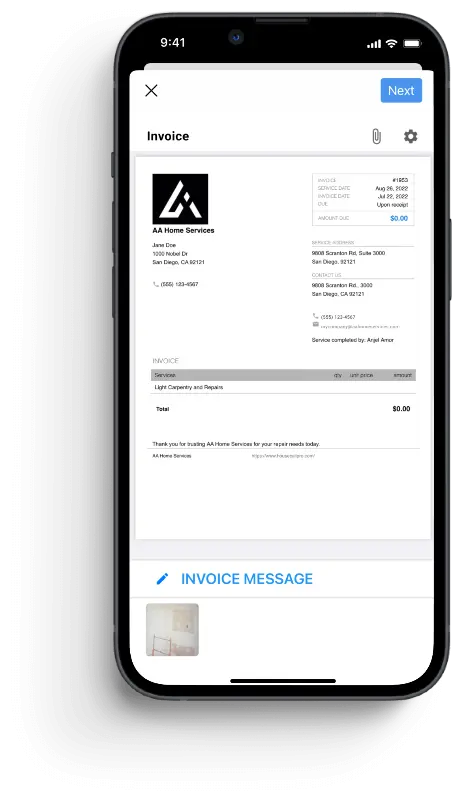
If you’re copying customer details between apps or switching tools to schedule a job, send an invoice, and collect payment, it may be time to connect those tasks. Housecall Pro’s HVAC software helps you manage jobs from booking through payment, with job details available to your office staff and technicians.
Here’s how it supports your day-to-day work:
- Job estimating: Build and send estimates by text or email, then follow up with customers who haven’t responded.
- Work scheduling: Manage job schedules, assign techs to service calls, and adjust appointments using the drag-and-drop calendar.
- Payments: Send branded invoices and request payment as soon as the job’s done, so you can get paid faster.
Keep the specialized tools you use for load calculations and diagnostics, and use Housecall Pro to manage the work around each job. Its QuickBooks and Bluon integrations help connect your accounting and technical tools with your job information.
Try Housecall Pro free for 14 days to see how scheduling, estimates, invoices, and payments work together. Have your team test the tasks they handle most often, from booking a service call to collecting payment in the field.
Get In Touch: 858-842-5746
Let us earn your trust
On average, Pros increase monthly revenue generated through Housecall Pro by more than 35% after their first year.
See plan options and feature breakdown on our pricing page.
HVAC apps FAQ
What features should HVAC scheduling software have?
HVAC scheduling software should help businesses assign available technicians, prevent scheduling conflicts, track job details, and keep customers updated. With Housecall Pro’s scheduling software, you can view each tech’s availability and reassign conflicting appointments to the next available pro using the simple drag-and-drop feature.
How much does HVAC business software cost?
HVAC business software costs vary by platform, user seats, and features. Some apps are free, such as Bluon, while others start at $12-$79 per month. Additional users, add-ons, and payment processing fees raise the total.
What’s the best app for HVAC technicians in the field?
The best apps for HVAC technicians in the field depend on your needs. Bluon looks up equipment specs and manuals (internet required), HVAC Buddy calculates superheat and subcooling, Freon Tracker logs refrigerant offline, and Cool Calc handles load calculations. To schedule, invoice, and collect payment from the same phone, use field service software like the Housecall Pro mobile app.
Is there free HVAC business software?
Yes, free HVAC business software exists, but it has limits on users, features, or the number of jobs you can manage. For example, Square gives you the essentials you need to sell online or in the field, but locks advanced features behind paid plans.
What’s the best free app for HVAC technicians?
The best free app for HVAC technicians depends on the features you need, such as job management, accounting, or technical tools. Bluon is a free diagnostics and field reference app, Freon Tracker is a good choice for refrigerant compliance, Square is a good choice for taking payments with no monthly fee, Homebase for team scheduling and time tracking, and MileIQ for mileage tracking.
What software do HVAC companies use for dispatching and invoicing?
HVAC companies use field service management software for dispatching and invoicing, and Housecall Pro offers these capabilities. You can assign jobs to technicians, manage schedules, create invoices, and request payments from the mobile app.