Want to win more jobs with less effort?
Grow your business and send quick quotes with our home service software.

Want to see your potential revenue?
See what businesses like yours earn with Housecall Pro in 1 - 2 minutes.

Plumbing companies deal with two kinds of work at the same time: the jobs you planned and the ones that just called in. A water heater install scheduled for Tuesday can get pushed when a burst pipe comes in at noon. A diagnostic visit from last week still needs an estimate follow-up before the customer calls someone else.
The challenge is keeping the schedule, estimates, invoices, and follow-up connected as the day changes. Housecall Pro helps plumbing businesses manage all of it from one place, so nothing falls through the cracks between the first call and the final payment. Here’s how.

Rate checker
Stop second-guessing your bids. Check your rates against market averages and get a clear picture of what you should be charging today.
Quick answer: How do plumbing companies manage scheduling, estimates, and follow-up?
Plumbing companies manage scheduling, estimates, and follow-up with field service management software, a system that connects the job from first call to final payment. The core tools are scheduling software, estimating software, invoicing software, and automated marketing. Together, they replace the back-and-forth between calendars, spreadsheets, text threads, and payment apps that slow most plumbing businesses down.
Key takeaways
Here's how plumbing software handles jobs from start to finish:
Scheduling software:: Keeps emergency and planned jobs on one dispatch board so the office can see who’s available, nearby, and what can move for urgent calls.
Emergency dispatch: Helps owners assign urgent calls to the nearest available tech without rebuilding the schedule from scratch.
Digital estimates: Let techs price work and send quotes from the field before leaving the customer’s driveway.
Estimate follow-up: Sends automated reminders to customers who haven’t approved a quote, so jobs don’t get lost between the visit and the decision.
Invoicing software: Turns approved estimates into invoices and payment requests automatically, with reminders for unpaid balances.
Automated follow-up: Sends review requests, maintenance reminders, and seasonal service messages after every job without manual effort.
Table of contents
How plumbing companies manage scheduling
Plumbing companies manage scheduling by keeping every job visible on one dispatch board, so the right tech can be assigned and the schedule updated in real time as the day changes.
Without that, emergency calls get handled through texts and phone calls, planned jobs get bumped without warning, and the dispatcher has no clear picture of who’s available or where anyone is. When a burst pipe call comes in at noon on a day that’s already full, someone has to figure out what moves—fast.
Housecall Pro’s scheduling software gives plumbing teams a live dispatch board where jobs, techs, and locations are visible in one place. Emergency calls can be added, assigned, and updated without rebuilding the schedule from scratch.
Emergency call dispatch
Emergency dispatch works by creating a job as soon as the call comes in, identifying the nearest available tech, and assigning the job from the dispatch board, so the customer gets a response and the tech gets the details without the owner coordinating every step manually.
Not every same-day call has the same urgency. A burst pipe, active leak, or sewer backup needs priority over a non-urgent fixture replacement or maintenance visit. Having all your jobs visible in one place makes it easier to decide what moves.
Once booked, the tech gets the job details in the mobile app: customer information, job notes, and service address. And if a call comes in while you’re on the job, Housecall Pro’s CSR AI can answer it, collect the customer’s details, and create the booking so you don’t have to stop what you’re doing.
Planned service scheduling
Planned jobs work the same way as emergency dispatch—a customer calls, texts, or books online, the job gets created, and it’s assigned to the right tech. The difference is the timeline: fixture installs, water heater maintenance, drain maintenance, and inspection visits can be scheduled days or weeks out instead of right now.
That longer window helps, but it also creates more room for things to slip. Without a clear workflow, confirmations get forgotten, reminders don’t go out, and customers call the office to find out if the tech is still coming.
Housecall Pro’s online booking connects directly to the schedule. When a customer books, the job is created automatically without anyone copying it over by hand. From there, a confirmation, reminder, and “on my way” message can go out before the tech even arrives.
How plumbing companies build and send estimates
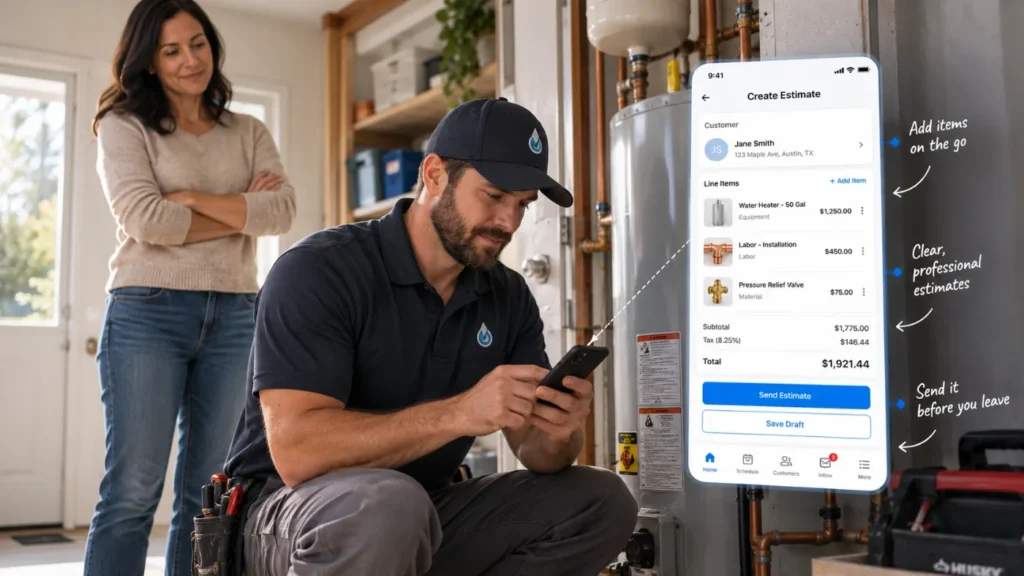
Plumbing companies build and send estimates by having the tech assess the job on-site, pricing the work, and sending the quote by text or email before leaving. That way, the customer can approve the work without waiting for the office to follow up.
Many plumbing jobs start with a diagnostic visit: leak detection, drain issues, sewer line problems, water heater failures. Without a way to price and send the quote on the spot, it gets typed up later, sent hours after the visit, and followed up manually. By then, the customer may have already called someone else.
Housecall Pro lets techs build estimates from a saved price book, send them by text or email, and move approved work directly into the next job or invoice step—no rebuilding required.
Building an estimate in the field
Building an estimate in the field means the tech assesses the job, opens the app, adds line items, and sends the estimate before leaving the driveway. That helps the customer make a decision while the problem is still fresh and the tech is still there to explain the work.
Plumbing companies can price jobs with flat rate pricing or time and materials. Flat rate pricing uses pre-set prices for common jobs like drain cleaning, toilet replacement, or water heater installation, while time and materials pricing charges based on labor time and parts used.
If you’re still building out your pricing process, start with our plumbing pricing guide, then connect that pricing to your estimates. Housecall Pro’s flat rate pricing software can help keep service pricing consistent across techs, estimates, jobs, and invoices.
What should a plumbing estimate include?
A plumbing estimate should include the customer’s name, service address, problem summary, recommended repair, labor, materials, permit-related costs if applicable, warranty notes, total price, approval deadline, and payment terms.
For example, a water heater replacement estimate might include removal of the old unit, installation of the new unit, code-required parts, disposal, labor, warranty details, and any permit-related line items. The more clearly the estimate explains the work, the easier it is for the customer to approve it without extra back-and-forth.
Estimate follow-up
Estimate follow-up is the process of reminding a customer to approve a quote after it’s been sent. If a customer doesn’t approve within a set number of days, an automated reminder can go out by text or email, so the job doesn’t sit forgotten while they’re deciding.
A simple message can say: “Hi [Customer Name], just following up on the plumbing estimate we sent for [service]. Reply here with any questions, or approve the estimate when you’re ready.”
Aspen T. of Rapid Rooter Plumbing says automatic estimate follow-up is one of his favorite Housecall Pro features: “I have had so many estimates get saved…because it is constantly doing everything in the background.”
Pro tip: Send a first reminder after 24 hours and a second after 72 hours—close enough that the job is still top of mind, far enough apart that it doesn’t feel pushy. For more examples, see our guide on how to follow up on a quote.
Get In Touch: 858-842-5746
Let us earn your trust
On average, Pros increase monthly revenue generated through Housecall Pro by more than 35% after their first year.
See plan options and feature breakdown on our pricing page.
How plumbing companies handle customer follow-up
Plumbing companies handle customer follow-up by setting messages to send based on job and estimate status: a review request after a completed job, a reminder for unapproved quotes, and a seasonal maintenance message for past customers.
The problem is that follow-up is usually the first thing to slip after a busy day. A review request that should have gone out Tuesday gets forgotten by Thursday. An estimate from last week never got a reminder. A customer who had their water heater replaced a year ago hasn’t heard from you since.
Housecall Pro handle all three automatically. A review request goes out after the job is marked complete. An estimate reminder goes out if the customer hasn’t approved after 24 hours. And seasonal reminders go out based on service history without anyone having to remember to send them.
What a plumbing business day looks like with the right software
When scheduling, estimates, invoices, and follow-up are connected, the day is easier to manage. Emergency calls still come in, but the schedule doesn’t have to live in one person’s head.
A burst pipe call comes in at noon. You find the closest available tech, assign the job, and update the schedule from one screen. The tech sees the job details in the app, completes the diagnostic, builds the estimate, and sends it before leaving the driveway. If the customer approves, it moves straight into an invoice. If they don’t, a follow-up goes out automatically.
After the job is done, the customer gets a payment reminder if the invoice is unpaid, a review request while the experience is still fresh, and a maintenance reminder when it’s time to come back. You don’t have to chase any of it.
Housecall Pro connects the full plumbing workflow in one place: scheduling, estimates, invoices, payment reminders, and follow-up. Emergency calls land on the dispatch board, estimates go out from the field, approved work converts directly to invoices, and customers hear from you after every job without anyone manually tracking it down.
On average, plumbing Pros increase the number of monthly jobs they complete through Housecall Pro by more than 25% after their first year.*
Ready to keep your plumbing schedule, estimates, invoices, and follow-up in one place? Sign up for Housecall Pro’s free 14-day trial.
Plumbing scheduling and estimates FAQ
How do plumbing companies manage scheduling for emergency and planned jobs?
Plumbing companies manage scheduling for emergency and planned jobs by using scheduling software with a live dispatch board. Planned jobs are assigned by date, time, tech, and location, while emergency jobs can be added to the schedule as they come in.
What software do plumbers use to send estimates?
Plumbers use plumbing estimating software to build and send estimates from the office or the field. The software should let the tech add labor, materials, service descriptions, flat rate pricing, photos, notes, and customer approval options.
How do plumbing companies turn estimates into invoices?
Plumbing companies turn estimates into invoices by converting the approved estimate inside their field service software. Once the customer approves the quote, the same line items can carry into the job and invoice.
The estimate is the proposed scope and price, the job is the scheduled work, and the invoice is the final payment request after the work is approved or completed. Keeping those steps connected saves time because the office doesn’t have to rebuild the invoice from scratch.
How do plumbing companies follow up after a service call?
Plumbing companies follow up after a service call by sending a review request while the experience is still fresh, a payment reminder if the invoice goes unpaid, and a seasonal maintenance reminder for past customers due for drain maintenance, water heater service, or inspection visits. Housecall Pro handles all three automatically, so follow-up goes out after every job without manual tracking.
What should a small plumbing business look for in scheduling and invoicing software?
A small plumbing business should look for software that handles scheduling, dispatching, estimating, invoicing, payments, and customer follow-up in one system. The software should also have a mobile app, because techs need job details, estimates, invoices, and customer notes in the field.
How do plumbers send invoices after a job?
Plumbers send invoices after a job by creating an invoice from the completed work order or approved estimate. The invoice should include the customer’s information, service date, job description, labor, materials, taxes, discounts, total amount due, and payment options.
Housecall Pro’s invoicing software handles this from the field. Techs send invoices directly from the mobile app when the job is complete, with card, ACH, and online payment options included and automated reminders going out if the invoice stays unpaid.