Want to win more jobs with less effort?
Grow your business and send quick quotes with our home service software.

Want to see your potential revenue?
See what businesses like yours earn with Housecall Pro in 1 - 2 minutes.

Every pest control job should end with a clear, accurate invoice. It documents the work completed, helps prevent billing questions, and makes it easier for customers to pay on time. Below, you’ll learn how to create a pest control invoice, what information to include, and how to build a consistent invoicing process that saves time and keeps your business organized.
Download our free pest control invoice template to get started.
Quick answer: How do you write a pest control invoice?
To write a pest control invoice, start with your company info and the customer’s service address, then list each service and material as its own line item with the cost. Add a subtotal, applicable taxes, total due, and payment terms—then send it the moment the job is done. What separates a professional invoice from a basic one: specific service descriptions (not just “pest control service”), a clear due date, and your company branding on every page.
Key takeaways
These steps keep your pest control billing organized and professional:
Match invoice type to the job: Use standard, itemized, deposit, or recurring invoices depending on the service.
Include all required details: Add company info, customer details, services, totals, taxes, and payment terms.
Send invoices immediately: Improve your cash flow by invoicing as soon as you finish the work.
Set clear payment terms: Spell out due dates and accepted payment methods.
Table of contents
Types of pest control invoices and when to use them
The invoice you use needs to reflect the specific job you’re doing. Using the right format keeps the billing process clear and helps you avoid unnecessary back-and-forth questions.
Here are the most common types of invoices that pest control pros use:
- Standard invoice: Best for one-time jobs with a flat rate, such as an emergency wasp nest removal or a single pest treatment visit.
- Itemized invoice: Ideal for more involved services, such as rodent exclusion projects, where you need to break out inspection fees, exclusion work, materials, and follow-up visits.
- Deposit invoice: Use this to collect partial payment upfront for higher-cost services that require significant labor or materials, such as termite treatment, wildlife removal, or extensive rodent exclusion work.
- Recurring or maintenance invoice: Perfect for ongoing service agreements, including quarterly pest control visits for commercial properties, monthly mosquito treatments during peak season, or year-round preventive pest management plans.
If your customer prepaid for an annual plan, note it on every invoice as “Paid—covered under service agreement dated [date].” If you bill per visit, reference the service agreement number so the customer can match it to their contract.
The easiest way to handle recurring billing without manual work each month: use invoicing software that lets you set up automatic invoices on a schedule. You define the frequency once, and the invoice goes out automatically after each visit.
What should a pest control invoice include?
Every professional pest control invoice should include the following:
- Heading information: Include your company name, logo, phone number, email address, and business address. This helps build brand awareness and makes it easy for customers to contact you.
- Customer details: List the customer’s full name, service address, phone number, and email address. This confirms who the invoice is for and where the work was completed.
- Invoice number and date: Assign a unique invoice number and include the date the invoice was issued. This helps you track payments and simplifies bookkeeping.
- Itemized services and costs: Clearly describe the pest control services performed, products or materials used, and any labor charges. An itemized breakdown prevents confusion and shows exactly what the customer is paying for.
- Subtotal and taxes: Include the total cost before taxes and any applicable sales tax. This keeps your pricing transparent and compliant with local requirements.
- Total amount due: Display the final balance owed prominently so customers know exactly how much they need to pay.
- Payment terms: Specify the due date, accepted payment methods, and any late payment fees. Clear payment terms help set expectations and reduce late payments.
- Notes: Add any relevant warranty information, service guarantees, follow-up recommendations, or a brief thank-you message. These details add clarity and help build trust with your customers.
Pest control invoice example
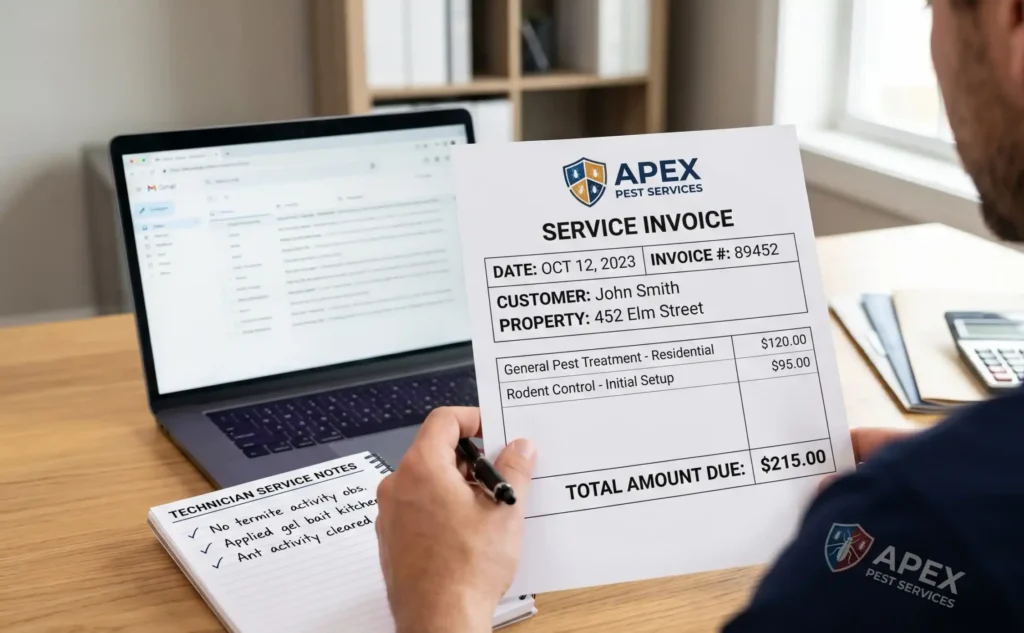
Seeing a real invoice can help you understand the layout, required fields, and how everything fits together. You can use the basic example below as a starting point and adjust the specific services and pricing to fit your business.
INVOICE
[Your Pest Control Company Name]
[Business Address]
[City, State, ZIP]
[Phone Number]
[Email Address]
Bill To:
[Customer Name]
[Service Address]
[City, State, ZIP]
[Customer Email]
Invoice #: PC-2026-001
Invoice Date: [MM/DD/YYYY]
Due Date: [MM/DD/YYYY]
| Description | Qty | Rate | Amount |
| Initial Property Inspection | 1 | [$___] | [$___] |
| Termite Treatment (Full Perimeter Application) | 1 | [$___] | [$___] |
| Follow-Up Monitoring Visit | 1 | [$___] | [$___] |
| Materials and Treatment Supplies | 1 | [$___] | [$___] |
Subtotal: [$]
Tax ([X] %): [$]
Total Due: [$____]
Payment Terms: Payment is due within [__] days of the invoice date. We accept credit cards, ACH transfers, or checks.
Notes: This service includes a [__-month] warranty on termite treatment. Please contact us if you notice new pest activity. Thank you for choosing [Your Company Name].
Tips for writing professional pest control invoices
Making small adjustments to how you present your work can make it easier for your customers to pay you on time.
Try these strategies to improve your billing process:
- Use a consistent invoice template: Sticking with the same layout for every job makes your business look organized and helps customers quickly find the total and due date.
- Add your branding: Include your logo, company name, and contact details to build recognition and remind customers who to call for future service.
- Send invoices immediately: Don’t wait days or weeks; invoice while the job is fresh in the customer’s mind to get paid sooner.
- Be specific with descriptions: Instead of writing “pest control,” specify “interior ant treatment and exterior perimeter spray.” Detailed descriptions reduce questions and disputes.
- Offer multiple payment options: Accept credit cards, ACH, checks, and mobile payments. The easier it is to pay, the faster you’ll collect.
- Track and follow up on unpaid invoices weekly: Review outstanding balances and send polite reminders before accounts fall too far behind.
Common invoice mistakes to avoid

Manual data entry accounts for more than 60% of invoice errors, which can lead to delayed payments and hurt customer trust. Even small oversights in your billing process can cost you significant time and money in the long run.
Here are five common invoice mistakes to watch for:
- Missing or incomplete customer details: Omitting the service address or contact info can lead to disputes or delayed payments.
- Vague service descriptions: Writing “pest control service” instead of listing specific treatments creates questions and slows down approval.
- No clear payment terms: If you don’t include a due date or accepted payment methods, customers won’t know when or how to pay.
- Math errors: Incorrect totals or tax calculations can hurt your credibility and take time to fix.
- Waiting to send the bill: Delaying invoice delivery increases the likelihood of a late payment.
One of the best ways to prevent these mistakes is to use professional invoicing software to automate your totals and stay consistent.
How to create a pest control invoicing process
As your business grows, your volume of paperwork will naturally increase. To stay efficient, you need a system that’s easy for you and your team to follow every single time. Consistency is key to ensuring every customer receives the same professional experience, so no jobs slip through the cracks.
Here’s how to build a strong billing routine:
1. Create a standard invoice template
Use one clean template for the whole team that includes all required fields and common services. When everyone works from the same starting point, invoices go out faster and look consistent to every customer.
2. Train your technicians
Show your staff how to describe services accurately and when to send the invoice to prevent delays. A tech who knows to send the invoice before leaving the driveway is worth more than any follow-up system.
3. Simplify your payment terms
Keep your payment expectations short and easy to find. If the terms are longer than the service list, it can create a poor experience—stick to due date, late fee policy, and accepted payment methods.
4. Review and refine your processes
Check your accounts weekly to identify patterns in late payments and tweak your wording or timing to improve cash flow. If the same customers are always late, consider requiring payment on the spot for future jobs.
How pest control invoicing software saves you time and reduces late payments
Chasing late payments and managing messy spreadsheets takes time away from the actual work that grows your business. Housecall Pro puts scheduling, job details, and invoicing in one place so billing happens automatically, not after the fact
Here’s how pest control software can help you take home more money and save time:
- Mobile invoicing: Create and send invoices from your phone as soon as the job is done, before you even leave the driveway.
- Automated templates: Avoid duplicate invoice numbers and formatting errors with a system that keeps everything organized automatically.
- Quick payment processing: Accept credit cards and online payments on the spot to reduce outstanding balances. Pros who use Payments with Housecall Pro get paid 2X faster.*
- Automatic reminders: Set up reminders to notify customers when payments are past due so you don’t have to send awkward follow-up emails manually.
- Accounting integration and reporting tools: Sync your invoices with accounting software and view reports that show who’s paid and who hasn’t.
Housecall Pro customers save an average of 8.6 hours per week—time that goes back into the field, not into chasing down receivables. Try Housecall Pro free for 14 days and see how much time you can save.
*Avg. experience of Pros processing 50%+ of their payments with Housecall Pro over the past year.
Get In Touch: 858-842-5746
Let us earn your trust
On average, Pros increase monthly revenue generated through Housecall Pro by more than 35% after their first year.
See plan options and feature breakdown on our pricing page.
FAQs
What is the difference between a pest control quote and a pest control invoice?
The difference between a quote and an invoice is timing. A quote is a set price provided before the job starts, while an invoice is sent after the work is completed to request payment for the actual services performed. An estimate is a rough cost range that may change, and a proposal is a detailed document covering the scope and timeline for larger projects.
What must be included on an invoice by law?
At minimum, every invoice should include your business name and contact info, a unique invoice number, the date issued, an itemized list of services, the total amount due, and any applicable taxes. Most states require all of these. Some have additional disclosure requirements for service contracts. Check your state’s contractor licensing board or consult a local accountant to confirm.
How long should I give customers to pay an invoice?
For residential jobs, it’s common to collect payment immediately after the service is completed. For mid-size commercial clients—restaurants, property managers, or office complexes—net 15 is a common middle ground, giving the customer 15 days from the invoice date to pay. For larger commercial accounts, you might offer net 30 terms.
Can I charge late fees on pest control invoices?
Yes, as long as you state your late fee policy clearly in your payment terms upfront. Common late fees include a flat monthly charge of $25–$50 or a percentage of the total balance.
Do I need invoicing software for my pest control business?
Not immediately, but most pest control businesses that hit more than 10–15 jobs per week find manual invoicing starts costing them more in errors and time than the software would. Manual invoicing leaves room for delays and missed follow-ups. Software like Housecall Pro lets you create invoices on the job, collect payment on the spot, and automatically remind customers who haven’t paid.
What should I do if a customer disputes a pest control invoice?
Pull up your job notes, photos, and signed work order before responding—those are your evidence. Reply in writing (email is fine) and reference the specific line items the customer is questioning, attaching any documentation that supports the charge. Most disputes come down to vague service descriptions, so if the invoice just says “pest control service,” that’s the first thing to fix going forward.
If the customer still won’t pay after you’ve provided documentation, your options depend on the amount: for balances under a few hundred dollars, sending to collections or using small claims court may not be worth the cost. For larger unpaid invoices, small claims is usually the most practical path. Most states allow claims up to $10,000 without an attorney.
Do I need to charge sales tax on pest control services?
It depends on your state. Most states tax pest control as a standard home service. Texas taxes the full service fee—including any add-on charges—even when no pests are found. Kansas taxes residential and commercial jobs but exempts applications on agricultural property. California generally does not tax pest control labor, though separately itemized materials may still be taxable.
Because rules vary and can change, check with your state’s department of revenue or a local accountant before deciding whether to charge tax, especially if you work across state lines or on agricultural accounts. Charging incorrectly in either direction creates compliance risk.