Want to win more jobs with less effort?
Grow your business and send quick quotes with our home service software.

Want to see your potential revenue?
See what businesses like yours earn with Housecall Pro in 1 - 2 minutes.

You can’t answer every call when you’re on a job, driving between appointments, or handling a customer in front of you. But if a potential customer gets voicemail, there’s a good chance they’ll call the next contractor on their list.
AI answering services help cover those gaps by picking up calls, collecting customer details, answering common questions, and, in some cases, booking the job.
The challenge is finding a service that actually fits the way a home service business works. Some tools connect directly to your scheduling and dispatch software, while others leave your office team with another message to review and another customer record to enter.
This guide compares five answering services based on the features that matter most to home service businesses, including contractor-specific call handling, appointment booking, software integrations, after-hours coverage, live receptionist support, and overall value.
Quick answer: What is the best AI answering service for contractors?
There’s no single best AI answering service for every contractor. Housecall Pro CSR AI is a strong choice for businesses that want AI answering integrated with scheduling and customer management. Smith.ai is a good option for businesses looking for a standalone AI answering service. Goodcall offers a lower-cost option for handling routine calls, while Ruby is best for contractors who prefer live receptionist support over AI.
The right choice depends on how you answer calls today, the workflows you want to automate, your price point, and whether you need AI, live receptionists, or a combination of both. If cutting down on the number of apps in your intake process matters, look for an option that connects directly to your CRM and already knows your business.
Table of contents
Live call answering vs. AI call answering
AI answering services are best at handling repeatable calls such as service questions, lead intake, appointment requests, and basic routing. Live answering services cost more, but a person can adapt when a caller is upset, the request is unusual, or the situation needs judgment. AI can handle these situations too—just not quite as well as a human or virtual assistant—but it’s particularly good at recognizing when a call needs to be escalated.
Hybrid services combine both models by letting AI handle routine calls and sending exceptions to a live agent. For most contractors, AI is a good fit for handling high volumes of routine calls, while live answering makes more sense if your business frequently handles complex requests, high-value projects, or customers who expect a more personal experience.
What should contractors look for in an AI answering service?
The best answering services don’t just answer the phone. They help you capture more jobs by collecting the right information and moving customers to the next step.
Use these criteria when comparing providers.
Field service management integration
Your answering service should work with the software you already use to run your business. That way, customer information, appointments, and job details flow into your system automatically instead of creating more office work.
If an answering service only emails a call summary, an office manager still has to copy the customer’s address, service request, and appointment time into the FSM the next morning. That creates another chance for a missed detail, duplicate customer record, or scheduling error.
Ask each provider:
- Can the answering service see real-time appointment availability?
- Can it create a customer and book a job?
- Can it recognize an existing customer?
- Can it update a customer or job record?
- Where do recordings and call summaries appear?
- Does the connection require Zapier or another third-party tool?
A native FSM integration may check availability and create a job immediately. A basic calendar connection may only reserve a time slot, leaving your office staff to create the customer and job record later.
Contractor-specific intake
Generic answering services usually stop after collecting a caller’s name, phone number, and reason for calling. A contractor-focused service should gather the details your team needs to understand the job and schedule it correctly.
For a no-cooling HVAC call, that could mean asking whether the system is running, whether the thermostat has power, whether the address is inside the service area, and whether the customer needs an emergency visit or a standard diagnostic appointment.
Depending on your trade, intake questions may include:
- What service do you need?
- Is this an emergency?
- Is water, power, heat, or cooling currently unavailable?
- Are you an existing customer?
- What is the service address?
- Is the address inside our service area?
- What type or age of equipment do you have?
- Are you requesting a repair, estimate, or maintenance visit?
The service should also know when to stop following a routine script. Calls involving active flooding, a gas smell, electrical sparks, or another safety issue should be transferred immediately or follow your emergency response process.
If you serve multilingual customers, confirm which languages are supported, whether calls are handled by AI or human agents, and whether your intake and booking scripts have been tested in each language.
Cost structure
Providers don’t all bill the same way. Some charge per call, some by unique caller or monthly usage, and live receptionist services often bill by receptionist minutes. Understanding how pricing works can make a big difference once your call volume starts growing.
Compare:
- Included calls, callers, or minutes
- Overage charges
- Charges for spam calls and wrong numbers
- Live-transfer fees
- Appointment-booking fees
- Setup or onboarding costs
- Contract requirements
- Charges for additional numbers or locations
Review at least one month of phone records before choosing a plan. Note your call volume, average call length, missed calls, spam volume, and busiest hours. That’ll give you a much more accurate estimate than choosing a plan based on pricing alone.
Also look at your current booking rate—the share of calls that convert into a scheduled job. Be cautious of booking rate numbers vendors advertise: many are inflated or drawn from a handful of best-case customers, so your own baseline is the only number you can fully trust when evaluating a plan.
Setup and training requirements
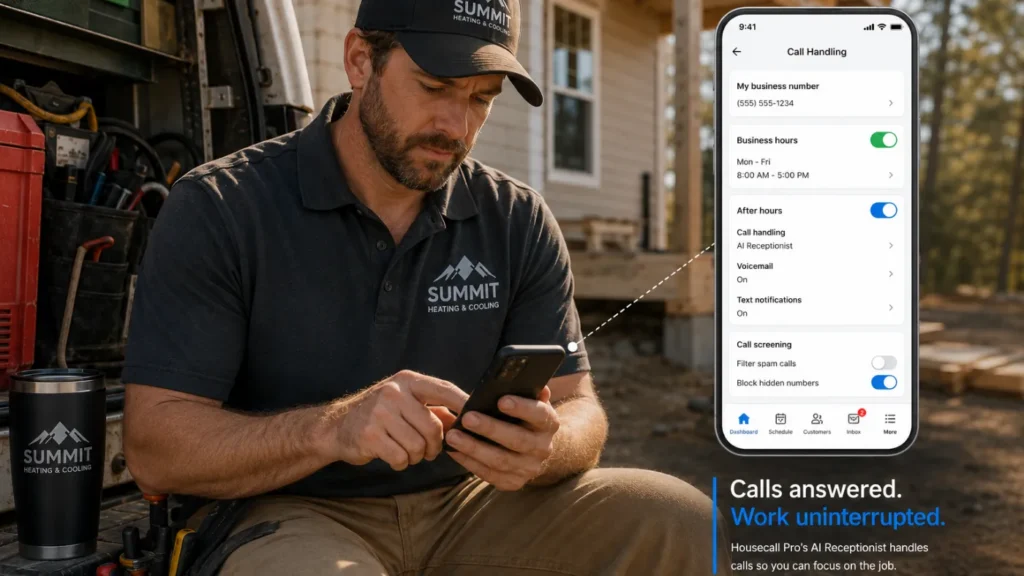
Before signing up, ask how much work setup actually requires. Most providers need your business hours, service areas, FAQs, booking rules, transfer numbers, and emergency instructions. Some AI tools require you to build and maintain your own call flows, while others connect to your field service software and use the information you’ve already entered, making setup faster and easier to keep up to date.
Phone-number routing
Confirm whether you can keep your existing business number and choose when calls route to the service.
Some contractors route every call through an answering service. Others only use one after hours, during peak call times, or when their office team is unavailable. Choose a provider that lets you decide when and how calls are routed.
AI answering services for contractors compared
We compared each service based on the features home service businesses care about most, including field service software integrations, contractor-specific call handling, appointment booking, after-hours coverage, live receptionist options, and how well each platform fits a contractor’s workflow.
Product information was reviewed on provider websites as of publish. Confirm current plans and features directly with the provider before you buy, since details can change.
| Service | Best for | How it handles calls | Workflow fit |
| Housecall Pro CSR AI | Contractors who want answering, booking, and job data in one system | AI answering with optional transfer to HCP Assist or another number | Built into HCP; uses service, customer, and scheduling data |
| Smith.ai | Businesses that want a stand-alone AI receptionist with live backup | AI-first answering with live-agent escalation | Connects to calendars, CRMs, and FSMs; setup varies |
| Goodcall | Small businesses with routine calls and a limited budget | AI answering with customizable call flows | General-purpose; contractor workflows may need Zapier/setup |
| Ruby | Businesses that want every caller to reach a person | Human receptionists supported by AI tools | Human-first service; scheduling may need integration/manual handoff |
| Quo (formerly OpenPhone) | Teams already using Quo for business calls | AI answers questions, captures messages, and routes calls | Works inside Quo but is not built around field service workflows |
CSR AI from Housecall Pro
CSR AI is a good fit for contractors who want calls to turn into booked jobs without reentering customer information. It answers calls, texts, and chats, responds to routine questions, gathers customer information, and books appointments based on the services and availability configured in Housecall Pro.
Because it’s built into Housecall Pro, CSR AI can use your existing service information, business hours, customer data, booking rules, and appointment availability instead of relying on a separate call script and manual handoff.
Pros can customize:
- Business hours
- Available services
- Call scripts
- Company information
- Booking rules
- Pricing responses
- Voice and tone
- Call-transfer instructions
- Whether the greeting identifies the representative as AI
If a caller wants to speak with someone, CSR AI can collect their information and transfer the call to a number you choose. That number can be Housecall Pro’s live answering service, HCP Assist, if you’d rather a virtual assistant step in when CSR AI needs to escalate. You set the rules for when that handoff happens—for example, transferring only for certain question types or specific moments in the conversation—so escalation follows how your business actually operates.
Pros can also set it up the other way: have HCP Assist’s virtual assistants answer live during business hours, then let CSR AI take over after hours, on holidays, or whenever call volume spikes. Either way, call summaries, booking details, and customer information are logged for the team to review.
Housecall Pro’s plans start at $59 per month and come with unlimited minutes. Because CSR AI is part of the broader Housecall Pro platform, that plan also includes scheduling, dispatching, invoicing, and payment processing—so the cost covers running the business, not just answering the phone.
Pros
- Built specifically for home service calls
- Uses existing Housecall Pro service and availability information
- Books directly into the Housecall Pro calendar
- Answers calls and chats 24/7
- Keeps customer information and call summaries in one system
- Supports customizable scripts and transfer rules
- Quick onboarding and can start responding to customers and booking jobs right away
Limitations
- Requires an active Housecall Pro subscription
- Booking accuracy depends on keeping your services, availability, pricing guidance, and booking rules up to date
- Emergency and exception handling still requires careful setup
Get In Touch: 858-842-5746
Let us earn your trust
On average, Pros increase monthly revenue generated through Housecall Pro by more than 35% after their first year.
See plan options and feature breakdown on our pricing page.
Smith.ai
Smith.ai is a stand-alone option for contractors who want AI to handle routine calls and the ability to escalate selected calls to a live receptionist.
Its AI service answers calls, qualifies leads, asks intake questions, schedules appointments, and routes callers. Smith.ai connects with calendars, CRMs, and select field service platforms, including Housecall Pro, Jobber, and GorillaDesk. The depth of the connection varies: some integrations can create or update lead records, while other workflows may still rely on calendar booking, Zapier, or custom setup. A live receptionist can step in when a call needs human support.
For contractors, Smith.ai can help with:
- Answering service and availability questions
- Verifying service areas
- Scheduling estimates or site visits
- Collecting project details
- Qualifying new leads
- Handling basic rescheduling requests
- Routing calls using custom business rules
Smith.ai’s free AI receptionist plan includes 25 calls per month, with additional calls priced at $3 each. Its Pro plan starts at $150 per month for 75 calls and includes dedicated onboarding and live support.
Pros
- AI answering with live receptionist backup
- Free plan for low call volume
- Lead qualification and intake
- Appointment scheduling
- Custom routing and business rules
- Call recordings, transcripts, and summaries
Limitations
- Doesn’t connect customer records, jobs, and scheduling as seamlessly as software built into an FSM platform
- Live receptionist support can increase your monthly costs
- More advanced call flows take extra time to set up and test
- Per-call pricing can get expensive as your call volume grows
Ruby
Ruby combines live virtual receptionists with AI-powered tools, rather than using AI to answer customer calls directly. It’s included here for contractors who prefer human receptionists for customer conversations but still want AI features like call summaries, transcripts, and software integrations.
Ruby’s receptionists answer calls, take messages, transfer callers, capture leads, and schedule appointments using instructions provided by the business. While customers always interact with a live person, Ruby uses AI behind the scenes to support receptionist workflows and automate post-call tasks.
Current plans include:
- 50 receptionist minutes for $250 per month
- 100 receptionist minutes for $395 per month
- 200 receptionist minutes for $720 per month
- 500 receptionist minutes for $1,725 per month
Ruby includes the same core receptionist features across its plans, with the price changing based on the number of minutes included.
Pros
- Calls are answered by live receptionists
- 24/7 availability
- Appointment scheduling and lead capture
- Customized greetings and call handling
- Better suited to nuanced conversations
Limitations
- Doesn’t offer fully automated AI call answering for routine customer calls
- Higher starting price than most AI answering services
- Minute-based pricing can add up if you handle a high call volume
- You’ll need to provide your own contractor-specific call scripts and intake questions
- Booking may require an integration or manual handoff to your scheduling software
Goodcall
Goodcall works best for small businesses looking for an affordable AI answering service. It handles routine calls like answering common questions, capturing leads, scheduling appointments, and transferring callers.
You can customize the AI using your services, FAQs, pricing guidance, and call-handling rules. Because Goodcall is designed for many types of small businesses—not specifically contractors—you’ll need to build your own service-area questions, emergency-call rules, and scheduling workflows.
Goodcall’s Starter plan costs $79 per agent per month and includes unlimited call minutes for up to 100 unique callers. Additional unique callers cost $0.50 each. A unique caller is counted once per month, even if they call multiple times from the same phone number.
Pros
- Affordable entry price
- Unlimited call minutes
- 24/7 AI answering
- Appointment requests and lead capture
- Custom call flows and routing
- Integrates with other tools through Zapier
Limitations
- Not built specifically for field service businesses
- You’ll need to configure contractor-specific intake and workflows
- CRM and FSM integrations may require Zapier
- Emergency or complex call handling may need additional setup
- Each additional AI agent requires its own subscription
Quo (formerly OpenPhone)
Quo’s AI agent, Sona, is best for contractors who already use Quo (rebranded from OpenPhone in late 2025) and want basic AI answering built into the same phone system.
Sona can answer calls 24/7, greet callers, respond to approved questions, capture messages, and follow routing rules you configure. It’s designed for general business phone workflows rather than contractor-specific intake, dispatching, or job creation.
Quo includes 10 Sona calls per month (1,000 credits) on its free tier. Paid Sona plans start at $25 per month for 40 calls, with higher tiers available for larger call volumes. Sona is billed by credits—100 credits per call—rather than by call length.
Pros
- Works inside the Quo business phone system
- Provides 24/7 AI call answering
- Supports custom greetings, FAQs, and call-routing rules
- Captures messages and keeps call details in Quo
- Offers a low starting price for limited call volume
Limitations
- Isn’t built specifically for contractors or field service workflows
- Doesn’t create jobs or use FSM scheduling rules natively
- Requires manual setup for contractor-specific intake and emergency handling
- Works best for businesses already using Quo
Which AI answering service is right for your contracting business?
The right answer depends on one thing: what happens on the call before it gets to your team. A no-heat call in January and a routine maintenance request need different handling, and the service you pick should match that.
Use the table below to start with your top priority and work backward. These recommendations are based on workflow fit, service model, and published pricing. We haven’t tested call quality hands-on, so run your own test calls before committing.
| Your priority | Strongest option |
| Use HCP data to answer and book calls | CSR AI |
| Combine automated intake with live backup | Smith.ai |
| Have a person answer every call | Ruby |
| Get unlimited AI call minutes on a budget | Goodcall |
| Keep AI answering inside your existing phone system | Quo |
Choose CSR AI when you use Housecall Pro and want your answering service to work with your existing customer, service, and scheduling information.
Choose Smith.ai when you want AI call answering that works independently of your field service software.
Choose Ruby when you want every call answered by a live person, not just the exceptions AI can’t handle.
Choose Goodcall when your calls are mostly routine and budget is the main constraint.
Choose Quo when you’re already using Quo as your business phone system and want AI answering without adding a separate tool.
Before making any service your primary phone experience, run at least five test calls:
- A new booking request
- An existing-customer reschedule
- An out-of-area lead
- An upset caller
- An emergency scenario
Review what the service said, what it recorded, what it booked, and what information your team received afterward.
Learn more about Housecall Pro’s full AI Team or start a free 14-day trial to see how customer communication, scheduling, dispatching, and job management work together.
AI answering services for contractors FAQ
What is the best AI answering service for contractors?
The best AI answering service for contractors depends on whether it connects directly to your FSM, collects trade-specific intake, and provides human backup when a call goes off script.
Housecall Pro users may prioritize CSR AI’s native workflow, while businesses that want answering independent of their FSM may prefer a service such as Smith.ai.”
How much does an AI answering service cost for a home service business?
An AI answering service can range from free for limited call volume to several hundred dollars per month, depending on call volume, booking features, transfers, and integrations.
Compare the billing unit as well as the monthly price. One provider may charge by call, another by minute, and another by unique caller, which can produce very different bills at the same call volume.
Traditional live answering services commonly cost about $135 to $450 per month for small-business plans, according to AMBS Call Center’s 2025 pricing guide, although heavy call volume can raise the total.
What is the difference between an AI answering service and a live answering service?
AI answering services use voice technology to handle routine calls at a lower cost. Live answering services use human receptionists who can adapt to less predictable conversations and provide more judgment or empathy. For example, AI is well-suited to a routine appointment request or a simple service-area question, while a live receptionist is better positioned to calm an upset customer, handle a complex insurance or warranty question, or make a judgment call on an ambiguous emergency. See the comparison above for when each model makes sense for your calls.
Can AI answering services book jobs or appointments for contractors?
Yes, some AI answering services can book jobs or appointments for contractors. A native FSM integration may check availability and create the customer and job immediately.
A basic calendar connection may only reserve a time slot, leaving office staff to build the customer record, add the job details, and confirm whether the requested service fits the schedule.
What is CSR AI, and how does it work for home service businesses?
CSR AI is Housecall Pro’s AI customer service representative. It answers calls and chats, references a business’s services and availability, responds to common questions, collects customer information, and books appointments in Housecall Pro.
It can also transfer callers using rules established by the business and store call summaries and booking details for the team to review.
Do AI answering services integrate with field service management software?
Some AI answering services integrate with field service management software, but the depth of the connection varies by provider.
Ask whether the integration can create customers, recognize existing customers, check real-time availability, book jobs, and attach call summaries. A tool that only sends an email or Zapier notification may still leave your office team entering the information manually.
What happens when a customer calls after hours with an AI answering service?
An AI answering service can greet the caller, identify what they need, collect job information, answer approved questions, and offer an available appointment.
A routine maintenance request may be booked automatically. Active flooding, a gas smell, electrical sparks, or loss of heat during extreme cold should trigger an immediate transfer or emergency script.
Do AI answering services record calls, and do contractors need consent?
Many AI answering services record or transcribe calls to create summaries and support their workflows. Recording-consent laws vary by state, so contractors should confirm the provider’s disclosure settings and get legal guidance for the states where they operate.
Businesses should also ask how recordings, transcripts, and customer information are stored, retained, accessed, and deleted.
Do AI answering services actually help contractors grow their business?
Many do, but the value depends on whether captured calls turn into booked work, not just logged messages. Housecall Pro’s 2025 AI in the Trades Report found that Pros actively using AI save an average of 3.2 hours a week, and 57% say it’s helped them grow their business. An answering service that captures a lead but doesn’t book the job or hand off clean details still leaves your team doing that work manually afterward.