Want to win more jobs with less effort?
Grow your business and send quick quotes with our home service software.

Want to see your potential revenue?
See what businesses like yours earn with Housecall Pro in 1 - 2 minutes.

Every pro has been there: A customer calls while you’re mid-job, hits voicemail, and calls the next company on Google. That’s a job lost—and for most home service businesses, it’s happening more than once a day.
AI fixes that. Housecall Pro’s 2025 AI in the Trades Report found that Pros actively using AI save an average of 3.2 hours a week, and 57% say it’s helped them grow their business.
Unsure where to start? Here’s how to use AI in customer service for your home service business: what to set up first, what to expect, and what’s coming next.
Quick answer: What is AI in customer service?
AI in customer service means using artificial intelligence to automate and improve how you interact with customers. It handles repetitive tasks for you, predicting needs and supporting your team during complex customer interactions.
For a home service business, that might look like:
- AI agents answering calls when you’re busy
- AI chatbots replying to common questions
- Auto-scheduling and reminders that run in the background
- Personalized messaging based on past jobs and preferences
If you’re a solo service pro, AI might mean never missing a call, even when you’re up on a ladder. For a growing team, it could mean smarter routing that keeps dozens of messages organized and prevents missed opportunities during peak season.
Either way, the result is the same: fewer missed opportunities and more time to focus on revenue-driving work, rather than constant phone tag.
Key takeaways
Here's what to know before you dive in:
Response time decides the job: 97% of homeowners say it influences who they hire. AI keeps you competitive even when you’re on a job.
Most homeowners are already comfortable with it: 53% are fine with AI handling their first call or chat. That number jumps to 71% among millennials.
Conversational AI does more than a basic chatbot: It understands natural language, books jobs, and hands off to a real person when the situation needs one.
You don't need to overhaul everything at once: Start with your biggest pain point—missed calls, no-shows, or slow follow-ups—and add from there.
The early mover window is open: Many home service businesses haven’t set this up yet. Getting your systems in place now is the competitive advantage.
Table of contents
- How home service businesses use AI for customer service
- Benefits of AI in customer service
- Risks of using AI in customer service
- Conversational AI for customer service
- 9 examples of AI in customer service
- How to use AI in customer service step by step
- How Housecall Pro handles customer service for you
- The future of AI in customer service
How home service businesses use AI for customer service
For home service businesses, AI usually helps with the work around the job: lead intake, appointment scheduling, follow-ups, customer updates, review requests, and repeat questions.
Good customer service AI usually starts with one specific task, not a full business overhaul. That keeps the first test manageable and makes it easier to tell whether AI is actually helping.
Common AI customer service use cases include:
- Lead intake: Answer calls, respond to chats, collect job details, and route customers to the right next step.
- Appointment support: Confirm bookings, send reminders, update arrival windows, and handle simple rescheduling requests.
- Customer communication: Draft estimate follow-ups, service explanations, apology messages, and review responses.
- After-hours coverage: Capture job details when the office is closed so fewer opportunities go to voicemail.
- Review requests: Send follow-up messages after completed jobs and help draft responses to customer reviews.
- Internal summaries: Turn call notes, job notes, or customer messages into cleaner summaries for the office team.
During Housecall Pro’s 2026 AI Accelerator Week, lead intake was one of the most common starting points for AI. Pros discussed using AI to answer calls, respond to chats, collect customer details, and book jobs automatically, especially after hours.
One thing worth noting: customers today don’t just call. They reach out via phone, text, chat widgets, online booking, Google, Angi, and Nextdoor. The value of AI isn’t just answering one channel faster—it’s covering all of them at once so no lead slips through regardless of how they found you.
Disclaimer: The workflows, tools, and prompts shared during AI Accelerator Week were submitted by Pros in the Housecall Pro community and are provided for informational purposes only. Housecall Pro does not endorse or recommend any external tool or integration. When using tools outside of Housecall Pro, review the security and data policies first.
“AI answers our calls outside of office hours and on weekends, so our customers don’t go to voicemail… These would normally have been calls that we would have lost.“
—Frankwin H., Treasure Valley Solutions
Benefits of AI in customer service
AI can help most when it removes the small delays that cost home service businesses jobs: missed calls, slow replies, unclear follow-ups, and repeat questions.
- Faster responses when customers are ready to book: AI can answer routine questions, collect job details, and start the booking process before a team member is available.
- Fewer missed calls and dropped follow-ups: AI can help capture after-hours requests, missed calls, and follow-up tasks so fewer jobs slip through.
- More consistent customer communication: AI can turn approved language into repeatable templates for pricing, timelines, warranties, service options, and follow-ups.
- Lower overhead without lowering service quality: AI can help lean teams handle routine calls, reminders, messages, and follow-ups without immediately adding office staff.
- Clearer handoffs to the team: AI works best when it knows when to stop, capture the right details, and send complex requests to a real person.
Risks of using AI in customer service
AI can make customer service faster, but it still needs guardrails. The biggest risks show up when AI has bad information, handles the wrong situation, or keeps a customer from reaching a real person.
- Too much automation: Customers get frustrated when they’re stuck in loops with no human help. Set clear handoff rules so AI knows when to stop and bring in your team.
- Robotic customer interactions: If replies feel too automated, customers may lose trust. Keep an easy path to live support when the issue is emotional, urgent, or complicated.
- Incorrect answers: AI can misunderstand questions, share the wrong details, or make unsupported promises. Review responses and make sure a real person can step in.
- Privacy and data security concerns: AI tools may handle names, addresses, payment details, and service history. During our conversations with home service business owners, this is consistently one of the top concerns raised when evaluating AI tools. Before connecting any customer data to an external tool, check privacy policies, data storage practices, access controls, and whether your data is used for model training. As AI becomes more involved in customer data workflows, understanding artificial intelligence in cybersecurity helps businesses evaluate and manage security risks. If employees access these tools remotely or through public Wi-Fi, a trusted business VPN can help protect data in transit. As AI becomes more involved in customer data workflows, understanding artificial intelligence in cybersecurity helps businesses evaluate and manage security risks.
When working with AI built into Housecall Pro directly, your data stays protected. External tools require your own due diligence.
Conversational AI for customer service
Conversational AI is technology that uses natural language processing (NLP) to understand customer messages and respond in a human-like way across phone, text, and chat. Instead of relying on strict scripts or menu options, it interprets what your customer is asking and takes action—like booking a job.
For example, instead of asking someone to “press 1 for scheduling,” it can understand a message like “I need someone to check my furnace this week” and move straight to scheduling the appointment.
For home service businesses, this shows up most often on calls and text because that’s how your customers already reach you. Here’s what that looks like in practice:
- A customer calls at 9pm with a burst pipe. Instead of going to voicemail, they connect with AI that gathers details, confirms service area, and books an emergency visit.
- A customer texts to reschedule. The system reads the request, checks your availability, offers new time slots, and updates the booking automatically.
- A new customer lands on your website from Google. AI answers questions about pricing and availability, then books the job before they leave.
When comparing conversational AI tools, focus on three things:
- It should connect directly to your scheduling system—not just capture information for someone on your team to handle later.
- It should complete the booking, not stop at lead capture. Otherwise, you’re adding work instead of saving time.
- It should know when to hand things off. If a customer is upset or the job is complex, there needs to be a smooth path to a real person.
If you want a simpler way to get started, Housecall Pro’s CSR AI answers calls, checks your availability, and books jobs directly—using your business’s voice, 24/7.
9 examples of AI in customer service
AI for home service businesses isn’t a future maybe. It’s a real tool that pros are using right now to communicate with customers every day. Booking jobs, providing after-hours service, predicting future service needs—it’s helping with all of it. Here are a few ways AI can work for you right now:
- AI agents answering calls. AI answers the phone in your business’s voice, collects the customer’s name, address, and service request, and either books the job directly or flags it for a callback—without putting anyone on hold.
- Automated message routing based on urgency. AI analyzes messages for tone and keywords, flagging urgent issues and sending them to the right inbox immediately.
- AI-generated service summaries for techs. After a customer call or chat, AI creates a detailed overview that highlights important details. This helps techs show up prepared, saving time and limiting mistakes.
- Sentiment analysis to detect unhappy customers. AI monitors tone and language in messages, giving your team a heads-up when frustration is on the rise. This way, you can step in before things get out of hand.
- Predictive analytics to anticipate service needs. AI uses past data to predict when a customer will need maintenance or another service, helping you reach out first.
- Automated appointment confirmations and reminders. AI sends reminders via email or text, confirms bookings, and even reschedules when customers respond.
- AI-powered dispatching assistance. AI matches incoming jobs to available techs based on location, skill set, and schedule—reducing the back-and-forth of manual assignment.
- Generative AI drafting follow-ups and estimates. After a job, AI can draft professional follow-up emails or estimates in your brand’s voice quickly and accurately. This can have a big impact: Our 2025 AI Industry Report found that Pros using generative AI for content or admin tasks were almost 2x more likely to report business growth.
- AI-triggered review and follow-up requests. After a job closes, AI sends a thank-you and review link automatically—no one on your team has to remember. According to our 2025 Customer Service report, 40% of homeowners are likely to leave a review when asked, and 73% would refer a pro after excellent service. The ask just has to happen.
How to use AI in customer service step by step
You don’t need to automate every customer interaction at once. Start with one repeat process, review the results, and build from there.
Step 1: Pick one customer service problem to solve
Choose one bottleneck you can test and track. “Use AI for customer service” is too broad. “Use AI to reduce missed calls after hours” or “Use AI to draft estimate follow-ups faster” is specific and measurable.
Good starting points include:
- Missed calls: Customers call while your team is in the field or after the office closes.
- Slow follow-ups: Customers ask for estimates but don’t hear back quickly.
- Repeat questions: Your team keeps answering the same questions about pricing, scheduling, warranties, or service areas.
- Inconsistent replies: Different team members explain the same service in different ways.
- Review requests: Completed jobs don’t always get a follow-up message asking for feedback.
Step 2: Start with a low-risk task
Start with work that’s easy to review. AI is useful for first drafts, summaries, reminders, and organizing customer information, especially when a person can quickly check the output before it’s used.
Good first AI customer service tasks include:
- Drafting: Estimate follow-ups, appointment reminders, review responses, and apology messages.
- Summarizing: Call notes, customer messages, job notes, and service histories.
- Organizing: Customer requests, intake details, open follow-ups, and next steps.
- Answering repeat questions: Service areas, business hours, appointment windows, cancellation policies, and warranty basics.
Step 3: Give AI approved business information
AI works better when it has the right context. Before using AI for customer service, give it approved answers and rules so it isn’t guessing.
Include:
- Business type: HVAC, plumbing, cleaning, landscaping, electrical, pest control, or another trade.
- Service area: Cities, neighborhoods, or ZIP codes your business serves.
- Common questions: Pricing ranges, appointment windows, emergency availability, warranties, financing, and deposits.
- Escalation rules: When to send the customer to a dispatcher, owner, manager, or technician.
- Tone: Friendly, professional, direct, calm, reassuring, or conversational.
Step 4: Review AI responses before customers see them
AI can create a useful first draft, but your team should still review the output before relying on it.
Check AI-generated customer replies for:
- Job details: Is the service, address, appointment window, and next step correct?
- Tone: Does it sound like your team, not a robot?
- Privacy: Did the reply include anything the customer shouldn’t see?
- Pricing language: Does it avoid unsupported discounts, guarantees, or promises?
- Escalation: Should this go to a dispatcher, manager, or tech instead?
A simple rule: Use AI to draft and organize, but require human approval before anything sensitive, unusual, or high-impact reaches a customer.
Step 5: Turn useful responses into templates
Once AI helps create a good response, save the prompt, review the output, edit it into your voice, and turn the final version into a reusable template.
Good templates to save include:
- Missed-call follow-ups: Same-day and after-hours responses.
- Estimate follow-ups: One-day, three-day, and seven-day messages.
- Appointment reminders: Confirmations, arrival windows, reschedules, and delays.
- Review responses: Positive, neutral, and negative review replies.
- Service explanations: Simple answers for common pricing, warranty, or repair questions.
Step 6: Track whether AI is improving customer service
AI should reduce the time it takes to draft, review, or send routine customer communication. If it adds confusion, creates cleanup, or makes messages less clear, the process needs to change.
Track simple signals like:
- Handoffs: Are complex issues reaching the right person faster?ns come up.
- Missed calls: Are fewer customer calls going unanswered?
- Follow-up speed: Are customers getting replies faster?
- Booked jobs: Are more leads moving from inquiry to appointment?
- Review time: Are drafts faster to review than writing from scratch?
- Customer complaints: Are automated messages creating confusion or frustration?
How Housecall Pro handles customer service for you
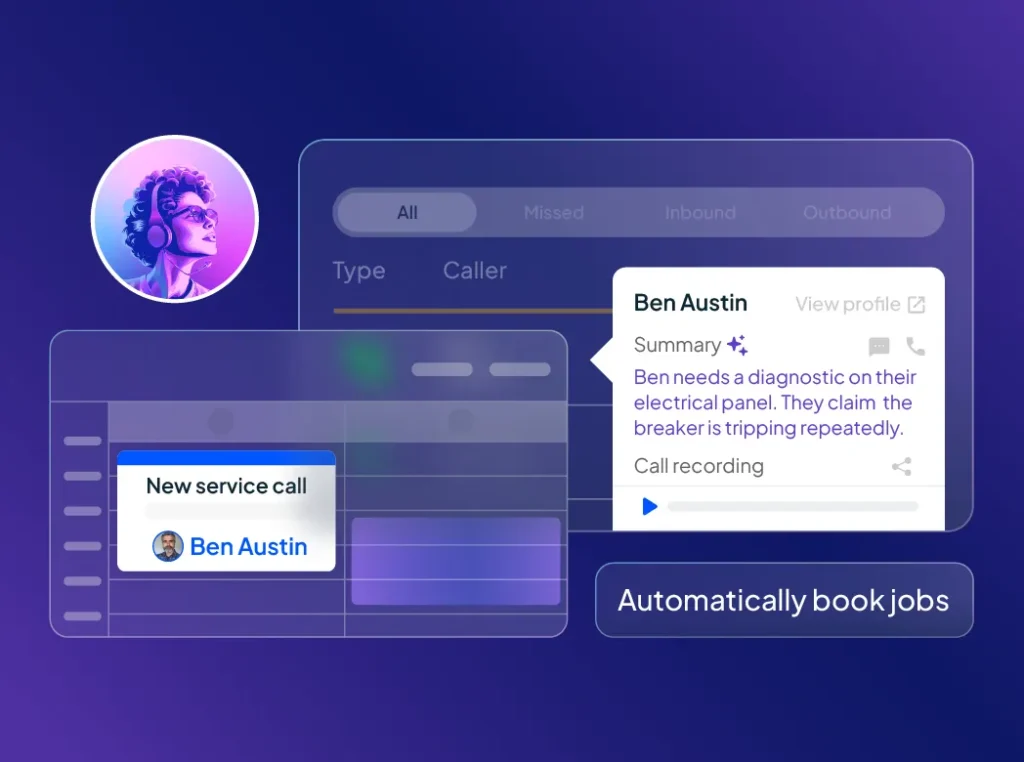
Your customers want and expect quick answers and seamless service, even when you’re on a job. Housecall Pro’s AI team works hard in the background to make that possible, saving you time and helping you capture more opportunities without extra staff.
- CSR AI: Missed calls mean missed jobs. CSR AI answers the phone, checks your schedule, and books appointments while you’re in the field. After the call, you’ll see a full summary, complete transcript, and the booked job directly in your Housecall Pro account, so you always know what happened and what’s next.
- Analyst AI: No more guessing what’s working. Analyst AI turns your job data into clear insights so you can make smarter, faster decisions.
- Marketing AI: Keeping up with follow-ups takes time you don’t have. Marketing AI writes ready-to-send emails and follow-up campaigns to keep your pipeline full.
- Coach AI: Big decisions don’t need to feel like a big task. Coach AI offers practical advice and growth strategies whenever you need them.
Together, these AI customer support tools help you win more jobs, keep your schedule full, and take the stress out of managing customer service without hiring extra staff or sacrificing your evenings.
Ready to see how it works? Try Housecall Pro free for 14 days.
Get In Touch: 858-842-5746
Let us earn your trust
On average, Pros increase monthly revenue generated through Housecall Pro by more than 35% after their first year.
See plan options and feature breakdown on our pricing page.
The future of AI in customer service
AI in customer service is shifting to proactive outreach. Rather than just responding to requests, AI tools are starting to flag service needs based on equipment age, last visit, and even local weather, then reach out before something breaks. For home service businesses, this isn’t far off—it’s something you can start putting in place now.
What stays the same: the work that needs a real person. Complex estimates, tough conversations, long-time customers—those still rely on you and your team. AI takes care of the high-volume messages so you have more time to focus on the moments that matter.
Pros are already putting this into practice. In our 2025 AI in the Trades Report, over 70% of Pros said they’ve tried AI, and nearly 40% are actively using it in their business.
But there’s still room to get ahead. Many businesses are early in adoption or only using basic features. If you set up automation and proactive communication now, you can stand out with faster responses and better availability—before it becomes the baseline.
Want to go deeper? Download our AI in the Trades Report to see what pros like you are using and where the industry is headed.
FAQ
Can AI replace customer service reps?
No. AI can handle routine calls, FAQs, appointment reminders, review requests, and simple scheduling tasks, but customer service reps should still handle upset customers, complex estimates, billing issues, refunds, warranty disputes, and sensitive situations.
What’s the best way to start using AI in customer service?
The best way to start using AI in customer service is to choose one repeat process, such as missed calls, common questions, appointment confirmations, no-show follow-ups, or review requests. Set approved answers first, test real interactions, then expand once the responses are accurate.
Is AI customer service safe for customer data?
AI customer service can be safe when the tool has clear privacy controls, data access limits, secure storage, and human review for sensitive requests. Businesses should avoid putting payment details, private customer notes, or sensitive disputes into AI responses unless the system is approved for that use.
How much does AI customer service cost for a small business?
AI customer service costs depend on the tool and setup. Some tools charge per user, per call, per message, or as part of a broader business software plan. Home service businesses should compare the monthly cost against missed calls, admin time saved, and additional booked jobs.
How do I know if AI is improving customer service?
You can tell AI is improving customer service when it saves time, improves consistency, or helps your team respond faster without creating more cleanup. Track simple before-and-after signals, such as missed calls, follow-up speed, booked jobs, draft review time, customer complaints, and handoffs to a real person.One shift that’s already underway: Google is using AI to call home service businesses and compare pricing and availability on behalf of homeowners. The businesses that answer, respond clearly, and have their information ready win those comparisons automatically. The ones that don’t get skipped before they ever knew there was an opportunity.When working with AI built into Housecall Pro directly, your data stays protected. External tools require your own due diligence.