Want to win more jobs with less effort?
Grow your business and send quick quotes with our home service software.

Want to see your potential revenue?
See what businesses like yours earn with Housecall Pro in 1 - 2 minutes.
AI can help home service businesses spend less time on office work and more time serving customers. But the best AI tool depends on the problem you’re trying to solve.
If you’re missing after-hours calls, you need a different solution than someone who’s spending hours building estimates or trying to keep up with customer follow-up. A growing HVAC company might need AI to answer the phone, while an electrical contractor might benefit more from faster estimating or automated scheduling. Depending on your business, the right answer might be one AI tool—or a few tools that each solve a different problem.
This guide compares the best AI tools by category, including call answering, estimating, scheduling, marketing, reporting, and workflow automation, so you can find the right fit for your business.
Quick answer: What are the best AI tools for home service businesses?
The best AI tools for home service businesses depend on the problem you’re solving. For call answering, Housecall Pro CSR AI, ServiceTitan AI Voice Agent, and Jobber AI Receptionist are built into the field service platforms many contractors already use, while Avoca, Smith.ai, and Goodcall work as standalone options.
For estimating, QuoteIQ, Roofr, and Togal.AI each generate a first-draft estimate from photos or plans. For scheduling and dispatch, Workiz and ServiceTitan Dispatch Pro help place jobs and match technicians automatically.
For marketing, Housecall Pro Marketing AI, Podium, and ChatGPT can draft campaigns and customer messages. And for reporting, Housecall Pro Analyst AI turns your own data into plain-language answers.
The right choice depends on which task is costing your team the most time, missed jobs, or lost revenue—and which tool gets you that time and money back fastest.
Read more: How to use AI in a home service business
Best AI tools for home service businesses at a glance
This guide outlines the best AI tools based on the business problem you need to solve, whether that’s call answering, marketing, or general workflow automation. Some AI tools do one job well, like generating an estimate from a photo. Others have AI built into several parts of the business at once, including call answering, marketing, and reporting. That means you’ll see some platforms show up more than once. The table below gives you the full picture of each platform’s AI capabilities before you dive into how each category compares.
| Platform | Covers | Best for |
| Housecall Pro AI Team | Call answering, marketing, analytics & reporting | Small and mid-size businesses wanting AI in daily operations |
| ServiceTitan | Call answering, marketing, analytics, scheduling & dispatch | Large enterprise operations wanting AI across the business |
| Jobber | Call answering, marketing, analytics, estimating | Businesses that want AI-drafted quotes with calls and booking |
| Podium | Call answering, marketing, analytics | Pros that want messaging, reviews, and marketing added on to an FSM |
| Avoca | Call answering, marketing, scheduling & dispatch, analytics | Pros that want AI call handling and scheduling added on to an FSM |
| Smith.ai | Call answering | Businesses who only need AI for calls, plus live human backup |
| Goodcall | Call answering | Businesses who only need AI for calls and don’t have a FSM tool |
| Workiz | Scheduling & dispatch | Businesses who only need AI for scheduling, based on tech routes |
| QuoteIQ | Estimating | Businesses who only need AI for estimates from photos |
| Roofr | Estimating | Roofing contractors who only need AI for online estimates |
| Togal.AI | Estimating | Remodelers and specialty contractors who only need AI for takeoffs |
| ChatGPT | Marketing, admin | Any writing task that doesn’t need your business data |
| Zapier | Workflow automation | Connecting your other tools |
Which AI tool is right for your business?
Start with what you’re already using and the problem you’re trying to solve.
If you already use…
- Housecall Pro: CSR AI for calls, Marketing AI for campaigns, or Analyst AI for reporting—all built into your existing plan.
- ServiceTitan: AI Voice Agent for calls, Dispatch Pro for technician assignment.
- Jobber: AI Receptionist for calls and booking.
- Workiz: Genius Scheduling for smarter time-slot suggestions.
- A different platform, or none yet: Standalone tools like Smith.ai or Goodcall for calls, QuoteIQ or Roofr for estimates, or ChatGPT for general writing and admin.
If your biggest problem is…
- Missed calls: An AI call-answering tool tied to your FSM, or a standalone option if you’re not ready to switch platforms.
- Estimates taking too long: QuoteIQ for general home service work, Roofr for roofing specifically, or Togal.AI for plan-based bids.
- Scheduling and dispatch: Workiz or ServiceTitan Dispatch Pro.
- Marketing and follow-up: Your FSM’s built-in marketing AI, or Podium if you want messaging and reviews unified across whatever FSM you already use.
- Understanding your numbers: Your FSM’s built-in analytics AI, if it has one.
How we chose the best AI tools for home service businesses
We evaluated AI tools based on how well they solve real problems for HVAC, plumbing, electrical, cleaning, and other home service businesses.
We looked at five main areas:
- Home service usefulness: Does the tool solve a common problem contractors actually face?
- Ease of setup: How much configuration, training, prompting, or integration work does it need?
- Level of automation: Does the AI finish the task, or does it only create a draft that still needs a person?
- Field service management (FSM) integrations: Can it work with the software you use to manage customers, appointments, jobs, estimates, or payments?
- Human oversight: Which situations can the AI handle on its own, and when should a person step in?
Because these tools do different jobs, we didn’t judge an AI phone agent by the same criteria as a general-purpose writing assistant. Instead, we compared tools based on the work they’re designed to handle, including answering calls, creating estimates, scheduling jobs, marketing to customers, and analyzing business performance.
Before choosing a tool, look at the actual interface, setup process, pricing, integrations, and how it fits into the way your team already works.
Note: The FSM-based tools on this list (Housecall Pro, ServiceTitan, Jobber) aren’t sold as standalone AI products. You’ll need an active plan—and in some cases a specific tier or add-on—to access the AI features. Tools like Smith.ai, Goodcall, QuoteIQ, ChatGPT, and Zapier can be used on their own. The tradeoff is that they don’t plug directly into your customer records, job history, or scheduling the way an FSM tool does, so you may still need to move some information between systems manually.
Best AI call-answering tools for home service businesses
You can’t answer every call while you’re on a roof, under a sink, driving between jobs, or helping another customer. But every missed call could mean missed work.
AI call-answering tools can pick up when your team can’t, collect lead details, answer routine questions, route urgent calls, and, in some cases, book appointments directly into your field service software.
1. Housecall Pro CSR AI
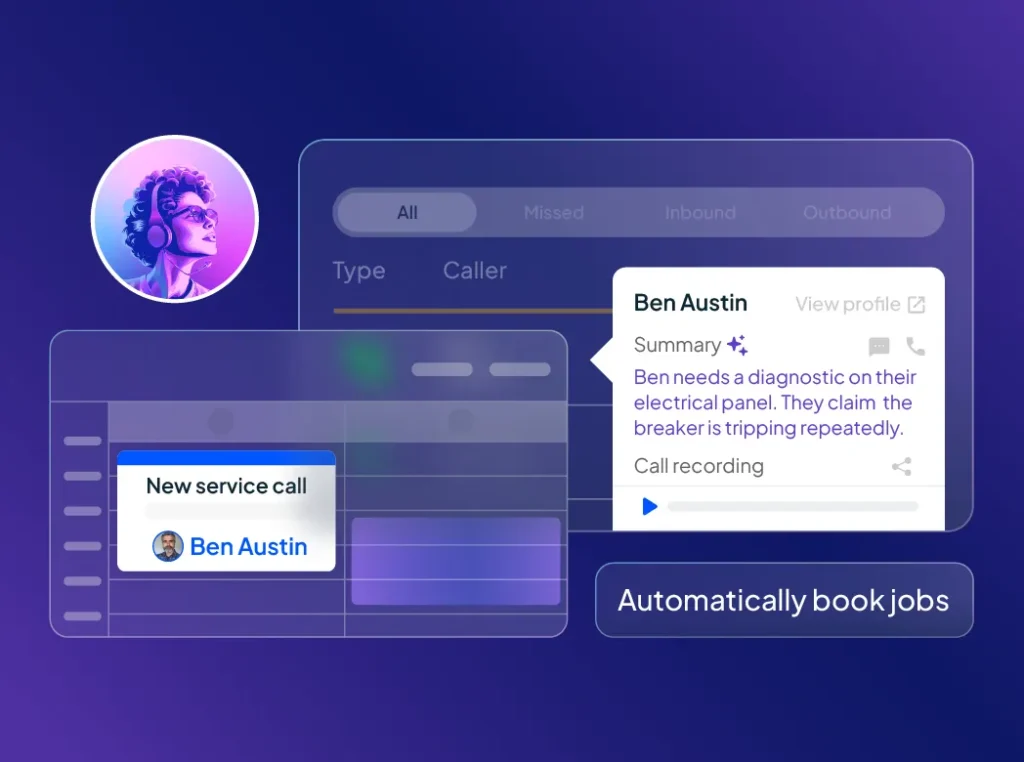
Housecall Pro CSR AI answers calls, texts, and chats 24/7, captures leads, and can help book jobs inside Housecall Pro.
What makes it especially useful is that it can use the customer’s service history already in Housecall Pro. Nobody has to write down a message, look up the customer in a separate system, or manually create the appointment later.
- Best for: Home service businesses that want AI to answer customer calls instantly and convert more inquiries into booked jobs without switching between tools.
- Why it stands out: A standalone AI receptionist may answer the phone, but your office could still be stuck moving customer information into another system. CSR AI keeps the conversation closer to the rest of your day-to-day operation.
- Limitation: It’s best suited to businesses already using or planning to use Housecall Pro rather than companies looking for a standalone AI phone tool for another FSM platform.
- Example use case: An HVAC customer calls at 8:30 p.m. because their AC stopped working. Instead of reaching voicemail, CSR AI can gather the customer’s information and help move the call toward the right next step based on your availability and business settings.
2. ServiceTitan AI Voice Agent
ServiceTitan’s AI Voice Agent answers inbound calls, books new jobs, confirms or reschedules appointments, shares dispatch fees, and transfers callers to a live team member based on the rules you set.
- Best for: Large home service businesses already using ServiceTitan that want AI call handling tied to their existing customer and scheduling workflows.
- Why it stands out: It integrates directly with the rest of the ServiceTitan platform, so businesses already on ServiceTitan don’t need a separate standalone phone tool.
- Limitation: Its value is closely tied to the broader ServiceTitan platform, so it may not make sense for a smaller contractor or a business running on another FSM.
- Example use case: A growing pest control company could use it to answer routine customer calls during busy periods, so human CSRs can focus on urgent issues and more complex customer conversations.
3. Jobber AI Receptionist
Jobber AI Receptionist answers calls and texts 24/7, captures lead information, takes messages, answers routine questions, and can book visits into your Jobber calendar.
- Best for: Small and growing service businesses that already manage their work in Jobber and want automated call, text, and scheduling support.
- Why it stands out: Because the same tool handles the conversation and the booking, nothing has to be transcribed into Jobber after the call ends.
- Limitation: It’s mainly useful for existing Jobber users. If you’re running on another FSM, you’d have to decide whether switching platforms makes sense.
- Example use case: A landscaper who can’t safely answer calls while operating equipment can use it to collect customer details and book an available appointment.
4. Avoca
Avoca works alongside your existing field service software, adding AI call answering, scheduling, customer re-activation campaigns, and call coaching without replacing your current system.
- Best for: Businesses that want AI call handling, scheduling, and re-activation campaigns integrated with the FSM they already use.
- Why it stands out: Avoca is designed to layer on top of your existing FSM platform, so you can add AI call handling without switching your core system.
- Limitation: It’s a specialized customer communication platform, so it isn’t meant to handle broad tasks like writing standard operating procedures (SOPs), analyzing documents, or creating general marketing content.
- Example use case: A plumbing company getting a flood of calls after a freeze could use AI to handle routine intake, collect customer details, and separate straightforward service requests from situations that need immediate human attention.
5. Smith.ai
Smith.ai can answer calls, qualify leads, collect information, route inquiries, and book appointments. Human agents can also step in when a call needs escalation.
- Best for: Businesses that want an AI receptionist but don’t want every unusual, sensitive, or complicated interaction handled without access to a person.
- Why it stands out: Smith.ai includes a trained live receptionist staff as part of the service itself, so backup coverage doesn’t depend on your own team being available to pick up.
- Limitation: Pricing typically increases as call volume grows, so compare your expected call volume with flat-rate pricing options before you decide.
- Example use case: An electrician could let AI handle routine calls and questions while sending an angry customer, billing problem, or complicated service request to a person.
6. Goodcall
Goodcall provides AI-powered phone agents that can answer calls, respond to common questions, collect information, route callers, capture leads, and schedule appointments.
- Best for: Small businesses that want to try AI call answering without committing to deep integration with a field service platform.
- Why it stands out: A standalone AI phone agent can be easier to test when you’re not ready to change your scheduling, CRM, or field service software.
- Limitation: Check how deeply it connects with the tools you already use. An AI phone agent won’t save much office time if somebody still has to copy every lead and appointment into another system manually.
- Example use case: A small cleaning company could use Goodcall to answer common questions about service areas, availability, and basic booking information while staff is out working.
Best AI estimating tools for home service businesses
Building estimates can eat up office time, especially if you’re starting from scratch every time. AI estimating tools help generate estimates faster using job details, photos, and set pricing information.
1. QuoteIQ AI Estimator
QuoteIQ’s AI Estimator uses property photos and job details to help generate estimates for home service work.
- Best for: Contractors who want an estimating tool built specifically around home service jobs.
- Why it stands out: Its focus on photo-based estimating gives it a more specific contractor use case than a general-purpose AI tool.
- Limitation: AI shouldn’t make the final pricing decision for unusual work. Someone still needs to check the actual scope, labor, materials, margins, and anything the photos don’t show.
- Example use case: A pressure washing contractor could upload property photos and basic job details, get a starting estimate, and then review the scope and price before sending it to the customer.
2. Roofr Instant Estimator
Roofr Instant Estimator lets homeowners answer a few questions about their property and get an online estimate, using your own pricing and satellite imagery of the roof.
- Best for: Roofing contractors who want to qualify leads and give homeowners a fast starting estimate online.
- Why it stands out: It replaces a generic cost-range calculator with your actual numbers, and captures the homeowner’s contact details in the process—so the estimate itself becomes a lead capture step, not just an informational tool.
- Limitation: It’s built specifically for roofing, and the first online estimate still needs to be confirmed against measurements, material choices, roof condition, and the final scope.
- Example use case: A homeowner researching a roof replacement after hours can answer a few questions, see an initial estimate, and submit their details before the office reopens.
3. Togal.AI
Togal.AI uses computer vision to read construction drawings, then detects, measures, and compares items across the plan set.
- Best for: Remodelers, specialty contractors, and larger teams that build estimates from plans or blueprints rather than a walkthrough.
- Why it stands out: Manual takeoffs (measuring and counting everything on a plan set by hand) can eat up hours before a bid even starts. Togal.AI compresses that stage into minutes.
- Limitation: It’s better suited to plan-based construction work than routine residential service calls, and an experienced estimator still needs to verify quantities and pricing.
- Example use case: A remodeling contractor can upload a plan set, use AI to create an initial takeoff, and then check the measurements before adding labor, materials, overhead, and margin.
Pro tip: Use AI to organize information and speed up estimate drafts, but keep someone experienced in control of margins, exceptions, and job-specific risks.
Best AI scheduling tools for home service businesses
Once a job is on the calendar, someone still has to decide when it should happen and who should do it. Manually juggling technician routes, skills, and open time slots eats up a dispatcher’s day. AI scheduling and dispatch tools can suggest smarter time slots and match jobs to the right technician, cutting down the guesswork that usually falls on whoever’s running the board.
1. Workiz Genius Scheduling
Workiz Genius Scheduling suggests appointment times based on your team’s availability and current schedule, helping reduce manual planning and unnecessary travel between jobs.
- Best for: Home service teams using Workiz that want AI-assisted time-slot suggestions for their existing schedule.
- Why it stands out: It factors in technician location and current route into its time-slot suggestions, so a recommended opening actually cuts down drive time instead of just being the next free space on the calendar.
- Limitation: It’s tied to the Workiz platform, and dispatchers still need to account for urgent calls, unusual job durations, customer preferences, and technician judgment.
- Example use case: A garage door office can use suggested time slots to place a maintenance visit near a technician’s existing route instead of sending them back across town.
2. ServiceTitan Dispatch Pro
ServiceTitan Dispatch Pro uses AI to recommend technician assignments based on factors such as skills, location, and revenue potential.
- Best for: Larger HVAC, plumbing, and electrical businesses that already use ServiceTitan and manage a busy multi-technician schedule.
- Why it stands out: It’s solving a different problem than a scheduling tool—not when a job happens, but which technician should do it, weighing skills and revenue potential once the job is already booked.
- Limitation: It’s designed for ServiceTitan users and may be more automation than a small shop with a simple schedule needs.
- Example use case: When an emergency call comes in, a dispatcher can use AI recommendations to identify a qualified nearby technician while limiting disruption to the rest of the day.
Best AI marketing tools for home service businesses
Following up with new leads, bringing back past customers, writing seasonal promotions, and keeping up with messages gets harder as your business grows. AI can take some of that repetitive work off your plate, but your team should still control your offers, customer promises, brand voice, and sensitive communications.
1. Housecall Pro Marketing AI
Marketing AI is part of Housecall Pro’s AI Team and generates copy for emails, service descriptions, and campaigns based on your business. You can type a simple prompt, like “20% off service,” and get a custom email built around that offer, or generate a clear, professional service description in seconds instead of writing one from scratch.
- Best for: Home service businesses that want help creating customer emails, service descriptions, and other marketing content without starting from a blank page.
- Why it stands out: You don’t have to move back and forth between a general-purpose writing tool and the software you use to run your home service business.
- Limitation: Marketing AI is a feature within Housecall Pro, not a standalone tool—you need an active Housecall Pro plan to use it.
- Example use case: A window cleaning company could use Marketing AI to help draft a seasonal gutter and window cleaning email and then review the offer, dates, price, and call to action before sending it.
2. Podium AI Employee
Podium’s AI Employee, Larry, can follow up with leads, reach back out to existing customers, send personalized marketing promotions, manage membership renewals, and request reviews after each completed job.
- Best for: Established HVAC, plumbing, and electrical businesses that want AI to help with calls, booking, follow-up, repeat-customer outreach, and review generation.
- Why it stands out: Podium works as a layer on top of whatever FSM you’re already running, unifying calls, texts, marketing, and reviews into one system regardless of which platform manages your jobs.
- Limitation: A solo operator who only needs occasional call coverage may not need such a broad platform.
- Example use case: A chimney sweep company could use AI to work through a maintenance customer list before slow season, reach out by text, check the calendar, and help turn those conversations into booked chimney sweeps.
3. ChatGPT
ChatGPT can help draft customer emails, social posts, seasonal promotions, FAQs, SOPs, training material, meeting summaries, and other business content.
- Best for: Home service business owners who need help drafting, organizing, summarizing, researching, or working through information rather than automating live dispatch or field operations.
- Why it stands out: It’s flexible. You can use the same tool to draft a customer message in the morning, clean up training notes after lunch, and organize a checklist at the end of the day.
- Limitation: ChatGPT doesn’t automatically know your business rules, prices, customers, schedule, or job history. You need to give it enough context and check the output before using it for facts, pricing, safety, customer disputes, or promises to customers.
- Example use case: A handyman business owner could provide the details of a fall home-prep offer and ask ChatGPT to draft an email, text message, and social post around the same promotion.
Read more: Best AI prompts for home service businesses
Best AI analytics and workflow automation tools for home service businesses
Your field service software may already have years of information about customers, revenue, jobs, technicians, estimates, and repeat business. The hard part is getting useful answers out of all that data without building another spreadsheet.
AI analytics tools can help you ask questions in plain language, while workflow automation tools can cut down on repetitive copying and handoffs between apps.
1. Housecall Pro Analyst AI
Analyst AI pulls your revenue, job trends, cash flow, and technician performance directly from Housecall Pro, so you can ask something like “What was my job revenue this month?” or “Which techs are booking the most jobs?” and get an answer without building a report yourself.
- Best for: Home service businesses that want fast answers about their own numbers without learning a reporting tool.
- Why it stands out: It’s built directly into Housecall Pro’s existing reports, so there’s no separate setup, export, or spreadsheet step—you ask the question in plain language and get a saved report back.
- Limitation: The answers are only as good as the information in your account. Missing or inconsistent job data can still leave gaps.
- Example use case: An electrical business owner could ask which technician had the highest average ticket last month instead of pulling the numbers manually and building the comparison themselves.
2. Zapier
Zapier connects apps and automatically triggers actions between them. AI-powered steps can also categorize information, draft text, summarize inputs, or help decide what should happen next in a workflow.
- Best for: Businesses that already use several software tools and want to cut down on repetitive copying, notifications, follow-up tasks, or manual handoffs.
- Why it stands out: You can automate repetitive work without replacing every tool your business already uses.
- Limitation: Simple workflows can be straightforward, but automations involving several apps, AI steps, filters, and conditional logic may take more setup and troubleshooting.
- Example use case: A new website lead could automatically be added to a spreadsheet, trigger a notification for the office team, create a follow-up task, and generate a first-draft response without somebody copying the same information between systems.
What should you look for in an AI tool for your home service business?

Before paying for an AI tool, start with one question: what job (or jobs) do you need it to do?
Don’t add AI just because the feature list sounds impressive. Start with your actual recurring problems, whether that’s one thing—like missed calls—or several piling up together. If you’re trying to solve several problems, decide whether you want one connected AI system handling all of them or a few specialized tools that each do one job well; that choice shapes everything else on this list.
Look at four things before choosing:
- Industry fit: Does the AI understand home service workflows, or will you have to teach a general-purpose tool how your business works?
- Setup required: Can you turn it on and start using it, or does it require prompts, integrations, scripts, or custom workflow building?
- Level of automation: Does the AI just draft something for a person to check, or does it also take the next step, like booking a job or sending a message? You’ll need human oversight regardless, but tools that take action can run with less manual review.
- Integration with your current tools: Can it work with your schedule, customer records, invoicing system, and other software without forcing your team to enter the same information twice?
Field service platforms are usually the better fit if the work you want to automate depends on having access to customer records, schedules, job history, estimates, or dispatch workflows. General-purpose AI tools can work for smaller, self-contained tasks like drafting, research, or planning, or as a starting point if just need to fill a specific gap or aren’t ready to commit to a full platform.
What can AI actually automate for a home service business?
AI can handle many repetitive tasks from beginning to end, but it struggles when a situation requires judgment, empathy, physical diagnosis, technical expertise, or exceptions to your normal business rules.
A simple way to think about AI is to split work into three buckets: tasks it can often handle independently, tasks where it can assist but still needs human review, and tasks that should remain primarily with a person.
Tasks AI can often automate completely
AI is strongest when the work is repetitive and based on information your business can easily provide.
Examples include:
- Answering routine calls or chats
- Capturing customer contact information
- Answering basic questions about business hours or service areas
- Sending appointment reminders
- Booking straightforward appointments when rules and availability are clear
- Summarizing calls, notes, or documents
- Moving information between connected apps
- Sending routine re-engagement messages
Tasks AI can help with but a person should review
AI can speed up work that involves interpretation, analysis, or writing, but a person should still review the result before a final decision or customer commitment is made.
Examples include:
- Drafting estimates or proposals
- Suggesting customer responses
- Summarizing complicated complaints
- Analyzing business reports
- Helping build SOPs or training materials
- Organizing job notes
- Suggesting schedule changes.
- Drafting marketing campaigns
For example, AI can draft a response to an unhappy customer, but a manager should review it before sending. The right response may depend on the customer’s history, technician notes, company policies, and whether a refund, discount, or return visit is appropriate.
Tasks home service businesses shouldn’t use AI for
Some work requires too much judgment, context, technical expertise, or human accountability to let AI do on its own.
These include:
- Diagnosing complex equipment problems without a technician
- Making final pricing decisions
- Handling serious customer disputes without oversight
- Making safety-critical decisions
- Managing emergencies without clear escalation rules
- Evaluating technician performance based only on incomplete data
- Making hiring, firing, or disciplinary decisions without human review
AI can support these tasks by organizing information, summarizing records, or suggesting next steps, but the final call should stay with a person.
How to start using AI in a home service business
You don’t need to automate everything at once. The best place to start is usually one task that’s repetitive, time-consuming, and easy to review.
For example:
- If you’re missing calls, start with AI call answering.
- If leads are going cold, start with automated sales follow-up.
- If your team spends too much time building quotes, look at AI-assisted estimating.
- If scheduling takes too much back-and-forth, start with straightforward appointment booking.
- If office staff are copying information between apps, start with workflow automation.
- If you’re spending hours writing emails, SOPs, or marketing copy, start with a general-purpose AI assistant.
- If you have plenty of business data but struggle to find useful answers, look at AI analytics.
A simple rollout looks like this:
- Pick one repetitive problem.
- Test the tool on a low-risk task that’s easy to review.
- Set clear rules for when a person should step in.
- Measure whether the tool saves time, speeds up responses, increases bookings, or reduces manual work.
- Expand only after the first use case is working reliably.
Get In Touch: 858-842-5746
Let us earn your trust
On average, Pros increase monthly revenue generated through Housecall Pro by more than 35% after their first year.
See plan options and feature breakdown on our pricing page.
Choose AI that solves a real problem for your home service business
The tools on this list solve real, recurring problems: missed calls, slow lead follow-up, repetitive estimates, marketing that never gets written, and business numbers that are hard to make sense of. Start with the problem you actually have, keep a person in charge of judgment calls, and choose a tool (or a connected system) that fits how your business already runs.
Housecall Pro’s AI Team was built around that same idea, inside the platform you’re likely already using to run jobs. CSR AI books directly into your schedule using customer history, so nothing gets written down and re-entered later. Marketing AI turns a one-line prompt into a ready-to-send campaign. Analyst AI answers questions about your own revenue, jobs, and technician performance in plain language—no spreadsheet required.
“Analyst AI changes the way we understand our business data,” says Anthony Suau of Dade Super Cool Air Conditioning. “It gives us instant answers to our questions and even breaks down the calculations behind them, so we can trust the data while eliminating hours of manual reporting.”
Ready to see how it fits your business? Start your free 14-day trial.
FAQ about AI tools for home service businesses
What AI tools do contractors need?
Most contractors don’t need every type of AI tool. Start with the problem that’s costing your business the most time or lost opportunities.
A company missing customer calls may benefit most from an AI CSR or receptionist. A business losing leads could start with automated follow-up. Contractors spending too much time building proposals can look at AI-assisted estimating, while growing businesses with years of job data may get more value from AI analytics. The best approach is to solve one specific bottleneck first instead of buying several AI tools at once.
How much do AI tools cost for home service businesses?
AI tools for home service businesses may be included in an existing software subscription, sold as a monthly add-on, priced as a standalone monthly plan, or charged based on usage such as calls, minutes, messages, or automated tasks. Some general-purpose AI and automation tools offer free plans, while specialized home service AI platforms may require paid plans or custom pricing.
Don’t compare tools based only on the lowest monthly price. Look at what the tool actually replaces or improves, including missed calls, office time, response speed, lead conversion, and manual data entry.
Do I need a field service management (FSM) platform to start using AI?
No. Standalone tools like Smith.ai, Goodcall, QuoteIQ, ChatGPT, and Zapier can be used on their own. But if the problem you’re solving depends on your schedule, customer records, or job history, like booking appointments or building estimates from past pricing, a connected FSM platform will generally get you further than a standalone tool bolted on separately.
Can AI completely replace a dispatcher or office staff at a home service business?
No. AI can reliably handle repetitive tasks such as basic call intake, reminders, straightforward scheduling, and message drafting, but a person should still handle complex schedule changes, customer disputes, unusual pricing decisions, emergencies, and situations that require judgment.
For example, AI may be able to book a routine maintenance visit into an open time slot, but an experienced dispatcher may still be needed to rearrange several technicians when an emergency call changes the day’s schedule.
What's the easiest AI tool for a small home service business to start with?
The easiest starting point is usually a tool that solves one repetitive problem inside software you already use. Avoid adding several tools at once. Start with one problem, measure whether the tool actually saves time or improves response speed, and expand from there.
Should I choose an AI tool built for home services or a general AI tool?
Choose a home-service-specific AI tool for operational tasks that require access to customer records, schedules, job history, estimates, or dispatch workflows.
A contractor who wants AI to book jobs based on real calendar availability may need industry-specific software, while someone who wants help turning technician notes into a training checklist may be better served by a general AI assistant.