Want to win more jobs with less effort?
Grow your business and send quick quotes with our home service software.

Want to see your potential revenue?
See what businesses like yours earn with Housecall Pro in 1 - 2 minutes.
If you’re considering Houzz, you probably want to know two things: Will it help you find work, and what will it cost? Between the free profile, paid software, and advertising packages, it can take some digging to figure out what you actually need.
Houzz puts a lot of emphasis on remodeling and design, so it helps to know where your trade fits. This guide covers the options, costs, and questions to ask before you sign up.
Quick answer: What is Houzz?
Houzz is a home design and remodeling platform where homeowners find project ideas and connect with local professionals. Contractors can create a free basic profile and pay separately for Houzz Pro business management software or advertising.
It’s generally a better fit for remodelers, builders, and designers than for businesses focused on routine repairs or emergency calls. Specialty trades may also find it useful for work tied to renovations.
Table of contents
- Is Houzz legit?
- How Houzz works for contractors
- How Houzz Pro works step by step
- How much does Houzz cost for contractors?
- Is Houzz worth it for your trade?
- Houzz Pro reviews: What contractors like and what they complain about
- How to get the most out of a free Houzz profile
- Questions to ask before you pay for Houzz Pro
- Next steps: How to follow up with Houzz leads before they go cold
Is Houzz legit?
Yes. Houzz is a real home design and remodeling platform, and a basic contractor profile is free. The complaints you’ll see from contractors aren’t about the platform being fake. They’re about billing, auto-renewing contracts, and canceling. Read the terms before you pay for software or ads.
How Houzz works for contractors
Contractors use Houzz to show past work, manage projects, and advertise to homeowners. You can start with a free profile, then decide whether the paid software or advertising makes sense for your business.
Free Houzz professional profile
A free basic profile lists your business in the Houzz “Find Professionals” directory. Homeowners search this directory by ZIP code and project category to compare local pros.
A free profile gives you:
- Directory listing: Your company name, contact info, and service area appear in local search results.
- Photo portfolios: Upload project galleries to show homeowners the kind of work you do.
- Customer reviews: Share feedback from past customers to help homeowners feel comfortable contacting you.
- Website backlinks: Link your business website directly to your profile.
Give homeowners enough detail to see whether you’re a good fit. Choose relevant project categories, add project locations, and write descriptive photo titles. “Bathroom remodel with a curbless shower” tells a homeowner more than “Another great project.”
During sign-up, watch for prompts to start a paid trial and enter your credit card details. If you only want a free listing, check that you haven’t enrolled in a paid plan.
Houzz Pro software
Houzz Pro provides business management tools for builders and design professionals. The tools included depend on your subscription plan.
Its broader feature list includes:
- Customer relationship management (CRM) for lead tracking
- Estimates and takeoffs
- Invoices and online payments
- Project schedule and daily logs
- A client dashboard, 3D floor plans, and a mobile app
The entry-level Design plan ($99 a month) includes 3D floor plans, estimates, and invoices. Takeoffs, formal contracts, project schedules, and daily crew logs are available on the Pro plan ($199 a month) and higher tiers.
Houzz advertising and project leads
Houzz offers paid advertising programs to help contractors connect with homeowners. According to Houzz, its concierge team screens project inquiries and connects contractors with homeowners by phone. You pay a flat subscription rate for ad placement rather than paying per lead.
Houzz lists an Advertising Package add-on starting at $499 a month, but your quote may depend on the package. Ask what’s included for your trade and service area, how inquiries are screened, and whether the agreement promises any number of leads. Get the answers in writing before signing.
Pro tip: Track cost per booked job instead of cost per lead. Divide your Houzz spending by the number of jobs you book through the platform. If you spend $600 and book two jobs, that’s $300 per booked job. Then check whether the profit from those jobs covers what you spent. A large project’s total price alone won’t tell you whether the ads paid off.
If you’re running more than one lead source, you need to see which one turns into booked jobs. Housecall Pro’s advanced reporting lets you track results alongside the rest of your jobs, so you’re not piecing it together from spreadsheets.
Get In Touch: 858-842-5746
Let us earn your trust
On average, Pros increase monthly revenue generated through Housecall Pro by more than 35% after their first year.
See plan options and feature breakdown on our pricing page.
How Houzz Pro works step by step
Here’s how you might use Houzz Pro to take a project from the first inquiry through payment. Some steps require features that are only available on certain plans.
- Set up your profile and users: Fill out your business details, set your service area, and invite crew members or office staff to the account.
- Log incoming inquiries: When a homeowner reaches out, save their project scope and budget inside the CRM.
- Build the estimate: Use the digital estimate tool to price labor and materials, or run a digital takeoff to calculate measurements and quantities from project plans.
- Send the proposal or contract: Email the estimate or formal contract to the customer to review and sign electronically.
- Schedule and track the project: Set the project timeline on the schedule board and log daily progress updates from the jobsite.
- Invoice and collect payment: Send digital invoices, collect payments online, and sync transactions with compatible accounting software if your plan includes the integration.
How much does Houzz cost for contractors?
A standard directory profile is free, while Houzz Pro software subscriptions start at $99/month. These prices are from Houzz’s pricing page as of November 2026. Confirm your quote, included features, and billing terms before signing up.
| Plan or add-on | Published monthly price | Included users | What to know |
| Free | $0 | N/A | Basic tools listed include estimates and invoicing |
| Pro | $199 | One | Estimates, invoices, payments, takeoffs, and floor plans |
| Teams | Starts at $399 | Five | Adds team tools, AI notes, and a premium profile |
| Enterprise | Custom quote | Unlimited | Adds enterprise onboarding and support |
| Additional users on Pro or Teams | $50 per user | Per added user | Adds to the subscription price |
| Advertising package | Starts at $499 | N/A | Separate from the software price |
Houzz offers a 30-day Pro trial. Before starting, confirm whether it converts to an annual subscription and when you’d need to cancel. Use the trial to test the software with a real project, and evaluate any advertising agreement separately.Houzz Pro is free for 30 days before your annual subscription begins. Get a quote in writing and set a reminder to cancel before the trial ends if Houzz isn’t bringing you leads.
Is Houzz worth it for your trade?
Houzz focuses on home remodeling and design. Its portfolio and project management tools are likely to be most useful if you handle renovations, new builds, or design work. If you mainly book service calls, check whether the homeowners using Houzz need the work you offer before paying for ads.
| Business type | Fit level | Why |
| Remodelers and builders | Strong | High-ticket projects justify platform costs |
| Interior designers | Strong | Floor plans and selection tools help present designs |
| Specialty trades (plumbing, HVAC, electrical) | Depends on the work | Renovation work fits better than urgent service calls |
An electrician who wants whole-home renovation projects may find portfolio photos useful. An electrician who mainly handles urgent troubleshooting should check whether Houzz brings in that kind of work before buying advertising.
A free profile gives you a place to start. Track the inquiries it brings in, including whether they match your services and lead to booked jobs.
Read more: Construction management software for home remodelers
Houzz Pro reviews: What contractors like and what they complain about
Capterra users give Houzz Pro a 4.3 out of 5 rating across more than 1,000 reviews, with feedback on both the software and the service.
What contractors like:
Positive reviews and Houzz’s customer stories mention:
- Estimates and takeoffs. Builders in Houzz’s success stories say clients can review and approve estimates through a single link, and the takeoff tool speeds up estimating.
- Advertising costs. Some builders featured in Houzz’s success stories say leads cost them less than print ads.
- Mobile access. Reviewers like being able to check bids and respond to inquiries from the jobsite.
- QuickBooks integration. Capterra reviewers cite the QuickBooks integration and having client billing in one place as useful.
- Design tools. Capterra reviews praise the 3D floor planner, mood boards, and having multiple tools in one platform.
What contractors complain about:
- Billing. Capterra reviewers describe billing as confusing or expensive.
- Learning curve. Capterra reviewers say setup and training can take time, and some call the interface slow or hard to navigate.
- Cancellation. Capterra reviewers mention 12-month auto-renewing contracts and say canceling is difficult.
- Lead quality. Some reviewers report getting little work from the leads they received. Results can vary by market and business.
Use these experiences to guide your questions, especially about billing, cancellation, and the types of inquiries you can expect. Customer stories and individual reviews won’t tell you what your own return will be.
How to get the most out of a free Houzz profile
A complete profile helps homeowners understand what you do and decide whether to contact you. Start with these steps:
- Complete your business details. Add your services, location, service area, and current contact information. Make it easy for homeowners to check that you serve their area and handle their project.
- Add project photos with descriptive titles. State the project type, style, and a standout feature, such as a Craftsman kitchen remodel with a walnut island. Houzz’s profile guide recommends wide-angle and close-up shots and tagging each project’s location.
- Include before-and-after photos. Shoot the same room from the same angle so customers can see what changed.
- Pick the right categories and service area. Choose categories that match the work you want to book, such as General Contractors or Plumbers. Keep your service area accurate so you don’t spend time fielding inquiries for jobs too far away.
- Ask satisfied customers for reviews. A past customer’s experience can help a homeowner feel more confident about reaching out. Make review requests part of your follow-up after a job.
- Reply to messages quickly. Aim to respond within an hour during business hours, even if it’s just to acknowledge the inquiry and explain when you’ll follow up.
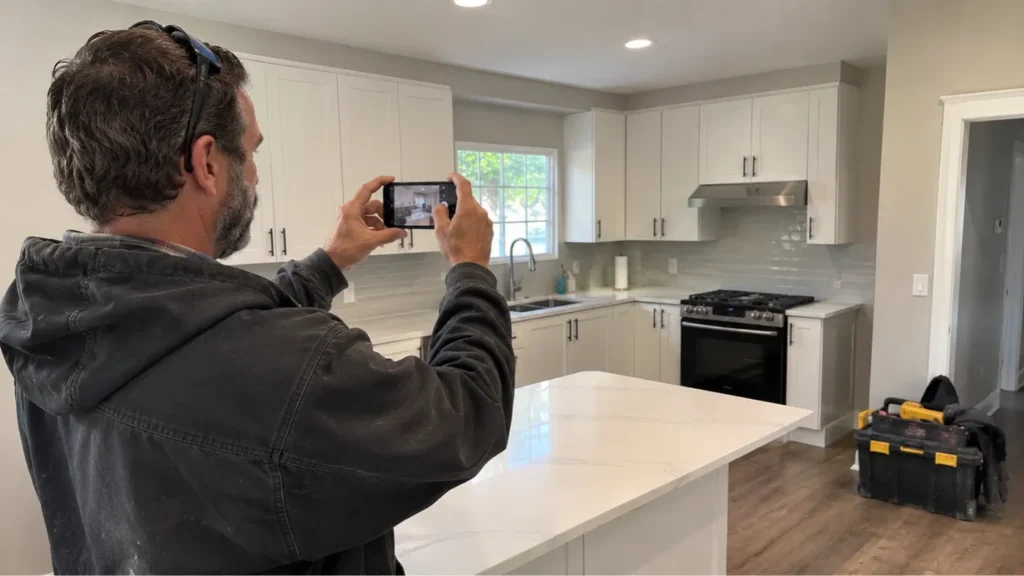
Pro tip: Use photos of your own work and take them before you reload the truck. Clear tools and packaging from the frame, wipe your camera lens, and get permission before sharing images of a customer’s home.
Questions to ask before you pay for Houzz Pro
Before paying for software or advertising, make sure you understand what you’re buying and how to end the agreement. Get these questions answered in writing before you pay for any membership on Houzz:
- How long is the contract, and does it renew automatically?
- How do you cancel, and how much notice is required?
- Does this package include advertising or leads, and what costs extra?
- What happens to your client data if you leave, and can you export it?
- Does it connect to your accounting software, and does your plan include the connection?
- What support is included, and when is it available?
Pay particular attention to cancellation and access to customer information. Reviews on Capterra, the Better Business Bureau, and ConsumerAffairs include complaints about canceling memberships and free trials. Save a copy of your agreement and any written answers you receive.
Next steps: How to follow up with Houzz leads before they go cold
When a Houzz inquiry comes in, who will reply, prepare the estimate, and schedule the work? Work out those responsibilities before adding another lead source so interested homeowners aren’t left waiting.
Whether the lead comes from Houzz, Google, or a referral, the risk is the same: a homeowner waits while you’re on a job. Housecall Pro can help you track and follow up on the work once you’ve added the customer’s details. You can use:
- Job Inbox: Keep supported lead inquiries in one place so your team can review and follow up.
- Online Booking: Let homeowners book available appointments online, including after hours. For Housecall Pro customers, 41% of jobs booked online come in after hours.
- Scheduling: Put booked work on one calendar instead of tracking it across messages.
- Estimates and Invoicing: Build professional estimates from the field, get customer approval, and send invoices with credit card or ACH payment options.
Start with a free Houzz profile to see whether it brings in the kind of work you want. If you also need help managing estimates, schedules, and payments, try Housecall Pro free for 14 days.
FAQs
What is Houzz?
Houzz is an online directory and project platform where homeowners look for remodeling ideas and hire local trade pros. Contractors can set up a free directory listing or pay for Houzz Pro software tools and regional advertising packages.
Is Houzz free for contractors?
Yes, contractors can create a standard profile in Houzz’s Find Professionals directory for free. Software features, marketing tools, and direct advertising leads require paid monthly plans.
How much does Houzz Pro cost?
Houzz’s published paid plans start at $199 a month for Pro, then $399 or more a month for Teams, with custom pricing for Enterprise. Advertising packages require custom quotes and start around $499 a month.
Does Houzz give contractors leads?
Houzz markets a paid construction lead program that it describes as subscription-based and phone-screened. A directory inquiry and a paid advertising lead aren’t the same thing. Ask which program your quote includes and whether it promises any lead volume.
Is Houzz worth it for contractors?
Houzz is worth paying for only if its tools or booked projects justify the total cost for your business. Track advertising spend separately from software costs, then compare the resulting work with your job profit—don’t judge the investment by inquiry volume alone.
Can plumbers, HVAC technicians, and electricians use Houzz?
Yes, plumbers, HVAC technicians, and electricians can list their businesses on Houzz for free. But the platform’s remodeling focus makes installation and renovation projects a more direct match than routine maintenance or urgent repair calls.
Does Houzz Pro have a free trial?
Yes, Houzz advertises a free 30-day trial before an annual subscription begins. Cancel in writing before the trial expires if you decide not to keep the subscription.
Does Houzz Pro work with QuickBooks?
Yes, Houzz lists QuickBooks Online as an integration. The pricing page doesn’t say which plans include it or list QuickBooks Desktop, so confirm both before you buy.