Want to win more jobs with less effort?
Grow your business and send quick quotes with our home service software.

Want to see your potential revenue?
See what businesses like yours earn with Housecall Pro in 1 - 2 minutes.

Calls come in while you’re on the job. Customers book after hours. The schedule changes throughout the day. Staying on top of every request can quickly become a full-time job.
AI booking and dispatch tools take a lot of that work off your plate. With Housecall Pro, CSR AI answers calls, collects customer information, and helps create new jobs. Online Booking lets customers schedule appointments anytime. Dispatch and Scheduling help assign the right tech and adjust when plans change. None of it runs on guesswork—each tool follows the exact service and booking rules you set, so the details it captures match how your business actually works.
Quick answer: What does AI do for booking and dispatch in home services?
AI helps home service companies automate the booking and dispatch process. AI-assisted booking captures customer requests, collects the job details, and helps confirm appointments, while AI-assisted dispatch helps assign jobs to technicians based on availability, location, skill, and schedule fit.
According to a 2025 Housecall Pro survey of over 1,000 U.S. homeowners, 97% say response time matters when hiring a pro, and 53% are already comfortable with AI handling that first response. Housecall Pro’s CSR AI answers calls in less than one second. That speed matters because the job usually goes to whoever responds first—answering and getting a tech on the schedule right away means you win the work before the homeowner calls the next pro on their list.
Key takeaways
Here’s how AI booking and dispatch help your team:
CSR AI captures jobs around the clock: Calls, chats, and online requests turn into scheduled jobs automatically—even after hours, when calls would otherwise go to voicemail.
Dispatch tools reduce guesswork: Jobs can be assigned based on tech availability, location, and skill, not just who’s free.
Route tools cut wasted drive time: Map efficient routes around real job locations so techs spend less of the day driving between appointments.
Scheduling stays connected: Calendar updates, tech notifications, and job details live in one place so nothing falls through.
Owners keep visibility: Call logs, job details, and schedule changes are all reviewable from one place.
Table of contents
How does AI booking work in a home service business?
AI booking works by turning an incoming customer request into a scheduled job without anyone in your office manually handling the intake. The request can come from a phone call, website form, booking link, text, or chat. The system captures the job details, checks your calendar, creates the job in your field service software, and sends the customer a confirmation automatically.
A typical booking flow looks like this:
- A customer calls, texts, chats, or submits a booking request.
- The AI captures the customer’s name, address, service type, and preferred appointment time.
- The system checks availability based on your calendar and booking rules.
- The job is created in your field service software.
- The customer receives confirmation.
- The job appears on the schedule or dispatch board for assignment.
For more on where AI fits across the rest of the business, see Housecall Pro’s guide to AI for home service businesses.
How does AI handle inbound calls?
AI handles inbound calls by answering the phone automatically, collecting the customer’s job details, and booking the appointment. The system greets the caller, asks what they need, confirms availability, and creates the job in your field service software with no manual response needed.
This can be especially helpful for calls that happen while you’re off the clock. According to Housecall Pro data, 26% of all jobs booked by CSR AI come in after hours—calls that would otherwise go to voicemail or move on to a competitor.
Chris O., owner of NW Moss Removal, saw only 15%-20% of callers leave a voicemail before using an AI answering service like Housecall Pro. With CSR AI, 60%-70% of callers now interact and leave their name, address, and the service they need.
Other Pros report similar results: “With CSR AI enabled for our business, we’ve been able to add thousands of dollars of revenue each month,” says Frankwin H., owner of Treasure Valley Solutions.
Case in point: CSR AI delivers an average return on investment of 42x.*
*Avg. revenue generated divided by cost of CSR AI.
How does online booking work for home service companies?
Online booking lets customers schedule service directly from your website or a shared link. The customer selects a service, picks an available time, and submits the request; the job appears on your calendar or dispatch board automatically. That means no one has to copy details from a form, check the calendar manually, or call the customer back just to confirm basic availability.
Housecall Pro’s online booking software lets you share a link on your website, social media, email signature, or marketing campaigns, and new jobs sync to the schedule based on your availability settings.
Read more: How to avoid double booking
Can customers book by text or chat?
Yes, customers can book by text or chat by sending a message, confirming available times, and having the job created from that conversation. It’s a good option for repeat customers who already have your number saved, and for anyone who’s at work, in a meeting, or dealing with a noisy emergency and doesn’t want to stay on the phone.
For website visitors who ask questions before booking, Housecall Pro’s CSR AI chat capabilities capture the request and keep the full conversation in the customer communication thread, so your team knows exactly what was discussed and what was scheduled.
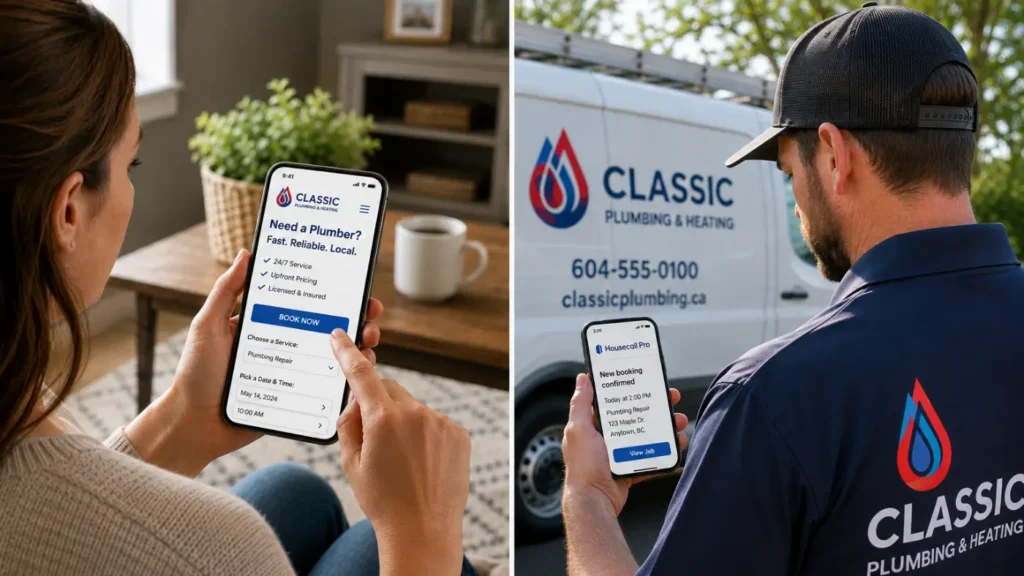
How do service companies automate scheduling and dispatch?
Service companies automate scheduling and dispatch by connecting AI-powered booking with dispatch software. AI booking captures and confirms the job, while dispatching software assigns that job to the right technician based on availability, location, skill, and schedule fit.
Once a job is booked, here’s how it moves through scheduling and dispatch
- A customer request comes in by phone, chat, booking link, or website.
- AI collects the job details and checks availability.
- The job is created inside the system.
- Dispatch tools show where the job fits on the schedule.
- The right technician is assigned based on availability, location, and skill.
- The tech receives the job details.
- Route tools help keep the day efficient as jobs are added, moved, or canceled.
This matters because dispatching is rarely just “who’s free?” A good dispatch decision also considers drive time, job type, tech skill, customer priority, and what’s already on the board.
For a deeper breakdown, read Housecall Pro’s guide to dispatch management.
How does dispatch software help match technicians to jobs?
Dispatch software helps match technicians to jobs by surfacing availability, current location, skill set, licensing, and scheduled jobs nearby. That gives the dispatcher what they need to identify the best fit for the incoming request without manually checking every schedule, route, and qualification.
For example, say a plumbing call comes in at 2 p.m. for a clogged drain. Housecall Pro’s dispatching software shows the dispatcher which technician is closest to the customer’s address, has no conflicting jobs, and has the right skills for the work. The dispatch board shows job addresses, customer info, appointment details, and estimated drive times in one place—so the dispatcher can assign without jumping between apps, texts, and paper notes.
If plans change, jobs can be reassigned with a drag and drop, and the update syncs automatically to the tech’s mobile app.
Read more: Technician scheduling tips
What is route optimization and how does it work?
Route optimization software maps efficient routes based on job locations and drive times. That helps dispatchers group nearby stops and cut wasted driving, so techs spend less time on the road and more time on billable work. For example, a plumbing company with four techs covering multiple ZIP codes can see which tech is already closest and group nearby stops together instead of sending one tech across town when another is already working nearby.
Housecall Pro’s route optimization software shows estimated drive times between stops, tracks vehicles on a live map, and keeps customers updated on arrival times. If a morning job cancels or an urgent call comes in, the dispatcher can adjust the schedule on the map without rebuilding the whole day from scratch.
Read more: Fleet management tips
What AI booking and dispatch looks like when it runs without you
When AI booking and dispatch run without you, jobs keep moving even when you aren’t personally answering calls or managing the board. Calls get answered, job details are collected, appointments are booked, techs get assigned, and the schedule updates when things change.
That only works if the tools are connected. If your booking tool doesn’t sync to your schedule, your dispatcher still copies details manually. If your dispatch board doesn’t connect to tech notifications, the schedule falls apart in the field. Housecall Pro is built so that doesn’t happen — booking, scheduling, dispatch, and customer communication all run from one platform, so a job that comes in at 9 p.m. shows up on the dispatch board by morning without anyone touching it.
Ready to see how it works on real jobs? Sign up for a free 14-day trial of Housecall Pro.
Get In Touch: 858-842-5746
Let us earn your trust
On average, Pros increase monthly revenue generated through Housecall Pro by more than 35% after their first year.
See plan options and feature breakdown on our pricing page.
AI booking and dispatch FAQ
Can AI answer inbound calls for a home service company?
Yes, AI can answer inbound calls for a home service company when it’s connected to the business’s services, availability, and booking rules. The AI can greet the customer, collect the job details, answer common questions, and help book an appointment.
Housecall Pro’s CSR AI is designed for this workflow. It answers calls and chats 24/7, captures leads, books jobs, and logs conversation details inside Housecall Pro so the owner or team can review what happened.
What do I need to set up before AI can book jobs?
Before AI can book jobs accurately, the business needs to set the rules. That usually means adding service categories, business hours, service areas, appointment windows, technician availability, and rules for when the AI should hand a call to a person. This matters because a drain cleaning, HVAC tune-up, electrical inspection, and emergency service call may all need different durations, pricing rules, and technician skills—AI shouldn’t guess how your company works. This setup happens once. After your rules are in place, the AI follows them on every call, so you’re not managing anything new day to day.
Can I trust AI to book jobs correctly?
Yes—AI books off the service rules you set, not guesswork. Every request runs through your service categories, appointment windows, and technician requirements, so the details it captures match how your business runs. And for anything outside those rules, you can set the AI to hand the call to a person instead of guessing.
What AI tools handle booking for home service businesses?
AI booking tools for home service businesses usually include AI phone answering, AI chat answering, online booking, automated scheduling, and customer communication tools. Phone AI handles voice calls, chat AI handles website conversations, and online booking handles self-scheduled appointments.
Housecall Pro’s CSR AI handles calls and chats, while Housecall Pro’s online booking feature lets customers schedule directly from a website, Google, social media, email, or shared booking link. When those tools connect to the calendar, the booking can move into the schedule without extra manual steps.
How do service companies automate scheduling and dispatch?
Service companies automate scheduling and dispatch using a combination of AI call answering, online booking, scheduling software, and dispatching software—all connected so jobs move from first contact to assigned tech without manual handoffs. The key is that each tool feeds into the next: the booking tool creates the job, the scheduling software finds the right time slot, and the dispatch board assigns the right tech based on location, skill, and availability. In Housecall Pro, CSR AI, online booking, scheduling, and dispatching all run from one platform, so nothing has to be copied between systems.
What should service companies look for in a booking and dispatch copilot?
Service companies should look for a booking and dispatch copilot that connects directly to their schedule, customer records, dispatch board, and technician notifications. The three must-haves are calendar sync, editable booking rules, and dispatch visibility.
The tool should be able to capture complete job details, check real availability, prevent double bookings, and help assign the right tech based on location and skill. A good copilot should also give the owner visibility and control with call logs, conversation summaries, editable booking rules, customer history, mobile tech updates, and route tools that help the team adjust when the day changes.
How is AI dispatch different from manual dispatching?
AI dispatch is different from manual dispatching because the system helps evaluate job details, technician availability, location, and schedule fit instead of making the dispatcher check everything by hand. Manual dispatching often depends on memory, spreadsheets, phone calls, texts, or switching between tools.
AI-assisted dispatch can reduce errors by keeping job details, technician schedules, route information, and customer updates connected. The dispatcher or owner can still review decisions, but the system does more of the sorting and schedule checking upfront.