Want to win more jobs with less effort?
Grow your business and send quick quotes with our home service software.

Want to see your potential revenue?
See what businesses like yours earn with Housecall Pro in 1 - 2 minutes.
A great painting website should do one thing: turn local visitors into calls, quote requests, and booked jobs. If your site looks dated, loads slowly, or hides your contact info, you could be losing jobs before you ever speak with the customer.
A professional site builds trust and shows you’re reliable by showcasing your best work. If you’re looking for simple website design ideas, practical SEO tips, and real examples from painting pros, you’ll find them below.

Website Conversion Grader
Get a free grade on the 12 things that turn website visitors into calls.
Quick answer: How to build a painting website
A high-quality painting website makes it easy for customers to contact you and trust your work right away. That means your phone number, service areas, and booking options should be visible on every page, with clear calls to action that guide visitors to request a quote or call.
To stand out locally:
- Create dedicated pages for each city you serve
- Use real project photos instead of stock images
- Feature strong customer reviews.
Keep your site fast, mobile-friendly, and easy to scan so homeowners can quickly find what they need.
To drive consistent leads, support your site with basic SEO practices like using service + location keywords, linking between pages, and keeping your Google Business Profile updated.
Key takeaways
When building your painting website, focus on what drives calls, clicks, and booked jobs:
Make contact info obvious: Place your phone number, hours, and booking options clearly on every page.
Build local trust: Create specific pages for every city you serve to show up in local searches.
Use real project photos: Skip stock images and show your actual crew, trucks, and before-and-after results to build trust quickly.
Keep it simple: Use short paragraphs and clear headings so busy homeowners can scan your site on their phones.
Update often: Refresh photos, reviews, and content to keep your site relevant.
Table of contents
- What every painting business website should include
- Painting business website design tips
- Painting website examples for inspiration
- Should you hire a web designer or do it yourself?
- How to optimize your painting website for SEO
- Common painting website mistakes to avoid
- Next steps for your painting business website
What every painting business website should include
With so much local competition, you need a site that clearly sets you apart and makes it easy to hire you. Customers want quick answers. They want to know what you do, where you work, how to reach you, and whether you can be trusted in their home or business.
They also want proof. Real photos, real reviews, and clear service details do more to win jobs than a long sales pitch.
Clear contact info and CTAs
If people can’t figure out how to reach you in seconds, they’ll move on. Your phone number and business hours should be easy to spot in both the header and footer. Don’t make users hunt for basic details.
Use simple buttons such as “Call,” “Book Now,” or “Request Service” on key pages. These give visitors a clear next step. Also, include an online booking or quote request form. Painting business software like Housecall Pro offers these tools so you can capture booking requests automatically without needing to be available.
Service area pages
Service area pages help your business show up when people search in specific cities or neighborhoods. Instead of one general page, create dedicated pages for each area you serve.
Use location-based phrases like “house painting in Minneapolis, MN” or “interior painting in St. Paul.” Add local details to make each page feel real. For example, a St. Paul service area page should include a photo from a project in that neighborhood and one review from a customer in that ZIP code—both give search engines and visitors context and build trust.
About page
Your About page gives people a reason to trust you. It’s where you move beyond services and show who you are as a business.
Share your story, what you stand for, and what customers can expect when they hire you. Include team photos if possible. This helps put faces to the name. You should also list any licenses, certifications, or insurance coverage. These details show that you run a professional operation and help customers feel more comfortable reaching out.
Reviews and testimonials
Reviews help people feel more comfortable choosing you. When someone sees that others had a good experience, it lowers the risk in their mind.
Feature reviews on your homepage and service pages so they’re easy to find. Use star ratings, short quotes, and badges from platforms like Google or Yelp. If you can, include short video testimonials. Hearing from real customers can make a big difference when someone is deciding who to hire.
Professional visuals
Photos can say a lot about your work before a single word is read. Skip generic stock images and use real photos whenever possible. As a painting contractor, you already have access to great project photos—use them.
In your photos, show your team, your trucks, and the work you have done. Potential customers will appreciate the opportunity to picture what it’s like to work with you. Keep your visuals consistent with your brand colors and overall style. Before-and-after photos are especially helpful. They give clear proof of what you can do and make your results easy to understand at a glance.
Compelling copywriting
Copywriting is the content on your website that is meant to persuade someone to take action, like calling or booking a service. It should feel natural, clear, and focused on the customer.
Address common concerns such as reliability, cleanliness, and staying on schedule. Use local keywords in a way that feels natural. For example, “We’ve been painting homes in South Minneapolis since 2012” reads naturally and includes a location signal, while “Minneapolis painting Minneapolis MN painting services” reads as keyword stuffing and hurts credibility.
Keep your writing easy to scan with short paragraphs, clear headings, and simple bullet points. Most visitors are skimming, especially on mobile, so clarity matters more than length.
Blog or resource section
Content writing is different from copywriting. Instead of selling, it focuses on educating. A blog is where you answer questions, share tips, and explain your services in more detail.
This helps position your business as knowledgeable and builds trust over time. It also helps your website show up in search results. You can write about topics like how often to repaint a home, how to choose paint colors, or the difference between interior and exterior paint. Blogs aren’t about giving away trade secrets, but showing customers why you’re the right pro for the job.
Be sure to link these posts back to your service pages or booking form so readers can take the next step when they’re ready.
Get In Touch: 858-842-5746
Let us earn your trust
On average, Pros increase monthly revenue generated through Housecall Pro by more than 35% after their first year.
See plan options and feature breakdown on our pricing page.
Painting business website design tips
Design alone won’t get you more leads. Your site also needs to be easy to use, quick to load, and built in a way that helps people find you online. When design, usability, and search visibility work together, visitors are more likely to stay, explore, and reach out.
Here are a few website design best practices to aim for:
- Fast load times: Aim for your site to load in under two seconds.
- Clean, modern layout: Keep pages simple and easy to scan.
- Consistent branding: Use the same colors, fonts, and tone across every page.
- Mobile responsiveness: Make sure your site looks and works great on phones.
- SEO optimization: Use clear titles, meta descriptions, and structured data.
- Accessibility: Use readable text, clear navigation, and logical page structure.
Painting website examples for inspiration
Sometimes the easiest way to figure out what works is to look at real examples. Below are a few painting websites that do a great job of turning visitors into leads. Each one takes a slightly different approach, but they all make it easy for customers to take the next step.
Clean and Clear
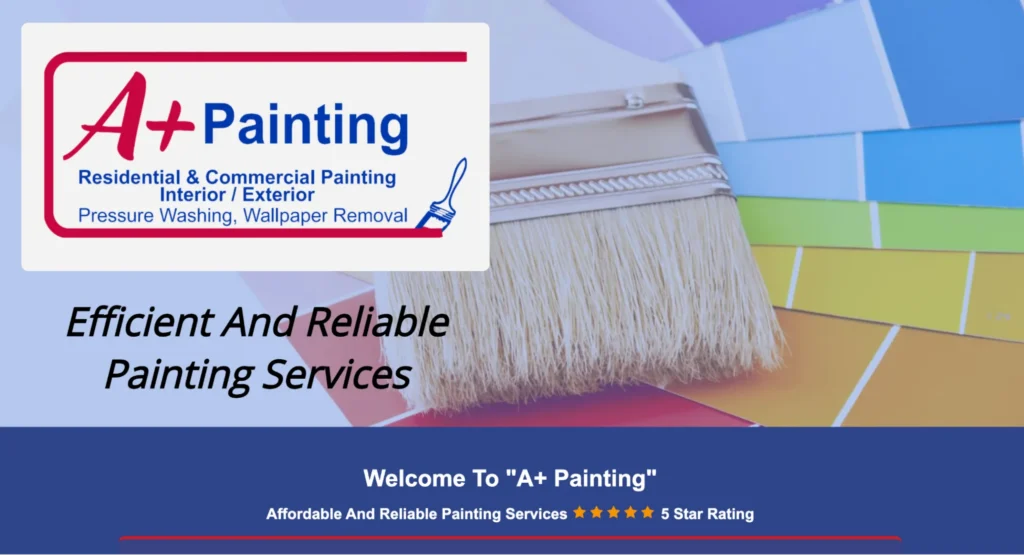
Clean and Clear’s painting website is a strong example of clarity and structure. Right away, you see the phone number in the upper-right corner, making it easy to call without searching. The top menu is simple and covers everything a visitor might need, including services, gallery, color studio, about, FAQ, contact, and blog.
What really stands out is how easy it is to request a free quote. That option is front and center, which removes friction for anyone ready to reach out. The page layout is clean, and the information is easy to scan.
Takeaways you can apply:
- Put your phone number where people can see it right away.
- Keep your main menu simple and organized.
- Make your quote or booking option easy to find on every page.
A+ Painting
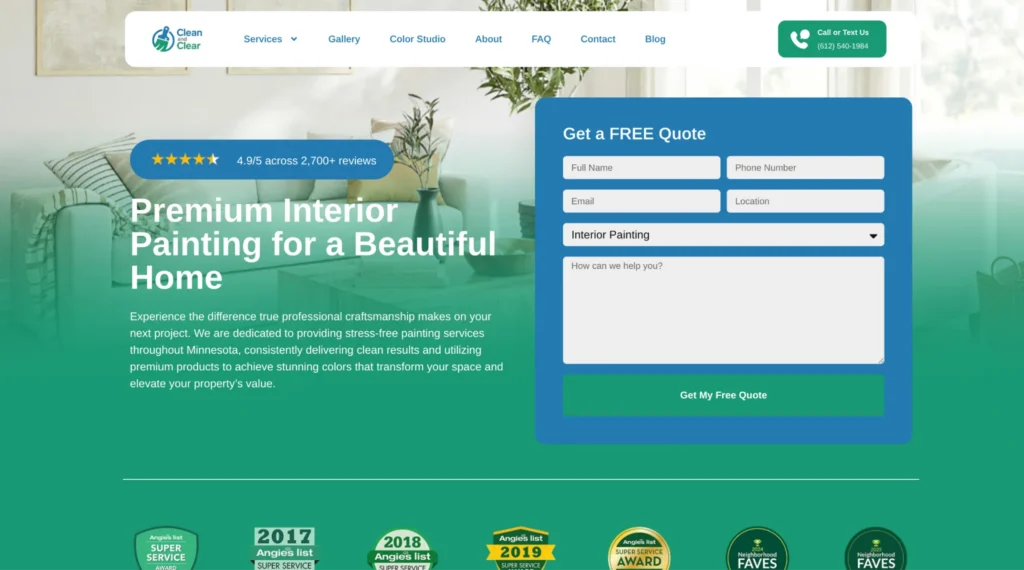
A+ Painting’s website takes a different approach with a bold, eye-catching homepage. The first thing you notice is the main graphic, which helps create a strong first impression. While the contact info is not as prominent at the very top, it still appears in multiple spots throughout the page.
It also works well as a single-page site. Visitors can scroll to see services, reviews, and contact details without clicking around. Reviews are easy to find, which helps build trust quickly. The layout makes it simple to skim and understand what the company offers.
Takeaways you can apply:
- Use a strong hero image to grab attention
- Make reviews easy to find and read
- Keep content organized so visitors can quickly scan your services
Premium Painters
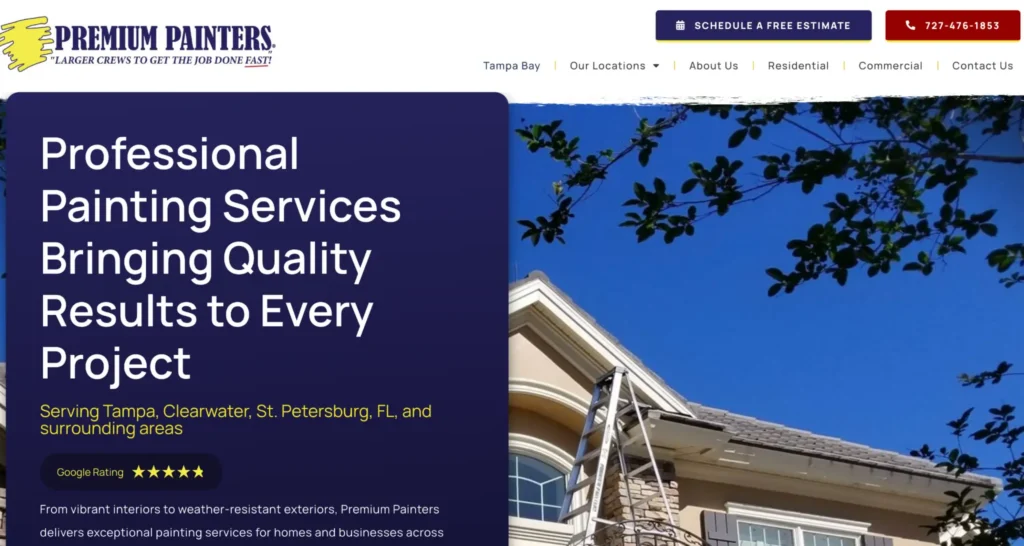
Premium Painters’ website leans heavily into visuals. As you let the homepage do its thing, you see images of their work, which helps show what they can do without needing a lot of text. At the top, there are clear options to call or schedule a free estimate, giving visitors an immediate next step.
The navigation is also well structured. You can easily find their location page, about section, and separate service pages for residential and commercial work. One of the strongest trust signals is their 5-star Google rating displayed right away.
Takeaways you can apply:
- Use real project photos to show your work in action
- Give visitors clear options to call or book at the top of the page
- Highlight ratings and reviews early to build trust
Each of these sites proves that there’s no single “right” way to design your website. What matters is making it easy for customers to understand what you do, trust your work, and contact you without second-guessing their decision.
Should you hire a web designer or do it yourself?
As a painter, you know that there are many painting projects homeowners or business owners can do themselves. Small projects are pretty easy. Bigger projects, not so much. The same holds true for your website. In most cases, it pays to get it done right the first time instead of piecing it together over time.
DIY
Many painting businesses start by building their own site. Tools like Wix, Squarespace, and WordPress templates make it possible to get something live without hiring a designer. These platforms come with drag-and-drop features and prebuilt layouts, so you don’t need to know how to code.
But like any DIY project, there are trade-offs.
| Pros of DIY Website Builders | Cons of DIY Website Builders |
| Lower upfront cost compared to hiring a designer* | Can look generic if you rely too heavily on templates |
| Quick to launch with pre-built designs | Limited flexibility as your business grows |
| No coding required | SEO setup can be confusing for beginners |
| Easy to make small updates on your own | Time-consuming to build and maintain |
| Built-in tools for hosting and basic features | May miss design details that impact conversions |
| Good option for testing ideas early on | Harder to stand out from competitors |
*DIY builder subscriptions typically run $15–$50/month. (Source: GruffyGoat; Elementor).
Professional website design
If you’d rather not build your site yourself, working with a professional is another option. This could mean hiring a freelance web designer or partnering with an agency. Both options give you access to someone who understands layout, user behavior, and how to turn a website into a lead-generating tool.
Instead of starting with a template, a professional can build a site tailored to your services, service areas, and ideal customers. That said, this route comes with its own set of trade-offs.
| Pros | Cons |
| Custom design tailored to your business | Higher upfront cost compared to DIY* |
| Stronger layout focused on lead generation | Longer timeline to launch |
| Better SEO structure from the start | May require ongoing fees for updates or support |
| More polished and professional look | Less control over quick edits if you rely on a designer |
| Saves you time so you can focus on your business | Need to vet designers to find the right fit |
| Can scale as your business grows | Miscommunication can lead to revisions or delays |
*Freelancers typically charge $1,500–$8,000 for a custom small business site; boutique agencies range from $6,000–$12,000. Budget an additional 10%–20% for ongoing maintenance and hosting. (Source: GruffyGoat; Elementor).
Want a professional website without building it yourself? Housecall Pro’s team creates websites specifically for home service businesses—so you get a site designed to generate leads, ready to go.
How to optimize your painting website for SEO
Getting your website online is step one. Getting people to find it is step two. That’s where search engine optimization (SEO) comes in. The better search engines can find and read your website, the more it will show up when people search for painting services in your area.
You don’t need to be an expert to see results, but you do need to cover these basics.
Keyword targeting
Start with the phrases your customers are actually typing into Google. These are usually service-and-location terms, for example:
- “Interior painting in Minneapolis, MN”
- “House painters near me”
- “Exterior painting St. Paul”
Use these naturally in your page titles, headings, and content. Avoid stuffing the same phrase repeatedly. Write for your customer first, then optimize for search.
Local SEO
Most painting jobs come from local searches, so your online presence should reflect that. Here’s how:
- Set up and update your Google Business Profile.
- Keep your name, address, and phone number consistent across all listings.
- Build out service area pages for each city you serve.
These steps help search engines connect your business to the right locations.
Internal linking
Help visitors and search engines move through your site with ease.
- Link blog posts to related service pages.
- Connect service pages to your booking or quote form.
- Use clear anchor text so people know where the link leads.
This keeps users engaged and supports your pages’ rankings.
Schema markup for services
Schema is extra code that helps search engines better understand your site.
To get started:
- Use your website builder’s settings: Platforms like Wix, Squarespace, or WordPress often include built-in SEO or schema options—look for “SEO,” “structured data,” or “schema” settings.
- Install an SEO plugin (WordPress): Tools like Yoast or Rank Math let you add business details (services, hours, location) without touching code.
- Fill in your business info completely: Add your business name, phone number, service areas, and hours in your site settings—many tools automatically turn this into schema.
- Add reviews where possible: If your site or plugin supports reviews, include them so search engines can display ratings.
If you’re not sure where to start, focus on fully completing your business details in your website platform—that alone often covers the basics.
Read more: For a more detailed look, check out our guide to technical SEO for home service businesses.
Common painting website mistakes to avoid
With anything in business, mistakes happen. The goal is to catch them early and fix them fast.
- Stock photos instead of real project photos: Generic images tell customers you don’t have a portfolio worth showing. Replace them with before-and-after shots from actual jobs. Even phone photos taken on-site are better than stock.
- No clear next step after your services are described: If a visitor reads about your interior painting service and hits a wall of text with no button or link, they leave. Every service description should end with a direct prompt—”Get a free quote” or “Call us today”—linked to your form or phone number.
- Thin or vague service pages: A page that says “we paint interiors and exteriors” gives search engines nothing to work with and gives customers no reason to trust you. Each service page should name the specific towns you serve, describe your process in two or three sentences, and include at least one real project photo.
- Content that hasn’t been updated in over a year: Outdated photos, old promotions, or missing recent reviews make your business look inactive. Set a reminder to refresh at least one page per quarter—add a new project photo, a recent review, or a seasonal note.
Next steps for your painting business website
Your website is your digital storefront. It’s often the first impression someone has of your business, and it can shape whether they reach out or move on. Take a few minutes to review your current site with fresh eyes. Is it easy to use? Is your contact info clear? Does it reflect the quality of your work?
Start applying what you’ve learned in this guide:
- Test your contact forms and phone links to make sure they work.
- Add your site to your Google Business Profile and social media pages.
- Keep content fresh by updating photos or seasonal promos.
- Check your site speed and fix anything that slows it down.
- Review your service pages for clear, local keywords.
- Add new project photos to show recent work.
Small updates can go a long way over time.
If managing leads from your website alongside your schedule feels unmanageable, Housecall Pro’s painting business software connects your site’s booking form directly to your job calendar and customer records so nothing slips through the cracks.
FAQ about painting business websites
How much does a painting website cost?
A DIY builder like Wix or Squarespace runs $15–$50 per month. If you hire a freelancer to build a custom site, expect to pay $1,500–$8,000 upfront. Boutique agencies typically charge $6,000–$12,000. For a first site, a DIY builder or freelancer is usually the right starting point.
How many pages does a painting website need?
At minimum, five: a homepage, an about page, a services page, a contact page, and at least one service area page. If you work in multiple cities, each city should have its own dedicated page. You can always add more over time, but these five give search engines and customers enough to work with from day one.
Should I show prices on my painting website?
Most painting contractors don’t list exact prices because jobs vary too much by size and scope. A better approach is to show a price range or starting rate—for example, “interior painting starting at $500″—alongside a clear quote request form. This pre-qualifies leads without locking you into a number before you’ve seen the job.
How do I get my painting website to show up on Google?
Start with the basics: create a free Google Business Profile, use location-specific phrases like “house painter in [your city]” in your page titles and headings, and build a dedicated page for each area you serve. These three steps alone will do more for local visibility than most other tactics.
Do I need a blog on my painting website?
Not immediately, but it helps over time. A blog lets you target search terms that your service pages can’t—questions like “how often should I repaint my home’s exterior?” or “best paint colors for small rooms?” Even two or three posts a year can bring in steady traffic if they answer specific questions your customers are already searching for.
How often should I update my painting website?
Aim to refresh something at least once per quarter. That could be a new project photo, a recent customer review, or a seasonal promotion. Search engines treat regularly updated sites as more relevant, and customers notice when a site looks current versus abandoned.