Want to win more jobs with less effort?
Grow your business and send quick quotes with our home service software.

Want to see your potential revenue?
See what businesses like yours earn with Housecall Pro in 1 - 2 minutes.

Thumbtack is a platform that connects home service businesses with customers actively requesting services in their area. Instead of waiting for calls or submissions on your website, you can respond to job requests and compete for work directly through the platform.
It can be a quick way to find new jobs, especially when your schedule has gaps or you’re trying to grow. Knowing how the platform works, what you’ll pay, and what kind of results to expect helps you decide if it fits how you want to get new work.
Quick answer: What is Thumbtack?
Thumbtack is a pay-per-lead marketplace where customers submit service requests and contractors pay to connect with those leads and compete for the job.
Contractors set their services, targeting, and budget. You’re charged when you access or are matched with a lead, not when you win the job.
Key takeaways
Thumbtack can generate leads, but the results depend on how you use it:
You pay per lead, not per job: You’re charged when you access a lead, even if it doesn’t convert.
Competition impacts performance: More pros in your area can increase costs and reduce win rates.
Speed improves close rates: Faster responses help you win more jobs.
Job size affects profitability: Higher-value jobs make it easier to offset lead costs.
Tracking performance is essential: Monitor cost per booked job to evaluate ROI.
Table of contents
- Who should use Thumbtack?
- How Thumbtack works for service professionals
- Does Thumbtack charge for leads?
- How much does Thumbtack charge for leads?
- Is Thumbtack legit?
- Is Thumbtack worth it for small businesses?
- Pros and cons of using Thumbtack
- How to get more jobs on Thumbtack
- Thumbtack alternatives
- How software can help you manage and replace paid leads
Who should use Thumbtack?
Thumbtack tends to work best for service pros who want to book more jobs quickly or test demand in their area. It’s especially useful if you have open time in your schedule or need a steady stream of new leads.
Because customers often reach out to multiple pros at once, you’re competing directly for each job. Your pricing, response times, and reviews all factor into whether you win the job.
Types of businesses that use Thumbtack
Thumbtack supports a variety of home service businesses, including:
- Plumbing
- HVAC
- Electrical
- Cleaning services
- Landscaping and lawn care
- Handyman services
- Moving and junk removal
- Painting and home improvement
The service-based businesses that respond quickly and handle one-off jobs tend to see the most activity on the platform.
When Thumbtack makes sense
Thumbtack can be a helpful tool in a handful of situations, such as:
- You’re starting out and need leads fast: It can help you get early jobs and bring in reviews.
- You have open time in your schedule: While it’s not a guarantee, it could help you fill those gaps.
- You’re testing a new service or area: It gives you a way to gauge demand without long-term marketing investment.
- You want to supplement other lead sources: It can add volume alongside referrals or organic marketing.
Learn more: Best lead generation websites for contractors

How Thumbtack works for service professionals
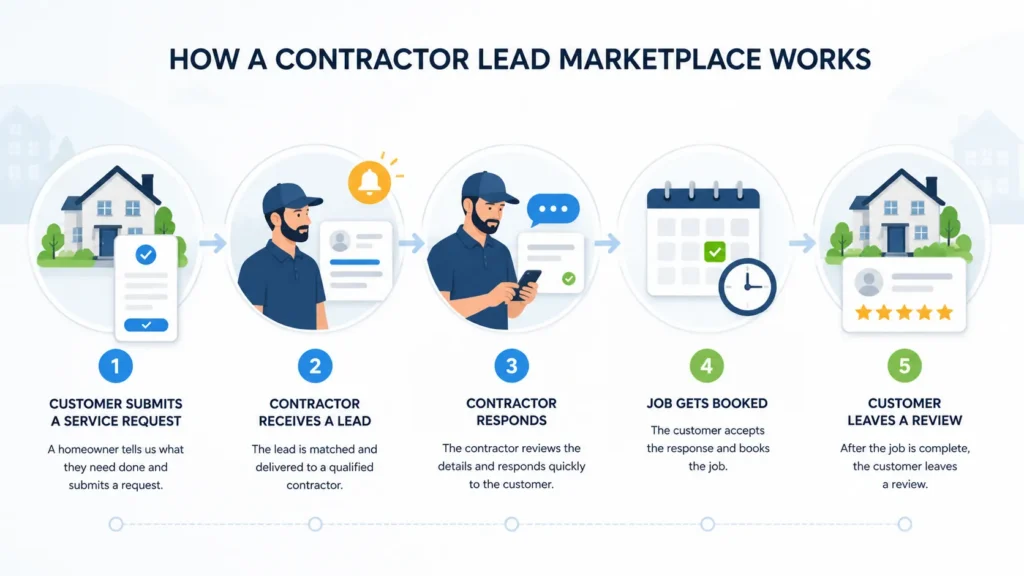
Once your profile is set up, Thumbtack works on a simple cycle: you get leads, decide which ones to pursue, and pay to contact customers. How you manage each step directly impacts how much you spend and how many jobs you win.
Step 1: Create your profile and services
You start by building a profile that lists your services, service areas, and business details. You can also set preferences like job types, travel distance, and availability. The more specific your setup, the more relevant your leads tend to be.
Be sure to include photos, pricing details, and reviews (as you get them). A complete profile helps you stand out when customers are comparing multiple pros.
Step 2: Set targeting and budget
Thumbtack lets you control which leads you receive and how much you’re willing to spend. You can adjust settings for job type, locations, and lead volume. You can also set a weekly or monthly budget. Once you hit that limit, you’ll stop receiving new leads unless you raise it.
Step 3: Receive and respond to leads
When a customer submits a request that matches your services, you’ll get a lead notification. In some cases, you can review job details before deciding to respond. Once you engage, you may be charged (depending on the lead type).
Step 4: Communicate and book jobs
After you connect with a customer, you’ll communicate through the platform or directly by phone or text. You’ll confirm the details, give pricing, and schedule the job. Whether you win the job often comes down to how quickly you respond and how clearly you communicate.
Step 5: Get reviews and build visibility
After completing a job, customers can leave a review on your profile. These reviews affect how often you appear in search results and how likely customers are to choose you. The more positive reviews you have, the better visibility and lead opportunities tend to be.
Does Thumbtack charge for leads?
Yes. Thumbtack charges pros for access to customer leads, whether or not the job turns into booked work.
Pay-per-lead model explained
Thumbtack uses a pay-per-lead model. When a customer submits a request, matching pros can view the opportunity and decide whether to pursue it.
In most cases, you pay to unlock the customer’s contact information or when Thumbtack automatically matches you with a lead based on your settings.
When you get charged
You’re typically charged in one of two scenarios:
- When Thumbtack automatically matches you with a lead and charges you when you receive it
- When you manually review a request and choose to pursue it by contacting the customer
What happens if a lead doesn’t convert
If a lead doesn’t turn into a job, you don’t get your money back. That means if a customer stops responding, chooses another pro, or decides not to move forward at all, you’ve still paid for the lead. Those outcomes are part of the risk built into this model.
How much does Thumbtack charge for leads?
Thumbtack doesn’t share cost data publicly, but pros across the platform report costs ranging from $10 to over $100 depending on trade, job size, and market. Small jobs like basic repairs tend to fall on the lower end, while larger projects can cost significantly more.
There’s some flexibility since you’re setting prices within a system that adjusts based on demand and job value.
Factors that affect lead cost
Thumbtack lead costs vary based on several factors:
- Type and size of the job: Larger or higher-ticket services usually cost more per lead
- Your location: Lead costs can be significantly higher in high-demand markets like Los Angeles or Chicago
- Number of pros available: More competition increases lead costs
- Your pricing settings: You can adjust how competitive you want to be, which affects how often you’re matched and what you pay
Thumbtack’s goal is to align lead cost with job value, so pricing changes depending on the opportunity. You can adjust your pricing within Thumbtack’s range for that job, which affects how competitive you are and how often you’re matched with leads.
Budget controls and limits
Thumbtack gives you a handful of ways to manage your spending:
- Set a weekly budget to cap total lead spend
- Adjust your lead prices to control how competitive you are
- Turn services or locations on and off
- Review certain leads before choosing to pay
When you reach your weekly budget, you’ll stop receiving auto-matched leads unless you increase your limit. Optional leads may still be available depending on your settings.
These controls help manage spend, but they don’t guarantee that every lead will be a good fit or convert into a job.
Cost vs. ROI
Lead cost is only part of the story. What matters is how many of those leads turn into paying jobs and how much those jobs are worth. That’s your return on investment (ROI).
For example, a $25 lead that turns into a $500 job is a strong return. A $25 lead that doesn’t respond or goes with another pro is a loss.
You need to know how many leads you’re buying, how many you’re closing, and what those jobs are worth over time.
Pro tip: Track cost per booked job, just cost per lead. We’ll break down the math below.

Is Thumbtack legit?
Yes, Thumbtack is a legitimate platform used by millions of customers and service professionals across the U.S. The platform handles lead matching, messaging, and payments, but it doesn’t guarantee every lead will turn into a job.
Common complaints from pros
Most concerns about Thumbtack come down to how the lead model works, not whether the platform itself is legitimate.
Common issues include:
- Paying for leads that don’t convert
- Competing with multiple pros
- Inconsistent lead quality (some leads may be unclear, low-budget, or not ready to hire)
- Slow or no customer response
These are typical trade-offs with pay-per-lead platforms, not unique to Thumbtack.
What to watch out for
Using Thumbtack effectively comes down to setting expectations and managing risk:
- Review job details before engaging, because not every lead is worth paying for
- Adjust your target settings regularly to make sure you’re getting the most relevant leads
- Track your results over time, including how many leads turn into jobs and how much revenue they bring in
Thumbtack can be a reliable source of leads, but your results depend on how selectively you use it and how well you convert opportunities into booked jobs.
Is Thumbtack worth it for small businesses?
Whether Thumbtack is worth it comes down to one thing: can you turn leads into paying jobs? The platform can bring in steady opportunities, but since you pay upfront for each lead, your profit depends on how well you close and what each job is worth.
When Thumbtack is worth it
Thumbtack tends to work best when:
- You’re starting out and need jobs fast
- You have gaps in your schedule
- You offer high-value services (which can offset lead costs more easily)
- You respond quickly and follow up well
In these cases, even closing 1 in 5 leads can produce a positive return if your average job value is high enough.
When it may not be worth it
Thumbtack is harder to justify when lead costs add up without consistent results. For example:
- You’re in a competitive, saturated market
- Your close rate is low (for example, booking fewer than 1 or 2 jobs out of every 10 leads)
- Your average job value is low (making it harder to recover lead costs)
If you’re not tracking performance or adjusting your approach, it’s easy to spend more than you make.
How to evaluate ROI
The simplest way to determine whether Thumbtack is working for you is to compare what you spend on leads to the revenue those jobs generate.
Use this formula:
Cost per booked job = total lead spend/number of jobs booked
Compare that number to your average job value.
For example, if you spend $300 on leads and book six jobs, your cost per booked job is $50. If your average job brings in $400, that’s a good returnL you’re spending $50 to make $400. If your average job is $75, on the other hand, you’re spending $50 to make $75—so your margins are much tighter.
When you’re managing multiple lead sources, ROI gets harder to track manually. Leads come in from different platforms, conversations happen across channels, and it’s easy to lose track of what actually turned into a job.
If you’re using Thumbtack, tools like Housecall Pro’s Thumbtack integration can help centralize that process by pulling leads directly into your job inbox. That way, you can respond faster, keep all customer communication in one place, and track which Thumbtack leads actually turn into booked jobs—without jumping between platforms.
Get In Touch: 858-842-5746
Let us earn your trust
On average, Pros increase monthly revenue generated through Housecall Pro by more than 35% after their first year.
See plan options and feature breakdown on our pricing page.
Pros and cons of using Thumbtack
Thumbtack can be a useful lead source, but it comes with tradeoffs Here’s a quick overview of Thumbtack’s pros and cons:
| Pros | Cons |
| Fast access to new leads | Pay for leads upfront |
| Easy to set up and start | Compete with multiple pros |
| Flexible budget controls | Leads may not convert |
| No long-term commitment | Costs can add up quickly |
| Helps fill schedule gaps | Lead quality can vary |
How to get more jobs on Thumbtack
Getting leads is one thing. Turning them into booked jobs is what makes Thumbtack worth your time. A few small adjustments in how you use the platform can make a notable difference in your results:
Optimize your profile
Thumbtack’s algorithm weighs profile completeness, review recency, and response rate when matching you with customers. That means your profile isn’t just a first impression—it directly affects how often you show up.
Make sure it includes:
- Clear service descriptions
- Recent photos of completed work
- Upfront pricing or starting ranges
- Accurate service areas and availability
Respond quickly
Speed is one of the biggest factors in winning jobs on Thumbtack. You’re competing with other pros, and the faster you respond, the more likely you are to get the customer’s attention. Even a short message to acknowledge the request can keep the conversation moving while you gather details.
Pro tip: If leads are going cold before you can reply, try using a platform with automated responses and centralized messaging, like Housecall Pro.That way, you’re not missing any opportunities, even when you’re tied up with jobs.
Be selective with leads
Not every lead is worth paying for. If it’s outside your ideal job size, budget, or service area, it may be better to skip it. Being selective can improve your close rate and reduce money spent on leads that won’t turn into jobs.
Track your performance
If you’re not tracking results, it’s hard to know whether Thumbtack is working.
At a minimum, keep track of:
- How many leads you receive
- How many you respond to
- How many turn into booked jobs
- How much you’re spending
That way, you can tweak as needed based on what’s not working.
Thumbtack alternatives
Thumbtack is one way to generate leads, but it’s not your only option. Most successful businesses use a mix of lead sources to maintain consistent work and reduce reliance on any single platform.
Other lead marketplaces
There are multiple platforms like Thumbtack that connect pros with customers actively seeking services, including:
- Angi
- HomeAdvisor
- Yelp
The core tradeoff is the same: you’re paying for access to could-be customers, not guaranteed jobs.
Trying multiple platforms can be a good way to compare lead quality, cost, and conversion rates in your market.
Owned marketing channels
Owned channels give you more control over how customers find and contact your business. These include:
- Your website
- Your Google Business Profile
- Search engine optimization (SEO)
- Customer referrals
Unlike paid lead platforms, these channels don’t charge per lead. Instead, they take time and consistency to build. Eventually, they can bring in higher-quality leads because customers are choosing your business directly.
Learn more: How to get free home service leads

How to reduce your reliance on paid leads over time
Paid platforms are useful for filling your schedule, especially early on. The downside is that costs can rise quickly if you rely on them for most of your work.
A more stable approach is to use paid leads to stay busy while building other channels that don’t charge per lead. For example, a customer you book through Thumbtack today can turn into repeat work or referrals if you stay in touch.
Over time, more of your jobs should come from repeat customers and direct inquiries. That shift lowers your average cost per hire and gives you more predictable month-to-month revenue.
How software can help you manage and replace paid leads
Paying for leads is only part of the challenge. The bigger issue is what happens after that first contact: whether that lead turns into a booked job, a repeat customer, or nothing at all.
Without a clear system, it’s easy for leads to fall through the cracks, follow-ups to get missed, and past customers to never hear from you again.
See which leads are actually worth paying for
If you’re tracking leads across messages, notes, or spreadsheets, you can’t tell what’s working. A tool that connects lead sources to booked revenue—like Housecall Pro—shows you which channels are profitable and which ones to cut.
Turn one-time jobs into repeat customers
Most paid leads are one-time jobs unless you have a way to stay in touch. If you don’t follow up, customers who already trust your work might go elsewhere the next time they need service.
Keeping a record of past work makes it easier to follow up at the right time. Tools like Housecall Pro make it easy to save that information and keep it organized in one place.
Automate follow-ups and marketing
When you’re busy, it’s easy to forget to check in, send reminders, or ask for reviews. Automated reminders and review requests—like those built into Housecall Pro—keep you top of mind without extra effort.
Start your free 14-day trial today to see the difference for yourself.
Thumbtack FAQ
-
Is Thumbtack free?
-
Thumbtack is free to join and create a profile, but you’ll pay for leads. Costs vary depending on the job, your market, and how competitive you choose to be.
-
Do you have to pay for every lead on Thumbtack?
-
You don’t pay for every lead on Thumbtack, but you’ll generally pay when a customer contacts you or when you choose to pursue a lead. Some leads—called ‘Opportunities’ in Thumbtack’s system—only charge you if the customer responds to your message, rather than when you view the lead.
-
How do you get more leads on Thumbtack?
-
You can get more leads on Thumbtack by expanding your service areas, adjusting your lead prices to be more competitive, and keeping your profile active and complete. Faster response times and strong reviews also help increase visibility.
-
What types of jobs perform best on Thumbtack?
-
Higher-value jobs tend to perform best on Thumbtack because they can offset the cost of leads more easily. For example, HVAC installs, electrical panel upgrades, and full bathroom remodels tend to perform well because they’re all high-ticket jobs where even a $100 lead cost is easy to offset against a $5,000+ project.
-
How fast do you need to respond to Thumbtack leads?
-
You should respond as quickly as possible, ideally within a few minutes. Customers often contact multiple pros at once, and early responses are more likely to win the job.
-
Can Thumbtack replace other marketing channels?
-
Thumbtack can bring in leads, but it’s not a complete replacement for other marketing channels. Most businesses get the best results by combining paid leads with referrals, repeat customers, and direct inquiries.
-
Is Thumbtack good for new businesses?
-
Thumbtack can work well for new businesses that need jobs quickly and want to build reviews. It can be a good way to gain early traction while other marketing channels are still growing.
-
Does Thumbtack have a subscription or monthly plan for contractors?
-
No. Thumbtack doesn’t charge contractors a monthly or annual fee. You only pay when you receive or pursue a lead. There is a Thumbtack Plus membership, but that’s for homeowners—it gives customers perks like discounts on bookings, not any special placement or pricing for pros. For contractors, the model is purely pay-per-lead with no subscription required.