Want to win more jobs with less effort?
Grow your business and send quick quotes with our home service software.

Want to see your potential revenue?
See what businesses like yours earn with Housecall Pro in 1 - 2 minutes.
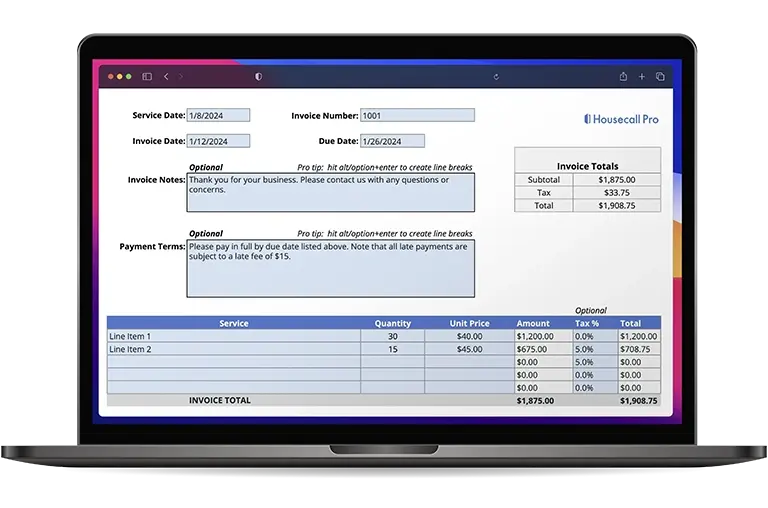
No HVAC business owner wants to spend time chasing down payments or haggling over charges after the job is done. But that’s exactly what happens when your invoice is unclear, incomplete, or hard for customers to understand.
A well-structured HVAC invoice protects your margins, reduces disputes, and helps you get paid faster. It also creates a professional experience that builds trust and encourages repeat business.
In this guide, you’ll learn the different types of HVAC invoices and when to use them, what to include on every invoice, common mistakes to avoid, and how to create a repeatable invoicing system your entire team can follow. You’ll also see how Housecall Pro helps you automate invoicing, attach job documentation, and collect payment on the spot.
→ To get started quickly, download our free HVAC invoice template with customizable branding and built-in formulas for calculations.
Key takeaways:
Remember these quick tips when writing an effective HVAC invoice:
Use a standard template: Keep formatting consistent and make invoices easy for your team to follow.
Include essential invoice fields: Add customer info, invoice number, itemized services, totals, taxes, and payment terms.
Pick the right invoice type: Use standard, itemized, deposit, or recurring invoices based on the job.
Send invoices immediately after service: Same-day HVAC invoices are paid significantly faster.
Avoid common HVAC invoicing mistakes: Don’t skip details, use vague descriptions, or rely on manual pricing.
Automate with HVAC invoice software: Use tools like Housecall Pro to streamline billing, reduce errors, and get paid faster.
Table of contents
Types of HVAC invoices (and when to use them)
Different HVAC jobs call for different invoice formats. Using the right type helps you communicate clearly, document work accurately, and maintain consistent financial records across your business.
Standard invoice
Best for one-time service calls or repairs, like:
- Capacitor replacements
- Blower motor repairs
- Thermostat fixes
- Minor refrigerant adjustments
This is your go-to invoice for fast turnaround jobs.
Itemized invoice
Essential for larger, multiphase projects such as:
- AC or furnace installations
- Ductwork projects
- Heat pump conversions
Detailed breakdowns reduce pricing disputes and help customers understand exactly what they’re paying for.
Deposit invoice
Use when you require partial payment upfront, especially for:
- Large installs
- Custom-order equipment
- Multiday projects
Deposit invoices protect your cash flow so you’re not fronting material costs before work begins.
Recurring maintenance invoice
Ideal for membership programs and service agreements.
If you offer ongoing maintenance, Service Plans inside Housecall Pro help you automate recurring visits and generate invoices automatically—so you’re not manually billing every quarter or season.
What should an HVAC invoice include?
A complete HVAC invoice documents exactly what you did, what materials you used, and how pricing was calculated. A clear, professionally branded invoice also builds trust and reinforces your credibility, which can increase the likelihood of repeat business compared to using basic, generic paperwork.
Here’s what every HVAC invoice should include:
Business information
Include your business name, logo, contractor license number, and contact details. This reinforces professionalism and compliance.
Customer details
Add the client’s name, service address, billing address, and preferred contact method. Accurate records help during tax season, audits, or future service calls.
Unique invoice number and date
Use clear, sequential invoice numbers to make it easier to track jobs. This also helps you stay organized for tax season and keep your records tidy if you ever need them for an audit or HVAC business valuation.
Itemized services and costs
Clearly list:
- Diagnostic fees
- Labor hours
- Parts installed
- Equipment used
- Refrigerant usage
- Environmental or disposal fees
Avoid vague descriptions like “repair work.” Specific line items reduce disputes.
Subtotal and taxes
Display pre-tax totals and applicable city or state taxes. This protects you from compliance issues and accounting headaches later.
Total amount due
Show the final balance after discounts, coupons, or membership pricing.
Payment terms
Include due dates, accepted payment methods, and late-fee policies. Clear expectations reduce overdue invoices.
Notes section
Use this space for:
- Warranty information
- Maintenance recommendations
- Future service reminders
- A short thank-you message
→ Pro tip: Want faster estimates and invoices? Use Housecall Pro’s HVAC estimate and proposal tools to turn approved estimates into invoices with one tap.
Get In Touch: 858-842-5746
Let us earn your trust
On average, Pros increase monthly revenue generated through Housecall Pro by 35% after their first year.
See plan options and feature breakdown on our pricing page.
HVAC invoice example
A strong invoice should be easy to read, transparent, and professionally formatted.
HVAC invoice sample
Business Name: AirPro Heating & Cooling
Address: 123 Service Lane, Austin, TX
Phone: (512) 555-5555
License: TACLB12345E
Invoice Number: #001527
Date: February 14, 2025
Customer:
John Smith
999 Maple Road Drive
Austin, TX 78704
Job description: No-cool call; diagnosed a failed capacitor and low refrigerant level.
Itemized services and costs:
- Diagnostic fee: $89
- Labor: 1.5 hours @ $95/hr: $142.50
- 45/5 mfd capacitor replacement: $69
- Refrigerant recharge: 1.5 lbs R410A @ $45/lb: $67.50
- Environmental disposal fee: $12
Subtotal: $380
Tax (8.25%): $31.35
Total due: $411.35
Payment terms: Due upon receipt. Credit card, ACH, or online payment accepted.
Notes: Capacitor covered under 1-year part warranty. Recommended full AC tune-up during spring visit.
→ Pro tip: Use the photos-and-notes feature inside Housecall Pro to attach job-site images directly to the invoice—strengthening documentation and reducing callbacks.
Common HVAC invoicing mistakes and how to avoid them
Even experienced HVAC pros run into billing issues, usually from rushed jobs, missing details, or inconsistent documentation. These mistakes slow down payments and can cause customers to question pricing. Here are some common pitfalls and tips to avoid them:
- Sending invoices late: Delayed billing leads to delayed payments and creates unnecessary back-and-forth with customers. Housecall Pro lets you send invoices instantly from the field, so you can bill as soon as the job is done.
- Not itemizing labor and parts: Vague line items make customers question pricing and can cause disputes or call-backs. List every service, part, and labor hour clearly and consistently.
- Using inconsistent pricing: Manual entry increases the risk of mismatched rates, discounts, or labor charges across techs. With Housecall Pro, you can easily create a standardized price book to reduce pricing errors and ensure yout team uses the same rates.
- Relying on handwritten forms: Paper invoices get lost, contain errors, and make tracking payments harder during busy seasons. Housecall Pro replaces paper forms with digital invoices that are easy to send, track, and store.
- Leaving out payment terms: Missing due dates or accepted payment types leads to unpaid balances and collection delays. Include clear payment terms on every invoice so customers know exactly what’s expected.
- Incorrect or missing tax calculations: Mistakes in tax rates or totals can create accounting problems during tax season. Double-check tax settings in your invoicing software to ensure accuracy.
- Failing to follow up on overdue invoices: Without reminders, unpaid invoices pile up and slow your cash flow. Housecall Pro can send automated payment reminders so you don’t have to chase down late invoices manually.
→ Want tips to set competitive, profitable pricing? Learn more in our HVAC pricing guide.
How to create an HVAC invoice process
A clear, step-by-step invoicing system keeps your team consistent and protects your cash flow.
1. Create a standard invoice template
Start with a clean template that includes all required fields. Consistency reduces errors during busy seasons.
2. Train your technicians
Teach techs how to:
- Add line items correctly
- Attach photos
- Document materials used
- Communicate pricing clearly
Consistency across your crew reduces disputes.
3. Set clear payment expectations
Define:
- Due dates
- Accepted payment types
- Late fees
Set these expectations before work begins.
4. Use HVAC invoice software
Housecall Pro lets techs create invoices on-site, add line items from your price book, attach photos, and accept payment instantly. Automation ensures consistent formatting, correct tax rates, and accurate invoice numbering.
5. Review open invoices weekly
Check your open invoices regularly to spot missing details, unfinished jobs, or unpaid balances before they become problems.
You can track open invoices and payment status inside the Reporting tab in Housecall Pro—giving you a clear picture of cash flow in real time.
How Housecall Pro’s HVAC invoice software can help
Managing HVAC invoices manually can eat up hours—especially during peak heating and cooling seasons. Every minute spent chasing paperwork, correcting pricing errors, or tracking unpaid invoices is time you could spend on profitable service calls. Housecall Pro streamlines your entire invoicing workflow so you can create, send, track, and collect payment with less administrative effort.
With our HVAC software, you can:
- Create and store digital HVAC invoices: Build invoices from reusable templates and save them directly inside each customer profile. This keeps job history, system details, and billing records organized for future service visits.
- Send invoices instantly from the job site: Generate invoices on the spot using preloaded pricing, diagnostic notes, photos, and part details. Sending invoices before leaving the driveway speeds up approval and payment.
- Automate follow-ups and overdue reminders: Housecall Pro automatically notifies customers about unpaid invoices so you don’t have to chase them manually. This keeps cash flow steady during busy seasons.
- Link invoices to estimates, job costing, and payments: Your invoices sync with approved estimates, flat-rate price books, and job costing tools to ensure accurate pricing and stronger reporting.
- Accept payment anywhere: Customers can pay by card, ACH, or online payment link. Instant payment collection reduces delays and eliminates the need for paper billing.
- Track invoice statuses in real time: Easily see which invoices are pending, paid, or overdue so nothing slips through the cracks.
Start your free 14-day trial to see how much faster and easier HVAC invoicing can be.