Want to see your potential revenue?
See what businesses like yours earn with Housecall Pro in 1 - 2 minutes.

A homeowner can decide in seconds whether to trust your cleaning company, and a lot of that judgment is based on your website. A clean, modern site shows your expertise, builds trust with potential customers, and helps you rank for relevant keywords when someone searches for cleaning services in your local area.
Set it up the right way, and your cleaning website can be a 24/7 salesperson for your business. This guide covers design tips, mistakes to avoid, and real-life examples of successful cleaning company websites for inspiration.
→ Not sure where to start? Download Housecall Pro’s small business website template. It includes all the key sections your website needs so you don’t miss anything.
Key takeaways
Here are some actionable tips to help you create a cleaning services website that converts:
Build trust: Post customer reviews and before-and-after shots to show you run a reliable business.
Show up in local search: Create service area pages and use keywords, like “window cleaning company NY” or “commercial carpet cleaners in Chicago,” to improve your visibility.
Strengthen your brand: Use consistent colors, fonts, and visuals so people recognize your company anywhere.
Streamline operations: Save time with cleaning business software like Housecall Pro to automate tasks and make online booking easy.
Jump ahead
- What every cleaning company website should include
- Cleaning company website design tips
- Cleaning services website examples for inspiration
- Should you hire a cleaning web designer or do it yourself?
- How to optimize your cleaning business website for SEO
- Common cleaning website mistakes to avoid
- Next steps for your cleaning business website
What every cleaning company website should include
Your cleaning business website doesn’t need a complicated design or dozens of pages to be effective. It needs the right components presented clearly so customers can quickly understand what you do, trust that you’re the best choice in the area, and book.
Here are the key sections to include.
1. Clear contact info and CTAs
Most visitors come looking for your phone number, hours, or an easy way to book a cleaning. Making these details easy to find to increase your chances of booking a job. “Clients come back to you when you’re making their lives easier,” says Brian Davis, CEO of Handy Rubbish.
Follow these tips to make the elements impossible to miss:
- Put your phone number and hours in the header and footer on every page.
- Add CTA buttons like “Call Us,” “Book Now,” or “Request Service” throughout the site to guide visitors to action.
- Use contrasting colors and bold fonts to make your CTAs stand out.
- Add online booking or quote request forms to capture leads around the clock.
2. Service area pages
Service area pages help your business show up when someone searches online for cleaning services in a specific city or neighborhood. If you serve customers in New York City, for example, you might create pages targeting keywords like:
- “House cleaning company NYC”
- “Commercial cleaning services Manhattan”
- “Carpet cleaning in Brooklyn”
- “Window cleaning in Queens”
Make the service pages feel specific to each location by adding local trust elements, such as maps, testimonials, and project photos.
3. About page
Your “About” page is where you show visitors the humans behind the brand to build trust. It should showcase who you are, what you stand for, and what makes you different from other cleaning businesses in your service area.
Use your About page to:
- Share a short company story that explains what drives you.
- Highlight your values, such as reliability, safety, or eco-friendly products.
- Include team photos to make your business feel approachable.
- List relevant licenses, certifications, and insurance to reinforce professionalism.
4. Reviews and testimonials
Having reviews on platforms such as Yelp and your Google Business Profile are important for search engine pptimization (SEO), but they can also be effective marketing tools. Display testimonials on your homepage and service pages. Seeing real reviews might be the nudge a visitor needs to book.
Your “Reviews” page can contain a combination of:
- Star ratings
- Customer quotes
- Badges from platforms like Google and Yelp
- Before-and-after photos for residential, commercial, or specialized cleaning services
- Short video testimonials
Will Hardwick, CEO of A-1 Cleaning, normalizes asking for reviews as part of his business growth strategy. “It’s a lost customer if you don’t,” he says.
With Housecall Pro’s review management tools, you can send automated review requests after each job with personalized messages to increase your response rates.
Get In Touch: 858-842-5746
Let us earn your trust
On average, Pros increase monthly revenue generated through Housecall Pro by more than 35% after their first year.
See plan options and feature breakdown on our pricing page.
5. Professional visuals
Stock photos are easy, but customers often see them as inauthentic. High-quality images of your team, vehicles, and real jobs help visitors see the people and quality behind your brand. When used consistently across your site, they highlight your work far better than text alone.
Here are some examples of visuals to include on your cleaning services website:
- Photos of your team
- Images of the cleaning equipment you use
- Before-and-after images of recent cleaning jobs
- Branded vehicle shots
- On-the-job cleaning videos
Pro tip: Keep all visuals aligned with your brand colors and style. Consistency makes your brand look professional.
6. Compelling copywriting
Customers need reassurance that your cleaning service is safe and dependable. They also want to know what you offer, how much you charge, when you’re available, and how they can book.
Your web content should address these concerns upfront. Write in a clear, conversational tone that makes your services feel approachable and focuses on customer needs.
Follow these copywriting tips for the best results:
- Keep paragraphs short (3-4 sentences each) for readability
- Answer common questions directly (e.g., pricing, service hours, what’s included in each service)
- Avoid industry jargon such as “HEPA filtration” or “encapsulation cleaning”
- Include local and service-specific keywords in a natural way to support SEO
- Add bullet points to make your copy more scannable
- Use clear headings to make your content easy to read and navigate
7. Blog or resource section
Publishing helpful blog posts and valuable resources helps your cleaning business show up for more search queries and positions you as an industry expert. It also signals authority to search engines and gives you opportunities to link readers to your booking or service pages.
Over time, this organic content can become a reliable source of new leads. Resource ideas include:
- Cleaning checklists and schedules
- Product recommendations for stain removal
- Safety guides for handling cleaning chemicals
- Cost comparison worksheets to help customers understand pricing differences
- DIY troubleshooting guides, like how to remove odors, mold, or tough stains
Learn more: 7 SEO Tips & Strategies to Grow Your Business
Cleaning company website design tips
When people land on your site, they should easily find what they need. Follow these tips to make that happen:
- Use a clean, modern layout: Keep plenty of white space so your site feels organized. Break content into headings using the HTML tags (H1–H6) to improve readability. These are often built into and labeled in your website editor, so you can add them without touching any code.
- Use consistent branding: Use the same color scheme, fonts, and tone across every page to make your business memorable.
- Make the website mobile-friendly: Make sure every page adjusts to fit phones and tablets. Buttons should be large enough to click, and fonts must be legible without zooming.
- Ensure fast load times: Over half of mobile visitors will leave a page that takes longer than three seconds to load. Compress your images and use modern file types like Webp to improve speed.
- Implement SEO tactics: Use tools like Semrush or Google Keyword Planner to find keywords people are searching for but that aren’t too competitive. Add these to your page titles, meta descriptions, and headers so your website is easier for Google to find.
- Design for accessibility: Use high-contrast colors and simple navigation so everyone can browse your site. Add descriptive alt text to your images.
Cleaning services website examples for inspiration
Here are some effective cleaning websites to show you what works. These examples have the perfect blend of sleek design, compelling copy, and high-quality visuals proven to improve conversion rates.
The Cleaning Authority
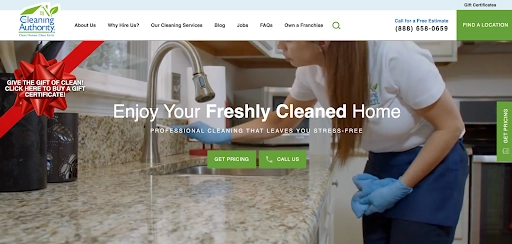
The Cleaning Authority makes it easy for visitors to contact them. On the homepage, you’ll find the company’s phone number in five different areas, including the header, regular footer, and a sticky footer. That way, visitors don’t have to visit a separate page to get in touch. The phone number is always right there, boosting inquiry rates just by being visible.
The takeaway: Display your primary CTA in multiple areas so visitors can access it wherever they are on the page.
USA Clean Master
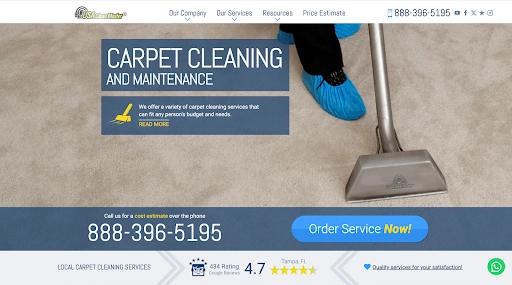
USA Clean Master makes online booking easy by embedding the scheduling form right into the homepage. It gives visitors the option to book a service via call, the scheduling form, or WhatsApp. This strategy makes the path to booking as short as possible, and that alone can bump up conversion rates.
The takeaway: Give visitors more than one way to book. When booking feels easy, more people complete the process.
Maid Marines

Many cleaning business websites hide their pricing and want you to request a quote, which slows people down. Maid Marines stands out by doing the opposite. The website displays a clear, detailed price list, and visitors can choose a pricing plan based on the size of their home and the estimated work hours.
The takeaway: Add pricing info if transparency is a core value. It promotes trust and shows you’re easy to work with.
Should you hire a cleaning web designer or do it yourself?
You can either build your cleaning website yourself using a website builder or hire a professional designer. The best choice depends on your budget, timeline, and comfort with tech.
DIY
Website builders like Wix, Squarespace, and WordPress let you create a modern website using easy drag-and-drop tools.
| Pros | Cons |
| You have full control of your site’s design | Your site may look similar to others using the same templates |
| Costs are low and predictable | Customization beyond the template can be difficult or limited |
| Templates make it easy to get a clean layout without design skills | You’re responsible for all website maintenance and troubleshooting |
Best for: Small cleaning businesses or solo cleaners who want a budget-friendly website and are comfortable managing updates themselves.
If you have the budget, hiring a web designer can give you a custom site that stands out and saves you time.
| Pros | Cons |
| You get a custom design that stands out | Costs more than DIY ($1,000–$10,000+) |
| You benefit from professional setup for mobile and SEO | You might be reliant on the designer for any future website changes |
| You save time on design decisions and troubleshooting | The project can take longer depending on the designer’s schedule |
Best for: Growing cleaning businesses that want a unique, polished website with professional setup for mobile, SEO, and lead capture.
If you want a professional website that brings in leads without the hefty agency cost, try Housecall Pro’s website builder. You get a clean, conversion-focused design with automatic online booking and built-in lead capture, fully integrated with your scheduling, invoicing, and payment tools.
How to optimize your cleaning business website for SEO
Search engines need clear signals about who you are, what you offer, and the locations you serve in order to show your website to the right customers. Here’s what to prioritize if you want to rank higher without getting lost in technical details.
Keyword targeting
Real customers use certain keywords when they’re searching for information about cleaning services. Don’t just limit your website to location-based keywords, like “house cleaners in [city].”
Build pages around all the phrases your ideal customers actually type, like these examples:
- Benefit-driven: “same-day carpet cleaning,” “eco-friendly window cleaners”
- Service-specific: “post-construction cleaning,” “commercial office cleaning”
- Problem-based: “how to remove pet stains from carpet”
- Comparison/questions: “deep clean vs regular clean,” “what does a move-out clean include”
Specific search terms like these are called long-tail keywords. They attract targeted traffic and usually have a much higher conversion rate than broad terms like “cleaning service.”
Local SEO
Local SEO is all about letting Google know which cities and neighborhoods your cleaning services cover. Here’s how to get it right:
- Claim and build out your Google Business Profile. Fill in all information correctly, add images, and respond to both positive and negative reviews.
- Create service area pages for major cities and neighborhoods you cover.
- Keep the same business Name, Address, and Phone number (NAP) across your website, social pages, and online directories.
Consistency helps Google trust your business and show you to nearby searchers more often. Even small details like “St” versus “street” can make a difference.
Internal linking
Link related pages together so visitors and search engines can easily navigate your site. For example:
- Link from your homepage to your core services and booking form.
- Link from blog posts to relevant service pages and contact options.
SEO pros generally recommend a few relevant internal links per page.
Schema markup
Schema markup is a bit of code you can add to your site to help search engines understand your business. By adding LocalBusiness or Service schema, Google can find more specific information about what you do, where you are, and the different services you offer.
This helps your pages appear in Google results with advanced features that stand out, like star ratings, service information, and FAQs.
How to get started (even if you’re new to SEO):
- Use a tool like Schema Markup Generator to create the code—no coding experience required.
- Copy the generated code and paste it into the HTML of the relevant page on your website (most website builders have a place for custom code).
- Test your markup using Google’s Rich Results Test to make sure it’s working correctly.
- Start with your most important pages first, like your homepage and service pages, then expand to other pages over time.
Common cleaning website mistakes to avoid
Website mistakes can cost you leads every day. Here are the most common pitfalls and how to avoid them:
- Hiding contact info: If visitors can’t find your number quickly, they’ll leave. Put it in the header and footer.
- Using bad images: Grainy photos look unprofessional. Use high-resolution images of your actual work.
- Forgetting CTAs: If people don’t know what to do next, they won’t act. Add “Book Now” buttons everywhere.
- Slow load speeds: Large files slow you down. Compress images and use reliable hosting.
- Not tracking performance: Use Google Analytics to see which pages convert and where visitors drop off.
Pro tip: Once your site goes live, use Housecall Pro’s cleaning services software to easily manage your service requests.
Next steps for your cleaning business website
Your website is your digital storefront. Small improvements can make a big difference in how many visitors turn into real customers. Updating your site regularly keeps it fresh, improves your search visibility, and shows customers your business is active and dependable.
Follow these steps for quick optimization wins:
- Test your contact forms and phone links to make sure your website displays properly on mobile devices.
- Add your website to your Google Business Profile and social media pages for more visibility.
- Refresh photos, seasonal offers, or service descriptions to keep your site up to date.
Ready to turn more visitors into booked jobs? Housecall Pro offers automated reminders, online booking, and scheduling tools—everything you need to run your business in one place.
Sign up for a 14-day free trial to start growing your business effortlessly.