Want to win more jobs with less effort?
Grow your business and send quick quotes with our home service software.

Want to see your potential revenue?
See what businesses like yours earn with Housecall Pro in 1 - 2 minutes.
Review management tools vary widely in how they collect feedback, connect with other software, and support day-to-day operations. For home service businesses, the strongest options work alongside the systems your team already uses rather than creating another process to manage.
This guide explains what review management features matter most, the questions to ask when comparing platforms, and how to choose software that fits the way your home service business already works.
Quick answer: What should home service businesses look for in review software?
Look for software that can automatically send review requests after completed jobs or payments, connect with your field service platform, direct customers to your Google Business Profile, and help you monitor and respond to feedback from one place. Compare each platform’s reporting, pricing, integrations, and compliance features before making a decision.
Key takeaways
Focus on how each platform will work in practice, not only the features listed on its website.
Prioritize connected workflows: Review requests should follow completed jobs or payments without extra steps from your team.
Check the depth of each integration: A native connection may offer more automation than a basic third-party integration.
Make reviews easy for customers: A short, direct path to your Google Business Profile can improve response rates.
Plan for ongoing management: Choose a platform that helps you track trends and respond consistently as review volume grows.
Review compliance practices: Avoid tools that filter customers or encourage review gating.
Table of contents
- What is review management software and why does it matter for home service businesses?
- What criteria should you use to compare review management platforms?
- What questions should you ask before choosing a platform?
- How review management fits into the broader customer follow-up workflow
- How review management works in Housecall Pro
What is review management software and why does it matter for home service businesses?
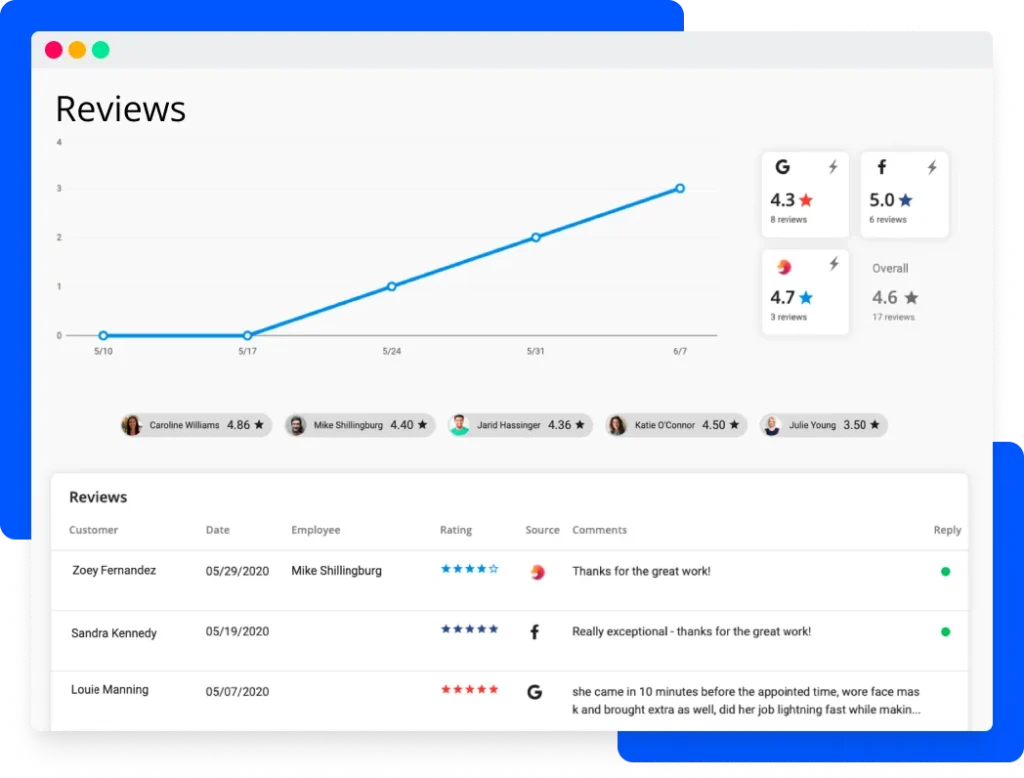
Review management software—sometimes called feedback management software—helps home service business owners monitor, track, and analyze customer reviews. Instead of manually asking every customer for feedback, these tools can automate review requests, organize incoming reviews, and help business owners reply from one central location.
This is especially important for home service businesses, where reviews can make or break a customer’s first impression. In Housecall Pro’s 2025 survey of 1,000+ U.S. homeowners, 93% said online reviews influence their decision to hire a pro. Prospective customers want to know that your team is reliable, professional, and trusted by other customers in their area.
By consistently requesting reviews after completed jobs, you can build a steady stream of recent feedback that strengthens your credibility and gives customers more confidence in choosing your business. Online review management software makes that process easier.
Read more: How to ask for Google reviews
What criteria should you use to compare review management platforms?
The right review management platform should fit your workflow, reduce manual work, and make it easier to stay on top of customer feedback. As you compare your options, focus on the features that will have the biggest impact on your day-to-day work.
Here’s what to look for and why each feature matters.
Automated review requests triggered by job status
The best review management software automatically sends review requests when a job is completed or a payment is received, instead of relying on manual reminders or fixed schedules. Timing matters because customers are more likely to leave feedback while the service experience is still fresh. Housecall Pro automates this process, sends personalized requests, and includes a direct review link to make responding quick and simple.
Integration with your existing field service software
Choose review management software that connects directly with your field service platform. Otherwise, your team may need to match customers with completed jobs, switch between systems, or update records manually. That extra admin work defeats the purpose of using software to save time.
An integrated platform can automatically send review requests when a job is completed or a payment is received. Housecall Pro keeps this process in the same workflow by tying review requests directly to completed jobs.
“We have hundreds of 5-star reviews on Google, and that is solely attributed to Housecall Pro,” says Amber D., owner of DeLong and Sons HVAC. “We have more reviews than some companies who have been in business for 50-some years.”
Direct link to Google Business Profile
Your Google Business Profile is the often first place prospective customers look before booking a service. Review management platforms handle this step in different ways. Some send customers directly to your Google review form, while others open a landing page where they can choose from several review sites or submit private feedback.
Look for a platform that makes the path to Google quick and clear and gives every customer the same opportunity to leave a public review. Avoid tools that use a customer’s rating to decide where they are sent. Routing unhappy customers to a private form while directing satisfied customers to Google can create a misleading picture of your business. It may violate Google’s review policies (more on that in the compliance section below).
Response tracking and reporting
Responding to reviews is an important part of managing your online reputation. Every review, positive or negative, is a chance to show customers you value their feedback and to keep your team engaged in the process.
Look for software that automatically surfaces new reviews, alerts your team when a response is needed, and lets you manage replies from a single dashboard. This saves time, keeps response times consistent, and shows prospective customers that your business listens.
Read more: How to respond to negative reviews
Compliance with FTC and platform guidelines
Your review strategy should follow both Federal Trade Commission (FTC) regulations and the policies set by platforms like Google and Yelp. Review gating—asking satisfied customers to leave public reviews while directing unhappy ones to private forms—is prohibited. Google also prohibits asking only for positive reviews and discouraging negative ones.
Look for software that supports compliant review practices like these:
- Sending review requests uniformly to every customer after a completed job, regardless of job size or expected feedback.
- Never paying for or offering incentives (discounts, gift cards, etc.) in exchange for positive reviews.
- Never creating or purchasing fake or AI-generated reviews.
- Requiring employees or company insiders to disclose their connection if they leave a review.
- Never hiding, threatening to remove, or removing legitimate negative reviews just because they’re unfavorable.
- Collecting genuine customer feedback fairly and consistently.
Pricing structure and contract terms
Review management pricing can vary widely, even when platforms offer similar features. Some charge a flat monthly fee. Others bill by review request or hide review tools behind higher-tier plans.
Before you sign up, check what happens when you hit your request limit, whether review management costs extra, and whether the plan locks you into a contract. Housecall Pro includes review management in its core plans instead of charging per request, helping you keep costs predictable as volume grows.
What questions should you ask before choosing a platform?
Don’t buy based on a demo alone. Ask questions that show how the software will work in real day-to-day use.
Use these questions to compare your options:
- Does the software automatically send review requests after a completed job or payment?
- Does it integrate with our existing field service software, or will your team have to manage separate systems?
- Can customers leave a review on our Google Business Profile in as few steps as possible?
- Can my team track new reviews, response rates, and rating trends from a single dashboard?
- Does the platform make it easy to respond to every review, whether it’s positive or negative?
- Does the software follow FTC and Google review guidelines?
How review management fits into the broader customer follow-up workflow
A review request is only one piece of the follow-up process. After a job, you may also need to send an invoice, confirm the customer is satisfied, collect payment, and schedule future service calls.
If you handle each step in a different tool, your team does more manual work and more details can fall through the cracks. A connected platform keeps reviews, invoicing, payments, customer communication, and scheduling in one workflow. That saves time and gives customers a smoother overall experience.
Read more: How home service companies automate customer follow-up after every job
How review management works in Housecall Pro
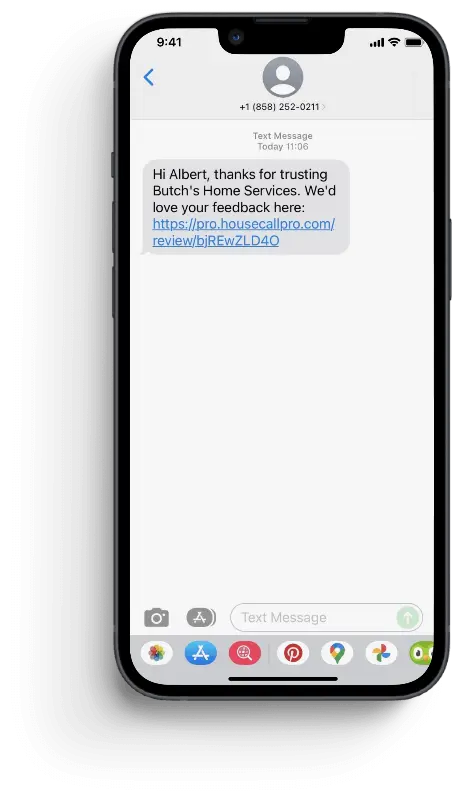
Busy home service business owners don’t have time to sort through several software platforms to get the information they need. Housecall Pro makes review collection part of your normal workflow by sending a review request after each finished job or payment. Every message includes a direct link to your preferred review platform, making it easy to get customer reviews while their experience is fresh.
From there, Housecall Pro helps you manage your online reputation with these features:
- Automated tracking: Monitor new feedback automatically as reviews come in.
- Performance reporting: Track total review volume, average star ratings, and response activity across platforms.
- Direct replies: Respond from one dashboard instead of switching between sites.
- Connected operations: Keep review management connected with Scheduling, Dispatching, Invoicing, Payments, and customer follow-up tools.
Ready to see how it works? Start your free Housecall Pro trial and start building a stronger online reputation today. Housecall Pro is rated 4.6/5.0 based on 30K+ reviews from the Apple App Store, Google Play Store, GetApp, Capterra, and Software Advice. Housecall Pro also offers comprehensive client support and is highly customizable, so you have everything you need at your fingertips.
Free download: How to manage bad reviews ebook
You can’t stop negative reviews. They can either make or break your business. Learn how to handle them effectively by download our free ebook. It includes:
- Overview of managing bad reviews: Handle criticism like a pro.
- Reporting false or abusive reviews: Protect your business.
- Responding to negative reviews: Turn criticism into opportunity.
- Upping your review game: Attract more positive feedback.